


How to find and change your MAC address on Windows 11

Are you wondering where to find or how to change your MAC address on Windows 11, but you don’t know how to do it yet?
Since it is possible to hide the IP address, this article will provide simplified steps to set a custom MAC address from the device properties on Windows 11.
Can the MAC address be changed?
It is possible to change the default MAC address of a Windows computer, but device manufacturers strongly recommend not doing so because it may cause unexpected problems.
On the Network Interface Controller (NIC), the MAC address is hardcoded and cannot be changed, but with some drivers, this may be possible.
Additionally, users can use third-party programs to change the MAC address to trick the operating system into thinking that a specific MAC address belongs to the NIC.
How to find and change MAC address on Windows 11?
1. Change MAC address Windows11 CMD
- key, type Command Prompt, and click Run as administrator. Windows
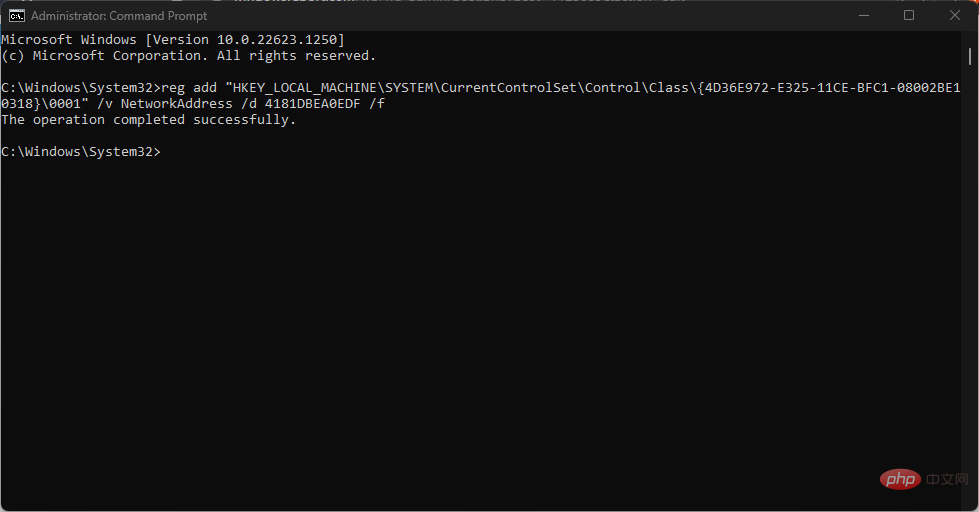
- Enter the following command and click: Enter
<strong>reg add “HKEY_LOCAL_MACHINE\SYSTEM\CurrentControlSet\Control\Class\{4D36E972-E325 -11CE-BFC1-08002BE10318}\0001” /v NetworkAddress /d 4181DBEA0EDF /f</strong> ##Remember to change the string value to the string value of the device.
 - Wait for the command to run successfully and restart your PC.
- To confirm that the changes have been made, follow the instructions above to open a command prompt, type the following command and press:
- Enter
ipconfig /all<strong></strong>You should now see the new MAC address displayed in the line starting with the physical address.
- Press the key to open the
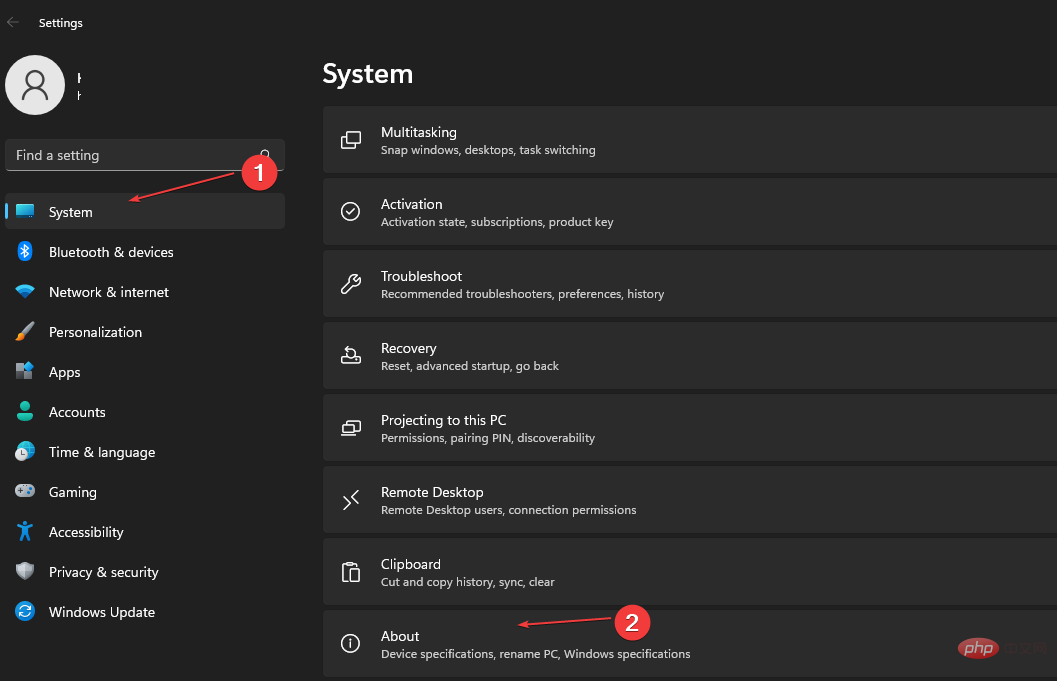
- "Settings" application. WindowsI Select the System category in the left sidebar and click
- About. Next, select Device Manager.
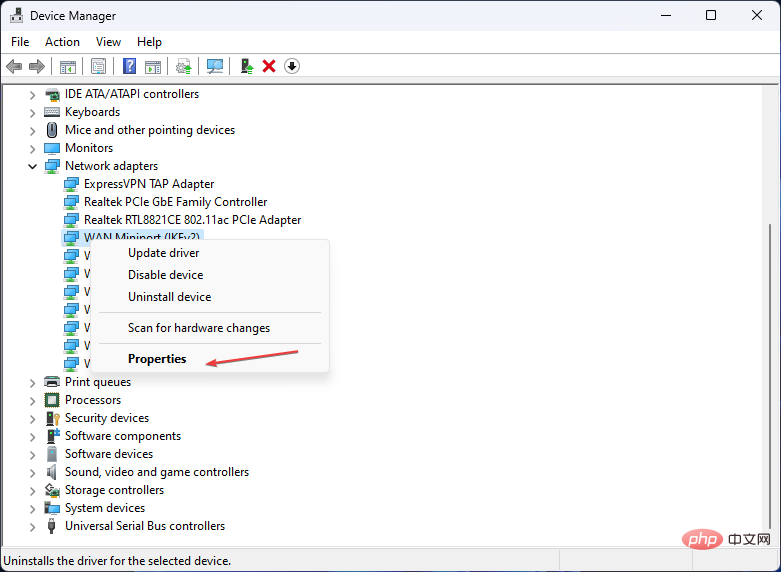
- Expand Network
- Adapters by double-clicking, then right-click on the network device and select the Properties option. From the Properties dialog box, select the
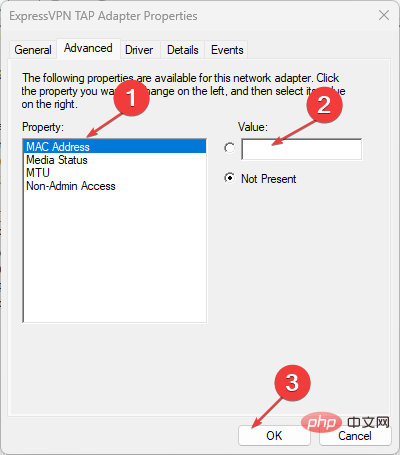
- Advanced tab. Under the Properties box, scroll down and select Locally Managed Addresses. Now type the new 12-digit MAC address in alphabetical order in the
- "Value" field and click the "OK" button. If you don't know what value to enter, you can use a search engine to find a MAC address generator. There are many websites that can help you generate one for you.
- Restart the computer.
3. Change the Wi-Fi MAC address on Windows 11
- Press the key to open the "Settings" app. WindowsI
- Go to Network & Internet Settings on the left sidebar and select Wi-Fi on the right.
- Now, enable the switch at the bottom of the window called "Random Hardware Address". This will allow you to spoof the MAC address of all Wi-Fi networks.
- To spoof the MAC address of a specific Wi-Fi network, click Manage Known Networks.
- Next, click on any wireless network of your choice.
- On that Wi-Fi network's page, find the Random Hardware Address setting.
- Then click the drop-down list to the right of it and select your preferred option (off/on/change daily).
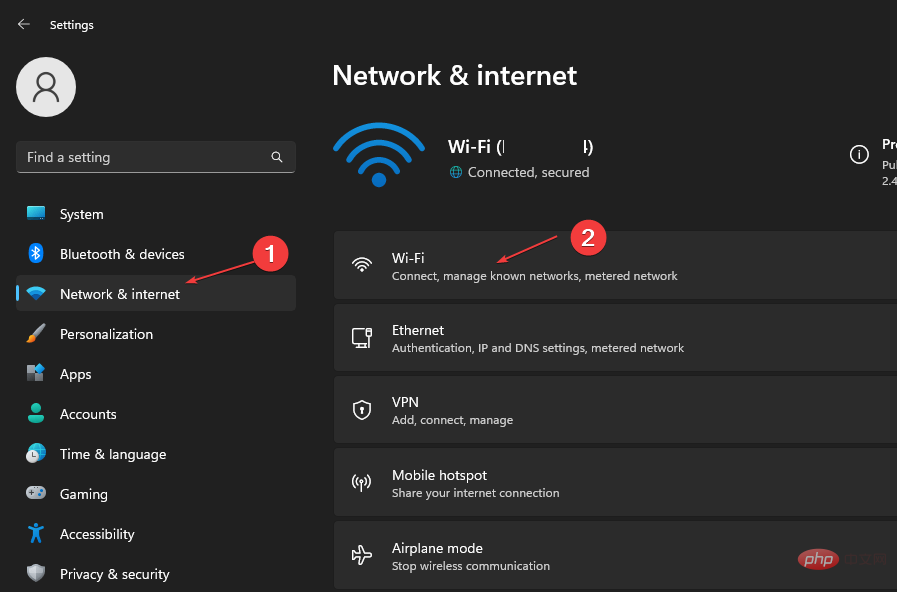
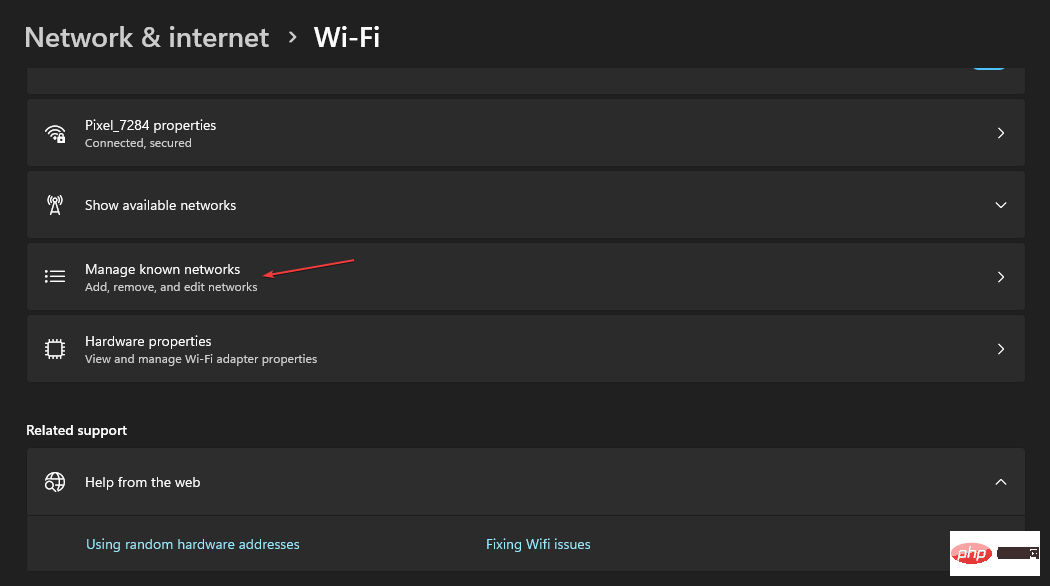
Windows 11 also gives you the option to change the MAC address of every Wi-Fi network you connect to, as well as the networks you'll still be connected to. Note that this setting will be effective when connected to the selected Wi-Fi network.
That’s it for how to find and change MAC address on Windows 11 PC, we hope the information we provided was useful.
For additional information, you can browse our dedicated guide on how to change your MAC address in Windows 10, hopefully you will find something useful in it.
The above is the detailed content of How to find and change your MAC address on Windows 11. For more information, please follow other related articles on the PHP Chinese website!

Hot AI Tools

Undresser.AI Undress
AI-powered app for creating realistic nude photos

AI Clothes Remover
Online AI tool for removing clothes from photos.

Undress AI Tool
Undress images for free

Clothoff.io
AI clothes remover

AI Hentai Generator
Generate AI Hentai for free.

Hot Article
Hot Tools

Notepad++7.3.1
Easy-to-use and free code editor

SublimeText3 Chinese version
Chinese version, very easy to use

Zend Studio 13.0.1
Powerful PHP integrated development environment

Dreamweaver CS6
Visual web development tools

SublimeText3 Mac version
God-level code editing software (SublimeText3)
Hot Topics
 1378
1378
 52
52

 No response when entering password on mac keyboard?
Feb 20, 2024 pm 01:33 PM
No response when entering password on mac keyboard?
Feb 20, 2024 pm 01:33 PM
Introduction: In this article, this website will introduce to you the relevant content about the Mac keyboard not responding when entering passwords. I hope it will be helpful to you, let’s take a look. How to solve the problem that the password cannot be entered on the Apple Mac system? You can also try to connect this keyboard to other computers to see if it works normally. If the same problem occurs on another computer, it's most likely a fault with the keyboard itself. You may consider replacing the keyboard or repairing it. The first time you log in to Alipay with your Mac computer, you will find the login interface and cannot enter your password. The password input field displays: "Please click here to install the control", so Alipay login requires the installation of security controls. Security controls can encrypt and protect the information you enter (amount, password, etc.) to improve account security. Tie
 3 tips to easily customize your Mac computer name, host name and Bonjour name
Mar 06, 2024 pm 12:20 PM
3 tips to easily customize your Mac computer name, host name and Bonjour name
Mar 06, 2024 pm 12:20 PM
Many Mac users tend to keep the default name of their device and may never consider changing it. Many people choose to stick with the name from the initial setup, such as "Johnny's MacBook Air" or simply "iMac." Learning how to change the name of your Mac is a very useful skill, especially when you have multiple devices, as it can help you quickly distinguish and manage them. Next, we will teach you step by step how to change the computer name, host name and Bonjour name (local host name) in macOS system. Why should you change your Mac name? Changing the name of your Mac can not only show your personality, but also help improve the user experience: Personalize your Mac: The default name may not be to your taste, change it to a name you like.
 pkg file to install on mac?
Feb 20, 2024 pm 03:21 PM
pkg file to install on mac?
Feb 20, 2024 pm 03:21 PM
Preface: Today, this site will share with you the relevant content about installing pkg files on Mac. If it can solve the problem you are facing now, don’t forget to follow this site and start now! The previous version of macos pkg cannot be installed to upgrade the operating system: If your laptop is using an older operating system version, it is recommended to upgrade to the latest operating system version. Because older versions may not support installation of the latest macOS system. Select "Erase" in Disk Utility, then select the Macos extension in the format, do not check the encryption option, and do not select the apfs format, and finally click the "Erase" button to solve the problem of being unable to complete the macOS installation. Drag the application's icon to the file starting with App
 How to set up WeChat Mac to automatically convert voice messages into text - How to set up voice to text conversion
Mar 19, 2024 am 08:28 AM
How to set up WeChat Mac to automatically convert voice messages into text - How to set up voice to text conversion
Mar 19, 2024 am 08:28 AM
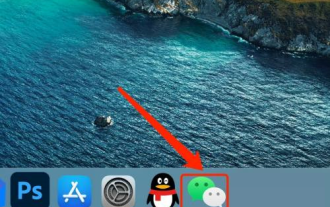
Recently, some friends have consulted the editor about how to set up WeChat Mac to automatically convert voice messages into text. The following is a method for setting up WeChat Mac to automatically convert voice messages into text. Friends in need can come and learn more. Step 1: First, open the Mac version of WeChat. As shown in the picture: Step 2: Next, click "Settings". As shown in the picture: Step 3: Then, click "General". As shown in the picture: Step 4: Then check the option "Automatically convert voice messages in chat to text". As shown in the picture: Step 5: Finally, close the window. As shown in the picture:
 Where can I change my Meituan address? Meituan address modification tutorial!
Mar 15, 2024 pm 04:07 PM
Where can I change my Meituan address? Meituan address modification tutorial!
Mar 15, 2024 pm 04:07 PM
1. Where can I change my Meituan address? Meituan address modification tutorial! Method (1) 1. Enter Meituan My Page and click Settings. 2. Select personal information. 3. Click the shipping address again. 4. Finally, select the address you want to modify, click the pen icon on the right side of the address, and modify it. Method (2) 1. On the homepage of the Meituan app, click Takeout, then click More Functions after entering. 2. In the More interface, click Manage Address. 3. In the My Shipping Address interface, select Edit. 4. Modify them one by one according to your needs, and finally click to save the address.
 3 Ways to Convert HEIC Photos to JPG on Mac
Mar 15, 2024 pm 08:43 PM
3 Ways to Convert HEIC Photos to JPG on Mac
Mar 15, 2024 pm 08:43 PM
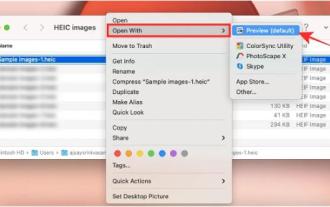
By default, iPhone takes photos from the camera in HEIC format. HEIC stands for High Efficiency Image Container and can hold more pixel data than PNG or JPG files, taking up significantly less space on iPhone storage compared to other formats. These files work best on iPhones but are not widely accepted on the internet because they often result in blurry/grainy pictures when you share them with non-Apple devices. To ensure that HEIC images are compatible on other devices, you may need to convert them to JPG format. This article will introduce how to convert HEIC images to JPG on Mac. How to Convert HEIC Photos to JPG on Mac [3 Methods] Method
 Mac configuration file does not take effect?
Feb 20, 2024 pm 02:00 PM
Mac configuration file does not take effect?
Feb 20, 2024 pm 02:00 PM
Introduction: This article will introduce to you the relevant content about the mac configuration file not taking effect. I hope it will be helpful to you, let's take a look. The solution to the problem that environment variables cannot take effect under Mac. After configuring environment variables in the Mac system, it is found that they are only effective in the current terminal and will become invalid once the terminal is switched. After inquiry, it was found that the Mac system is pre-installed with a tool called ultimate shell-zsh, and the reading of environment variables needs to be set in the .zshrc file. 2. In order for our configuration file to take effect, we can only add the above configuration in .zshrc. If you don’t make the above settings, you will find that it will only take effect every time you source ~/.bash_profile. Re-open z next time.
 vmmac virtual machine full screen (how to full screen virtual machine macos)
Feb 20, 2024 pm 01:15 PM
vmmac virtual machine full screen (how to full screen virtual machine macos)
Feb 20, 2024 pm 01:15 PM
Preface: Many friends have asked questions about the full screen of the vmmac virtual machine. This article will give you a detailed answer for your reference. I hope it will be helpful to you! Let’s take a look! Mac virtual machine Overwatch has no screen reason: graphics card compatibility issue. If you used to run Overwatch normally but now have a black screen, it may be due to a faulty graphics driver. Solution: Check whether the graphics card supports the game requirements. Update graphics card driver. Try using a different power supply to rule out the second possibility. Check whether there are any abnormalities on the motherboard, such as whether the capacitor is bulged (may have been broken down), whether there is obvious damage to the surface of the motherboard, causing circuit interruption, etc. It is recommended to send the motherboard to a repair station for inspection. If conditions permit, you can consider replacing it with another one.