


 Operation and Maintenance
Linux Operation and Maintenance
What is the linux process creation command?
Operation and Maintenance
Linux Operation and Maintenance
What is the linux process creation command?
What is the linux process creation command?

Linux process creation commands: 1. The fork command can create a new process from an existing process. The new process is a child process, and the original process is the parent process; the child process completely copies the resources of the parent process. . 2. With the vfork command, the child process created shares the address space with the parent process, which means that the child process completely runs in the address space of the parent process. 3. The clone command can selectively copy the resources of the parent process to the child process, and the data structures that are not copied are shared by the child process through pointer copying.
#The operating environment of this tutorial: linux7.3 system, Dell G3 computer.
There are three commands available for creating a process in Linux system: fork, vfork, and clone.
fork
When fork creates a process, the child process only completely copies the resources of the parent process. The copied child process has its own task_struct structure and pid, but Copies all other resources of the parent process. For example, if the parent process has five files open, then the child process also has five files open, and the current read and write pointers of these files are also stopped at the same place. So, what this step does is copy. The child process obtained in this way is independent of the parent process and has good concurrency. However, the communication between the two requires special communication mechanisms, such as pipe, shared memory and other mechanisms. In addition, to create a child process through fork, you need to use the above description Make a copy of each resource. From this point of view, fork is a very expensive system call. These overheads are not necessary in all cases. For example, after a process forks a child process, its child process is just to call exec to execute another executable. file, then copying the virtual memory space during the fork process will be a redundant process. But since Linux now adopts copy-on-write (COW copy-on-write) technology, in order to reduce overhead, fork will not actually produce two different copies initially, because at that time, a large amount of data is actually completely the same. Copy-on-write defers the actual copy of the data. If writing does occur later, it means that the data of parent and child are inconsistent, so a copy action occurs, and each process gets its own copy, which can reduce the overhead of system calls. So with copy-on-write, the implementation of vfork is of little significance.
The fork() call returns two values once executed. For the parent process, the fork function returns the process number of the subprogram, while for the subprogram, the fork function returns zero. This is the essence of a function returning twice. .
After fork, both the child process and the parent process will continue to execute the instructions after the fork call. The child process is a copy of the parent process. It will obtain a copy of the parent process's data space, heap and stack. These are copies. The parent and child processes do not share this part of memory. In other words, modification of a variable with the same name in the parent process by the child process will not affect its value in the parent process. But the father and son processes share something, which is simply the text section of the program. The text segment stores machine instructions executed by the CPU and is usually read-only.
vfork
The vfork system call is different from fork. The child process created with vfork shares the address space with the parent process, which means that the child process completely runs in the parent process. In the address space, if the child process modifies a variable at this time, this will affect the parent process.
Therefore, if vfork() is used in the above example, the values of a and b printed twice will be the same, and the address will be the same.
But one thing to note here is that the child process created with vfork() must explicitly call exit() to end, otherwise the child process will not be able to end, and this situation does not exist with fork().
Vfork also returns the process number of the child process in the parent process, and returns 0 in the child process.
After using vfork to create a child process, the parent process will be blocked until the child process calls exec (exec, loads a new executable file into the address space and executes it.) or exit. The advantage of vfork is that after the child process is created, it is often just to call exec to execute another program, because it will not have any reference to the address space of the parent process, so the copy of the address space is redundant, so it is shared through vfork Memory can reduce unnecessary overhead.
clone
The system calls fork() and vfork() have no parameters, while clone() has parameters. fork() is to copy all, vfork() is to share memory, and clone() can selectively copy the parent process resources to the child process, and the data structure that is not copied is shared by the child process through pointer copying. Specifically Which resources to copy to the child process are determined by clone_flags in the parameter list. In addition, clone() returns the pid of the child process.
Learn more about the fork command (process creation) below.
In-depth fork function
The fork function is a very important function in Linux. It creates a process from an existing process. new process. The new process is the child process, and the original process is the parent process.
The return value of fork function:
- Return the pid of the child process to the parent process
- Return 0 to the child process
Next, let’s use the fork function () as an example
Let’s compile and run it:
General usage of fork
- A parent process wants to copy itself so that the parent and child processes execute different code segments at the same time. For example, a parent process waits for a client request and spawns a child process to handle the request.
- A process wants to execute a different program. For example, after the child process returns from fork, it calls the exec function.
The reason why the fork call failed
- There are too many processes in the system
- Actual users The number of processes exceeds the limit
After reviewing the use of the fork function, let’s study a topic:
fork() creation Child process, what operations does the operating system do?
The process calls fork. When control is transferred to the fork code in the kernel, the kernel does the following operations:
Allocate new memory blocks and kernel data structures to child processes.
Copy some data structure contents of the parent process to the child process.
Add the child process to the system process list.
fork returns and starts scheduler scheduling.
After the parent process executes the code before fork (before), it calls fork to create the child process, and the two execution streams of the father and child are executed separately. . Note: After fork, who executes first is completely determined by the scheduler.
There is another question here. After fork, is the code sharing between the parent and child processes after shared, or is all code shared? Why does the child process always accurately execute the corresponding code after the fork?
#Answer: All code is shared because the CPU keeps track of where the process is executing.
- After the code is assembled, there will be many lines of code, and each line of code will have a corresponding address after it is loaded into the memory.
- Because the process may be interrupted at any time (may not be completed), the next time it continues to execute, it must continue from the previous position (not the beginning of the program or the main function), which requires The CPU must record the execution position of the current process in real time.
- So, there is corresponding register data in the CPU to record the execution position of the current process. This register is called EIP, also known as pc (point code program counter), which is used to record the next line of the executing code. The address of the code (contextual data).
- When the child process is created, its EIP will be modified. At this time, the child process will think that the data saved in the EIP is the code to be executed.
#When a child process is created, the operating system allocates the corresponding data structure to the child process, and the child process runs independently because the process is independent.
Theoretically, the child process must also have its own code and data, but generally speaking, there is no loading process when creating a child process, and the child process itself does not have its own code and data.
So, the child process can only "use" the code and data of the parent process, and the code is read-only, and parent-child sharing will not conflict; while the data may be modified and must be separated.
At this time, the operating system adopts the copy-on-write strategy.
Copy-on-write
Why does OS use copy-on-write technology to separate parent and child processes
Copying when writing is a manifestation of efficient use of memory.
Improves the operating efficiency of the system.
The OS cannot predict which spaces will be accessed before the code is executed.
Extended knowledge: process termination and
##Process termination
When the process terminates, the operating system releases the relevant kernel data structure and corresponding code data requested by the process. Its essence is to release system resources.1. Process exit code
Common ways of process termination:We can clearly distinguish between the first case and the second case through the exit code of the process. About the return value of the main function in the C language learned, where the return value of the main function is the exit code of the process. Its meaning is to return to the upper-level process to evaluate the execution results of the process.After the code is run, the result is correct.
- After the code is run, the result is incorrect.
- The code did not finish running and the program crashed.
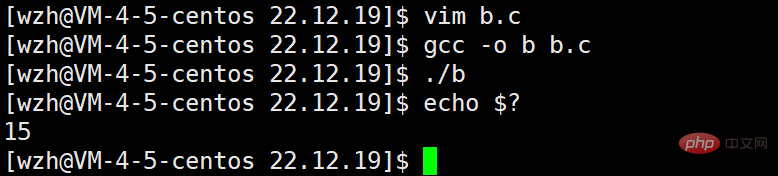
Now we write a simple C program.
Then we can get the exit code of the latest process through echo $? .
The return value of the process has two situations: 0 and non-0. 0 means that the program runs successfully and the result is correct, and non-0 means that the program runs successfully but the result is incorrect. There are countless zero values, and different non-zero values can represent different errors, making it easier for us to define the cause of the error.
What are the common error messages?
We can use strerror to print it out
The result is as follows:
Found that under Linux, there are a total of 133 error codes
Of course, when the program crashes, the exit code is meaningless.
As we all know, Linux is written in C language, and the commands are essentially C language programs, so we can simply use the ls command as an example
The error message corresponding to exit code No. 2:
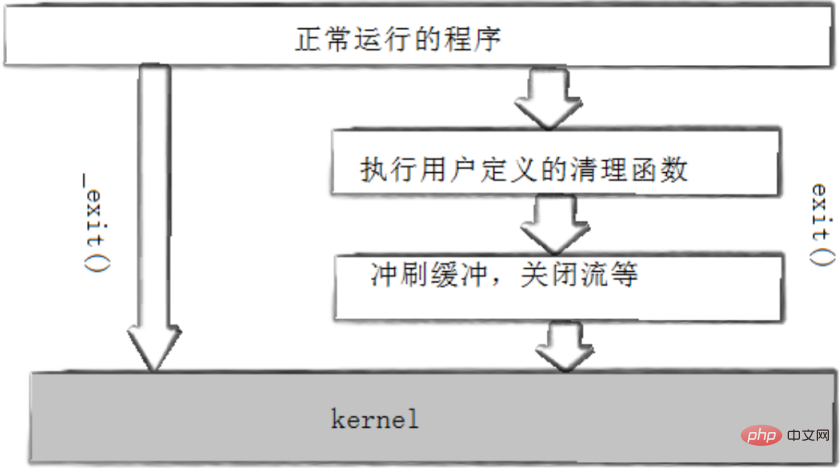
2. exit and _exit
can be used to terminate a process. return statement, you can also call the exit and _exit functions
exit function:
Linux Video Tutorial"
The above is the detailed content of What is the linux process creation command?. For more information, please follow other related articles on the PHP Chinese website!

Hot AI Tools

Undress AI Tool
Undress images for free

Undresser.AI Undress
AI-powered app for creating realistic nude photos

AI Clothes Remover
Online AI tool for removing clothes from photos.

Clothoff.io
AI clothes remover

Video Face Swap
Swap faces in any video effortlessly with our completely free AI face swap tool!

Hot Article
Hot Tools

Notepad++7.3.1
Easy-to-use and free code editor

SublimeText3 Chinese version
Chinese version, very easy to use

Zend Studio 13.0.1
Powerful PHP integrated development environment

Dreamweaver CS6
Visual web development tools

SublimeText3 Mac version
God-level code editing software (SublimeText3)
Hot Topics
 1793
1793
 16
1736
56
1587
29
267
587
16
1736
56
1587
29
267
587

 Postman Integrated Application on CentOS
May 19, 2025 pm 08:00 PM
Postman Integrated Application on CentOS
May 19, 2025 pm 08:00 PM
Integrating Postman applications on CentOS can be achieved through a variety of methods. The following are the detailed steps and suggestions: Install Postman by downloading the installation package to download Postman's Linux version installation package: Visit Postman's official website and select the version suitable for Linux to download. Unzip the installation package: Use the following command to unzip the installation package to the specified directory, for example /opt: sudotar-xzfpostman-linux-x64-xx.xx.xx.tar.gz-C/opt Please note that "postman-linux-x64-xx.xx.xx.tar.gz" is replaced by the file name you actually downloaded. Create symbols
 Detailed introduction to each directory of Linux and each directory (reprinted)
May 22, 2025 pm 07:54 PM
Detailed introduction to each directory of Linux and each directory (reprinted)
May 22, 2025 pm 07:54 PM
[Common Directory Description] Directory/bin stores binary executable files (ls, cat, mkdir, etc.), and common commands are generally here. /etc stores system management and configuration files/home stores all user files. The root directory of the user's home directory is the basis of the user's home directory. For example, the home directory of the user user is /home/user. You can use ~user to represent /usr to store system applications. The more important directory /usr/local Local system administrator software installation directory (install system-level applications). This is the largest directory, and almost all the applications and files to be used are in this directory. /usr/x11r6 Directory for storing x window/usr/bin Many
 Where is the pycharm interpreter?
May 23, 2025 pm 10:09 PM
Where is the pycharm interpreter?
May 23, 2025 pm 10:09 PM
Setting the location of the interpreter in PyCharm can be achieved through the following steps: 1. Open PyCharm, click the "File" menu, and select "Settings" or "Preferences". 2. Find and click "Project:[Your Project Name]" and select "PythonInterpreter". 3. Click "AddInterpreter", select "SystemInterpreter", browse to the Python installation directory, select the Python executable file, and click "OK". When setting up the interpreter, you need to pay attention to path correctness, version compatibility and the use of the virtual environment to ensure the smooth operation of the project.
 The difference between programming in Java and other languages Analysis of the advantages of cross-platform features of Java
May 20, 2025 pm 08:21 PM
The difference between programming in Java and other languages Analysis of the advantages of cross-platform features of Java
May 20, 2025 pm 08:21 PM
The main difference between Java and other programming languages is its cross-platform feature of "writing at once, running everywhere". 1. The syntax of Java is close to C, but it removes pointer operations that are prone to errors, making it suitable for large enterprise applications. 2. Compared with Python, Java has more advantages in performance and large-scale data processing. The cross-platform advantage of Java stems from the Java virtual machine (JVM), which can run the same bytecode on different platforms, simplifying development and deployment, but be careful to avoid using platform-specific APIs to maintain cross-platformity.
 MySQL installation tutorial teach you step by step the detailed steps for installing and configuration of mySQL step by step
May 23, 2025 am 06:09 AM
MySQL installation tutorial teach you step by step the detailed steps for installing and configuration of mySQL step by step
May 23, 2025 am 06:09 AM
The installation and configuration of MySQL can be completed through the following steps: 1. Download the installation package suitable for the operating system from the official website. 2. Run the installer, select the "Developer Default" option and set the root user password. 3. After installation, configure environment variables to ensure that the bin directory of MySQL is in PATH. 4. When creating a user, follow the principle of minimum permissions and set a strong password. 5. Adjust the innodb_buffer_pool_size and max_connections parameters when optimizing performance. 6. Back up the database regularly and optimize query statements to improve performance.
 Experience in participating in VSCode offline technology exchange activities
May 29, 2025 pm 10:00 PM
Experience in participating in VSCode offline technology exchange activities
May 29, 2025 pm 10:00 PM
I have a lot of experience in participating in VSCode offline technology exchange activities, and my main gains include sharing of plug-in development, practical demonstrations and communication with other developers. 1. Sharing of plug-in development: I learned how to use VSCode's plug-in API to improve development efficiency, such as automatic formatting and static analysis plug-ins. 2. Practical demonstration: I learned how to use VSCode for remote development and realized its flexibility and scalability. 3. Communicate with developers: I have obtained skills to optimize VSCode startup speed, such as reducing the number of plug-ins loaded at startup and managing the plug-in loading order. In short, this event has benefited me a lot and I highly recommend those who are interested in VSCode to participate.
 How to limit user resources in Linux? How to configure ulimit?
May 29, 2025 pm 11:09 PM
How to limit user resources in Linux? How to configure ulimit?
May 29, 2025 pm 11:09 PM
Linux system restricts user resources through the ulimit command to prevent excessive use of resources. 1.ulimit is a built-in shell command that can limit the number of file descriptors (-n), memory size (-v), thread count (-u), etc., which are divided into soft limit (current effective value) and hard limit (maximum upper limit). 2. Use the ulimit command directly for temporary modification, such as ulimit-n2048, but it is only valid for the current session. 3. For permanent effect, you need to modify /etc/security/limits.conf and PAM configuration files, and add sessionrequiredpam_limits.so. 4. The systemd service needs to set Lim in the unit file
 Comparison between Informix and MySQL on Linux
May 29, 2025 pm 11:21 PM
Comparison between Informix and MySQL on Linux
May 29, 2025 pm 11:21 PM
Informix and MySQL are both popular relational database management systems. They perform well in Linux environments and are widely used. The following is a comparison and analysis of the two on the Linux platform: Installing and configuring Informix: Deploying Informix on Linux requires downloading the corresponding installation files, and then completing the installation and configuration process according to the official documentation. MySQL: The installation process of MySQL is relatively simple, and can be easily installed through system package management tools (such as apt or yum), and there are a large number of tutorials and community support on the network for reference. Performance Informix: Informix has excellent performance and
