


 Web Front-end
JS Tutorial
Detailed explanation of JavaScript weak mapping and weak collection knowledge
Web Front-end
JS Tutorial
Detailed explanation of JavaScript weak mapping and weak collection knowledge
Detailed explanation of JavaScript weak mapping and weak collection knowledge

This article brings you relevant knowledge about javascript, which mainly introduces issues related to weak mapping and weak collections. Let’s take a look at it together. I hope it will be helpful to everyone.

[Related recommendations: javascript video tutorial, web front-end]
Simply speaking, if a If a variable or object is "unreachable", then there is no need for the variable or object to continue to be stored in memory and should be recycled.
For example:
let xiaoming = {name:'xiaoming'}//创建一个对象,并用变量xiaoming引用

xiaoming = null	//将变量xiaoming置空,从而使对象{name:'xiaoming'}不可达

//{name:'xiaoming'}对象被回收If an object is referenced by an array and other objects, as long as it refers to the array and the object exists in the array, then the object is considered reachable.
Objects in the array:
let xiaoming = {name:'xiaoming'}
let arr = [xiaoming]
xiaoming = null //将变量xiaoming置空
//对象{name:'xiaoming'}由于存在于数组中,并不会被释放Similarly, if we use an object as the key of Map, if Map exists, then the object It will not be recycled by the engine. Key objects in
Map:
let xiaoming = {name:'xiaoming'}
let map = new Map()
map.set(xiaoming,'a boy')
xiaoming = null //将变量xiaoming置空
//对象{name:'xiaoming'}由于是map的键,并不会被释放WeapMap is essentially the same as Map in the processing of releasing key objects The difference is, simply put, WeapMap will not prevent garbage collection because the object is used as a key. The difference between
WeakMap
WeakMap and Map can be divided into three aspects:
-
WeakMapOnly objects can be used as keys
let weakMap = new WeakMap()
let obj = {name:'obj'}
weakMap.set(obj,'obj as the key')
weakMap.set('str','str as the key')//报错The code execution results are as follows:
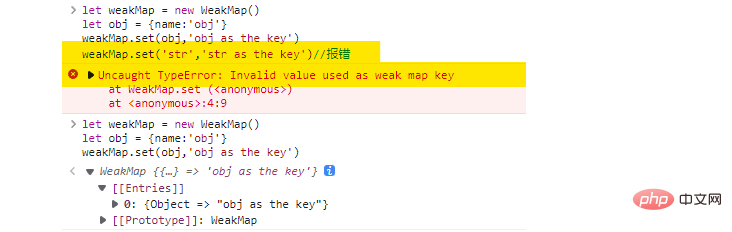
is visible when we use strings as When key is used, the program cannot execute normally.
- Does not prevent the engine from recycling keys (objects)
That is, if an object has no other references except the reference to WeakMap , then the object will be recycled by the system.
For example:
let weakMap = new WeakMap()
let obj = {name:'obj'}
weakMap.set(obj,'obj as the key')
obj = null	//将变量obj置空
//此时,对象{name:'obj'}就会被回收-
WeakMapSupported methods are limited
- ##WeakMap
Iteration is not supported - WeakMap
Not supportedkeys() - WeakMap
Not supportedvalues() - WeakMap
Does not supportentires()
WeakMapYou can only use the following methods:
- weakMap.get(key)
Get the key-value pair - weakMap.set(key,val)
Set key-value pair - weakMap.delete(key)
Delete key-value pair - weakMap .has(key)
Determine whether it exists
WeakMap is because of the timing of JavaScript engine releasing the object It is impossible to determine.
JavaScript engine may release the space occupied by the object immediately, or it may wait a while.
WeakMap cannot be determined. (Just imagine, if we traverse the elements of WeakMap after an object loses all references, we may get different results.)
is usually to store data that "belongs" to an object. When the object does not exist, the data that "belongs" to the object should also be released accordingly. There is a historical story that is very suitable for using WeakMap`: "The cunning rabbit dies, and the lackeys are cooked; the birds are gone, and the good bow is hidden."
If we use
JavaScript code to describe this story, we should use WeakMap:<div class="code" style="position:relative; padding:0px; margin:0px;"><pre class="brush:php;toolbar:false">let weakMap = new WeakMap()
let rabbit = {name:'rabbit'} //狡兔
let runDog = {name:'runDog'} //走狗
let flyBird = {name:'flyBird'} //飞鸟
let goodBow = {name:'goodBow'} //良弓
weakMap.set(rabbit,runDog)
weakMap.set(flyBird,goodBow)
rabbit = null //狡兔死
flyBird = null //飞鸟尽
//随即,走狗和良弓都会被释放,也可能不是立刻就释放
//这个故事告诉我们,当走狗没有啥好下场,可能不是立刻就被
//弄死了,但是迟早要弄死</pre><div class="contentsignin">Copy after login</div></div>WeakSet
and
Compared with Set, WeakSet has the following differences:
- WeakSet
- can only add object elements
- Does not prevent the system from recycling elements
- Supports
add(),has(),delete()WeakSet - does not support the
sizeattribute andkeys()method we can use
to verify some existence information, or verify "yes/no" status, for example, we can use WeakMap to determine whether the user is online: <div class="code" style="position:relative; padding:0px; margin:0px;"><pre class="brush:php;toolbar:false">let onlineUser = new WeakMap()
let zhangSan = {name:'张三'}
let liSi = {name:'李四'}
let wangEr = {name:'王二'}
let maZi = {name:'麻子'}
function login(user){
... ...
onlineUser.add(user)
}
//判断用户是否在线
function isOnline(user){
return onlineUser.has(user)
}</pre><div class="contentsignin">Copy after login</div></div>
and WeakSet is that they cannot iterate and obtain all elements at once, which does not affect their important role in very critical places. <h2 id="Summary">Summary</h2>
<ol>
<li>
<code>WeakMap can only use objects as keys. When all external references to the keys are lost (there are no other variable references except WeakMap key object), WeakMap will not prevent the engine from recycling key values. Once recycled, the elements corresponding to WeakMap no longer exist.
WeakSet can only store objects. Once the object element loses all external references (except WeakSet, no other variables refer to the element object), WeakSet Will not prevent the engine from recycling elements. Once recycled, the corresponding elements in WeakSet disappear. clear(), size, keys(), values() and other methodsWeakMap and WeakSet are often used to store the data structure associated with the "main" object. Once the "main" object loses its meaning, the corresponding associated data structure is naturally deleted.
【Related recommendations: javascript video tutorial, web front-end】
The above is the detailed content of Detailed explanation of JavaScript weak mapping and weak collection knowledge. For more information, please follow other related articles on the PHP Chinese website!

Hot AI Tools

Undresser.AI Undress
AI-powered app for creating realistic nude photos

AI Clothes Remover
Online AI tool for removing clothes from photos.

Undress AI Tool
Undress images for free

Clothoff.io
AI clothes remover

AI Hentai Generator
Generate AI Hentai for free.

Hot Article
Hot Tools

Notepad++7.3.1
Easy-to-use and free code editor

SublimeText3 Chinese version
Chinese version, very easy to use

Zend Studio 13.0.1
Powerful PHP integrated development environment

Dreamweaver CS6
Visual web development tools

SublimeText3 Mac version
God-level code editing software (SublimeText3)
Hot Topics
 1378
1378
 52
52

 How to implement an online speech recognition system using WebSocket and JavaScript
Dec 17, 2023 pm 02:54 PM
How to implement an online speech recognition system using WebSocket and JavaScript
Dec 17, 2023 pm 02:54 PM
How to use WebSocket and JavaScript to implement an online speech recognition system Introduction: With the continuous development of technology, speech recognition technology has become an important part of the field of artificial intelligence. The online speech recognition system based on WebSocket and JavaScript has the characteristics of low latency, real-time and cross-platform, and has become a widely used solution. This article will introduce how to use WebSocket and JavaScript to implement an online speech recognition system.
 WebSocket and JavaScript: key technologies for implementing real-time monitoring systems
Dec 17, 2023 pm 05:30 PM
WebSocket and JavaScript: key technologies for implementing real-time monitoring systems
Dec 17, 2023 pm 05:30 PM
WebSocket and JavaScript: Key technologies for realizing real-time monitoring systems Introduction: With the rapid development of Internet technology, real-time monitoring systems have been widely used in various fields. One of the key technologies to achieve real-time monitoring is the combination of WebSocket and JavaScript. This article will introduce the application of WebSocket and JavaScript in real-time monitoring systems, give code examples, and explain their implementation principles in detail. 1. WebSocket technology
 How to use JavaScript and WebSocket to implement a real-time online ordering system
Dec 17, 2023 pm 12:09 PM
How to use JavaScript and WebSocket to implement a real-time online ordering system
Dec 17, 2023 pm 12:09 PM
Introduction to how to use JavaScript and WebSocket to implement a real-time online ordering system: With the popularity of the Internet and the advancement of technology, more and more restaurants have begun to provide online ordering services. In order to implement a real-time online ordering system, we can use JavaScript and WebSocket technology. WebSocket is a full-duplex communication protocol based on the TCP protocol, which can realize real-time two-way communication between the client and the server. In the real-time online ordering system, when the user selects dishes and places an order
 How to implement an online reservation system using WebSocket and JavaScript
Dec 17, 2023 am 09:39 AM
How to implement an online reservation system using WebSocket and JavaScript
Dec 17, 2023 am 09:39 AM
How to use WebSocket and JavaScript to implement an online reservation system. In today's digital era, more and more businesses and services need to provide online reservation functions. It is crucial to implement an efficient and real-time online reservation system. This article will introduce how to use WebSocket and JavaScript to implement an online reservation system, and provide specific code examples. 1. What is WebSocket? WebSocket is a full-duplex method on a single TCP connection.
 JavaScript and WebSocket: Building an efficient real-time weather forecasting system
Dec 17, 2023 pm 05:13 PM
JavaScript and WebSocket: Building an efficient real-time weather forecasting system
Dec 17, 2023 pm 05:13 PM
JavaScript and WebSocket: Building an efficient real-time weather forecast system Introduction: Today, the accuracy of weather forecasts is of great significance to daily life and decision-making. As technology develops, we can provide more accurate and reliable weather forecasts by obtaining weather data in real time. In this article, we will learn how to use JavaScript and WebSocket technology to build an efficient real-time weather forecast system. This article will demonstrate the implementation process through specific code examples. We
 How to use insertBefore in javascript
Nov 24, 2023 am 11:56 AM
How to use insertBefore in javascript
Nov 24, 2023 am 11:56 AM
Usage: In JavaScript, the insertBefore() method is used to insert a new node in the DOM tree. This method requires two parameters: the new node to be inserted and the reference node (that is, the node where the new node will be inserted).
 Simple JavaScript Tutorial: How to Get HTTP Status Code
Jan 05, 2024 pm 06:08 PM
Simple JavaScript Tutorial: How to Get HTTP Status Code
Jan 05, 2024 pm 06:08 PM
JavaScript tutorial: How to get HTTP status code, specific code examples are required. Preface: In web development, data interaction with the server is often involved. When communicating with the server, we often need to obtain the returned HTTP status code to determine whether the operation is successful, and perform corresponding processing based on different status codes. This article will teach you how to use JavaScript to obtain HTTP status codes and provide some practical code examples. Using XMLHttpRequest
 How to get HTTP status code in JavaScript the easy way
Jan 05, 2024 pm 01:37 PM
How to get HTTP status code in JavaScript the easy way
Jan 05, 2024 pm 01:37 PM
Introduction to the method of obtaining HTTP status code in JavaScript: In front-end development, we often need to deal with the interaction with the back-end interface, and HTTP status code is a very important part of it. Understanding and obtaining HTTP status codes helps us better handle the data returned by the interface. This article will introduce how to use JavaScript to obtain HTTP status codes and provide specific code examples. 1. What is HTTP status code? HTTP status code means that when the browser initiates a request to the server, the service
