


How to remove duplicate data in oracle

In Oracle, you can use the Distinct keyword to remove duplicate data and filter duplicate rows in the result set. This keyword can ensure that the value of the specified column or columns returned in the SELECT clause is unique. ;The syntax is "SELECT DISTINCT field name FROM data table name;".

The operating environment of this tutorial: Windows 7 system, Oracle 11g version, Dell G3 computer.
In Oracle, you can use the Distinct keyword to remove duplicate data.
Oracle Distinct keyword
Use the DISTINCT clause in the SELECT statement to filter duplicate rows in the result set. It ensures that the values returned in the specified column or columns in the SELECT clause are unique.
The following explains the syntax of the SELECT DISTINCT statement:
SELECT DISTINCT
  column_name
FROM
  table_name;
In the above syntax, table_namethe column_name# of the table ## Values in columns will be compared to filter out duplicates.
SELECT clause, as follows:
SELECT
    DISTINCT column_1,
    column_2,
        ...
FROM
    table_name;
In this syntax, ## The combination of values in #column_1
, column_2, and column_n is used to determine the uniqueness of the data. The
clause can only be used in the SELECT statement. Please note that
is not a synonym for the SQL standard UNIQUE. It is a good habit to always use DISTINCT instead of UNIQUE. Oracle DISTINCT Example
Here are some examples of how to use
SELECT DISTINCT to see how it works. 1. Example of Oracle DISTINCT applied on one column
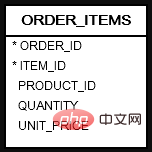
View the Contacts (
contacts) table in the sample database:
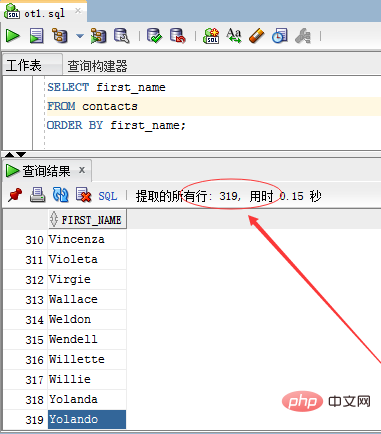 The following example retrieves the names of all contacts:
SELECT first_name
FROM contacts
ORDER BY first_name;
Execute the above query statement and get the following results-
The query returned
row means that the contact (contacts) table has 319 rows. To obtain unique contact names, you can add the
keyword to the SELECT statement above, as follows: <pre class="brush:php;toolbar:false">SELECT DISTINCT first_name
FROM contacts
ORDER BY first_name;</pre> Execute the above query statement and get the following results -
 The query returned
rows, indicating the contact (contacts) table There are 17 rows that are duplicates and they have been filtered. 2. Oracle DISTINCT application multi-column example
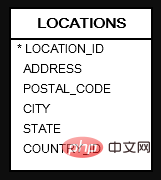
Look at the
order_items table below. The structure of the table is as follows:
The following statement selects different product IDs and quantities from the
table: <pre class="brush:php;toolbar:false">SELECT
DISTINCT product_id,
quantity
FROM
ORDER_ITEMS
ORDER BY product_id;</pre>Execute the above query statement and get the following results-
 In this example, the values of the
and quantity columns are both used to evaluate the uniqueness of the rows in the result set. 3. Oracle DISTINCT and NULL
treats NULL values as duplicate values. If you use the SELECT DISTINCT statement to query data from a column with multiple NULL values, the result set contains only one NULL value. Please refer to the
table in the sample database, the structure is as follows -
The following statements are from
Retrieve data with multiple NULL values in the column: <pre class="brush:php;toolbar:false">SELECT DISTINCT state
FROM locations
ORDER BY state NULLS FIRST;</pre>Execute the above example code and get the following results-

value is returned. Recommended tutorial: "
The above is the detailed content of How to remove duplicate data in oracle. For more information, please follow other related articles on the PHP Chinese website!

Hot AI Tools

Undress AI Tool
Undress images for free

Undresser.AI Undress
AI-powered app for creating realistic nude photos

AI Clothes Remover
Online AI tool for removing clothes from photos.

Clothoff.io
AI clothes remover

Video Face Swap
Swap faces in any video effortlessly with our completely free AI face swap tool!

Hot Article
Hot Tools

Notepad++7.3.1
Easy-to-use and free code editor

SublimeText3 Chinese version
Chinese version, very easy to use

Zend Studio 13.0.1
Powerful PHP integrated development environment

Dreamweaver CS6
Visual web development tools

SublimeText3 Mac version
God-level code editing software (SublimeText3)
Hot Topics


 How to uninstall MySQL and clean residual files
Apr 29, 2025 pm 04:03 PM
How to uninstall MySQL and clean residual files
Apr 29, 2025 pm 04:03 PM
To safely and thoroughly uninstall MySQL and clean all residual files, follow the following steps: 1. Stop MySQL service; 2. Uninstall MySQL packages; 3. Clean configuration files and data directories; 4. Verify that the uninstallation is thorough.
 Oracle's Role in the Business World
Apr 23, 2025 am 12:01 AM
Oracle's Role in the Business World
Apr 23, 2025 am 12:01 AM
Oracle is not only a database company, but also a leader in cloud computing and ERP systems. 1. Oracle provides comprehensive solutions from database to cloud services and ERP systems. 2. OracleCloud challenges AWS and Azure, providing IaaS, PaaS and SaaS services. 3. Oracle's ERP systems such as E-BusinessSuite and FusionApplications help enterprises optimize operations.
 MongoDB vs. Oracle: Understanding Key Differences
Apr 16, 2025 am 12:01 AM
MongoDB vs. Oracle: Understanding Key Differences
Apr 16, 2025 am 12:01 AM
MongoDB is suitable for handling large-scale unstructured data, and Oracle is suitable for enterprise-level applications that require transaction consistency. 1.MongoDB provides flexibility and high performance, suitable for processing user behavior data. 2. Oracle is known for its stability and powerful functions and is suitable for financial systems. 3.MongoDB uses document models, and Oracle uses relational models. 4.MongoDB is suitable for social media applications, while Oracle is suitable for enterprise-level applications.
 What steps are required to configure CentOS in HDFS
Apr 14, 2025 pm 06:42 PM
What steps are required to configure CentOS in HDFS
Apr 14, 2025 pm 06:42 PM
Building a Hadoop Distributed File System (HDFS) on a CentOS system requires multiple steps. This article provides a brief configuration guide. 1. Prepare to install JDK in the early stage: Install JavaDevelopmentKit (JDK) on all nodes, and the version must be compatible with Hadoop. The installation package can be downloaded from the Oracle official website. Environment variable configuration: Edit /etc/profile file, set Java and Hadoop environment variables, so that the system can find the installation path of JDK and Hadoop. 2. Security configuration: SSH password-free login to generate SSH key: Use the ssh-keygen command on each node
 MongoDB vs. Oracle: Choosing the Right Database for Your Needs
Apr 22, 2025 am 12:10 AM
MongoDB vs. Oracle: Choosing the Right Database for Your Needs
Apr 22, 2025 am 12:10 AM
MongoDB is suitable for unstructured data and high scalability requirements, while Oracle is suitable for scenarios that require strict data consistency. 1.MongoDB flexibly stores data in different structures, suitable for social media and the Internet of Things. 2. Oracle structured data model ensures data integrity and is suitable for financial transactions. 3.MongoDB scales horizontally through shards, and Oracle scales vertically through RAC. 4.MongoDB has low maintenance costs, while Oracle has high maintenance costs but is fully supported.
 How to configure the database connection of weblogic on centos
Apr 14, 2025 pm 02:06 PM
How to configure the database connection of weblogic on centos
Apr 14, 2025 pm 02:06 PM
Configuring WebLogic database connection on a CentOS system requires the following steps: JDK installation and environment configuration: Make sure that the server has installed a JDK that is compatible with the WebLogic version (for example, WebLogic14.1.1 usually requires JDK8). Correctly set JAVA_HOME, CLASSPATH and PATH environment variables. WebLogic installation and decompression: Download the WebLogic installation package for CentOS system from the official Oracle website and unzip it to the specified directory. WebLogic user and directory creation: Create a dedicated WebLogic user account and set a security password
 Centos options after stopping maintenance
Apr 14, 2025 pm 08:51 PM
Centos options after stopping maintenance
Apr 14, 2025 pm 08:51 PM
CentOS has been discontinued, alternatives include: 1. Rocky Linux (best compatibility); 2. AlmaLinux (compatible with CentOS); 3. Ubuntu Server (configuration required); 4. Red Hat Enterprise Linux (commercial version, paid license); 5. Oracle Linux (compatible with CentOS and RHEL). When migrating, considerations are: compatibility, availability, support, cost, and community support.
 Can vscode run kotlin
Apr 15, 2025 pm 06:57 PM
Can vscode run kotlin
Apr 15, 2025 pm 06:57 PM
Running Kotlin in VS Code requires the following environment configuration: Java Development Kit (JDK) and Kotlin compiler Kotlin-related plugins (such as Kotlin Language and Kotlin Extension for VS Code) create Kotlin files and run code for testing to ensure successful environment configuration
