


The solution to the problem that the Bluetooth icon is missing in win7: First open the control panel and search for bluetooth in the search bar; then find and enter the change bluetooth option; finally check the [Show bluetooth icon in the notification area] option and click OK That’s it.

#The operating environment of this article: windows7 system, thinkpad t480 computer.
When we use the computer, sometimes the Bluetooth icon disappears. So how should we solve the problem when encountering this situation?
The solution is as follows:
First open the Start - Control Panel in the lower left corner of the computer.
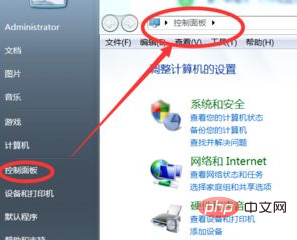
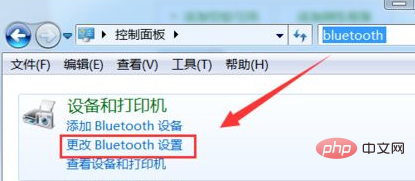
After opening the control panel, enter bluetooth in the search bar on the upper right side of the screen and click search.
You can find two options about bluetooth in the search results, which proves that the Bluetooth function in the system is indeed still there, but it was deleted by mistake. Now click on Change bluetooth settings.
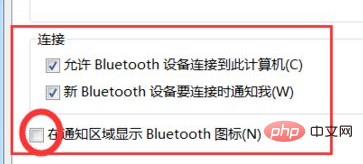
#After the Bluetooth function menu pops up, check the last three options and click OK to save.
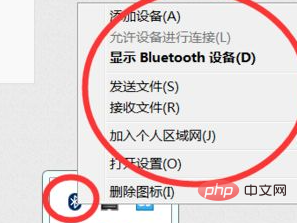
#At this time you can find and use the Bluetooth function in the lower right corner of the computer.
Related recommendations: windows system
The above is the detailed content of What should I do if the Bluetooth icon is missing in Windows 7?. For more information, please follow other related articles on the PHP Chinese website!
 win10 bluetooth switch is missing
 How to create virtual wifi in win7
 How to change file type in win7
 How to set up hibernation in Win7 system
 How to open Windows 7 Explorer
 How to solve the problem of not being able to create a new folder in Win7
 Solution to Win7 folder properties not sharing tab page
 Win7 prompts that application data cannot be accessed. Solution





















![[Web front-end] Node.js quick start](https://img.php.cn/upload/course/000/000/067/662b5d34ba7c0227.png)



