Selectcomposer require darkaonline/l5-swagger Using version ^5.6 for darkaonline/l5-swagger ... - Installing swagger-api/swagger-ui (v3.17.4) - Installing doctrine/annotations (v1.6.0) - Installing zircote/swagger-php (2.0.13) - Installing darkaonline/l5-swagger (5.6.5) ...Runphp artisan vendor:publish
L5Swagger\L5SwaggerServiceProvider
ThisTwo files will be added at this time
/config/l5-swagger.php
/resources/views/vendor/l5-swagger/index.blade.php
- Configuration
- Add a comment before class
app/Http/Controllers/Controller.php
file<?php namespace App\Http\Controllers;
use Illuminate\Foundation\Bus\DispatchesJobs;
use Illuminate\Routing\Controller as BaseController;
use Illuminate\Foundation\Validation\ValidatesRequests;
use Illuminate\Foundation\Auth\Access\AuthorizesRequests;
/**
* @SWG\Swagger(
* basePath="/calculate-rates",
* @SWG\Info(
* title="项目名称 API",
* version="1.0.0"
* )
* )
*/
class Controller extends BaseController
{
use AuthorizesRequests, DispatchesJobs, ValidatesRequests;
}Run commandphp artisan l5-swagger:generate
Open your project URLhttp://localhost/api/documentation, you will see that swagger has run successfully, but no API documentation is displayed. Write documentationGethttp://localhost/home
method in HomeController Write the document
/**
     * @SWG\Get(
     *   path="/home",
     *   summary="用户资料",
     *   @SWG\Response(response=200, description="请求成功"),
     *   @SWG\Response(response=401, description="用户验证失败"),
     *   @SWG\Response(response=500, description="服务器错误")
     * )
     *
     */
    public function index()
    {
        return view('home');
    }
above and run the command again php artisan l5-swagger:generate
Go back to http://localhost/api/documentation to refresh, the document will be out, it should look like this Appearance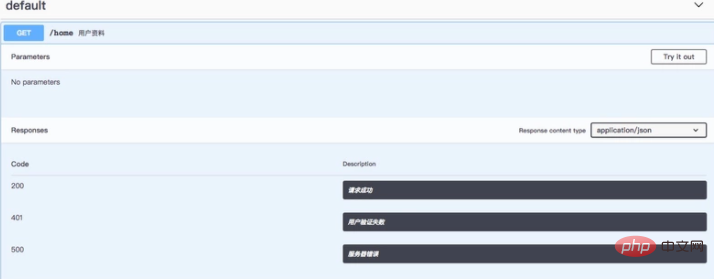 Recommended: