


How to use mid function

How to use the mid function: First open Excel and enter characters in cell A1; then enter the function "=MID (A1, 4, 3)" in cell A2; the final result should be "Browse device".

The operating environment of this article: Windows 7 system, Microsoft Office Excel 2007 version, Dell G3 computer.
How to use the mid function:
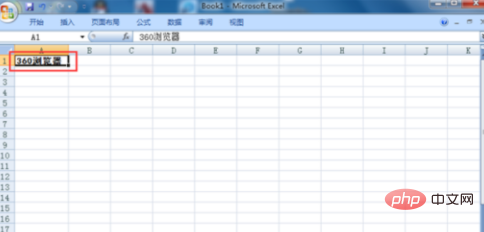
1. The following is an example. Here is Excel2007 as an example. Open Excel and enter characters in cell A1. Here Enter "360 Browser".
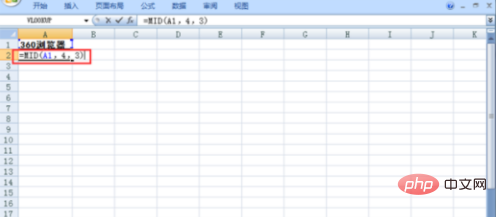
2. Then enter the function "=MID (A1, 4, 3)" in cell A2, which means to start extracting from the 4th character in cell A1 , the extracted characters are 3, so the final result should be "browser". Note: Numbers including punctuation marks are also characters.
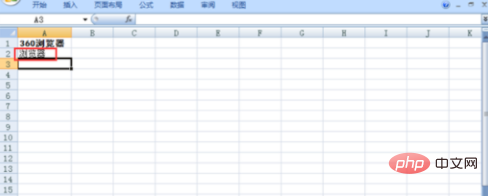
#3. After entering the formula, press the enter key, and the result will appear, as shown in the figure below.
Related learning recommendations: excel tutorial
The above is the detailed content of How to use mid function. For more information, please follow other related articles on the PHP Chinese website!

Hot AI Tools

Undress AI Tool
Undress images for free

Undresser.AI Undress
AI-powered app for creating realistic nude photos

AI Clothes Remover
Online AI tool for removing clothes from photos.

Clothoff.io
AI clothes remover

Video Face Swap
Swap faces in any video effortlessly with our completely free AI face swap tool!

Hot Article
Hot Tools

Notepad++7.3.1
Easy-to-use and free code editor

SublimeText3 Chinese version
Chinese version, very easy to use

Zend Studio 13.0.1
Powerful PHP integrated development environment

Dreamweaver CS6
Visual web development tools

SublimeText3 Mac version
God-level code editing software (SublimeText3)

