


How to set the cad mouse cross cursor

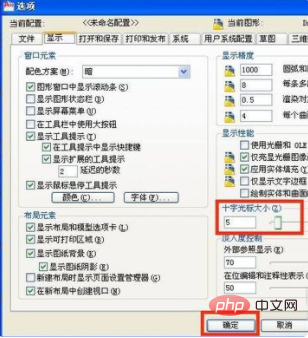
How to set the cad mouse cross cursor: first click the drop-down menu of the cad window tool and click Options; then click the display button with the mouse on the options window; finally adjust the size of the cross cursor by moving the ruler .

The operating environment of this article: Windows 7 system, autocad2020 version, Dell G3 computer.
How to set the cad mouse cross cursor:
1. First, click the desktop cad2010 software shortcut with the mouse to open the cad drawing window
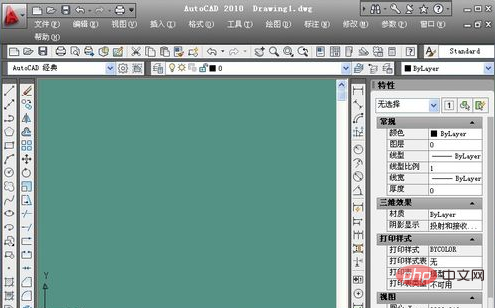
2. After the cad drawing window is opened, use the mouse to click on the tool on the cad window
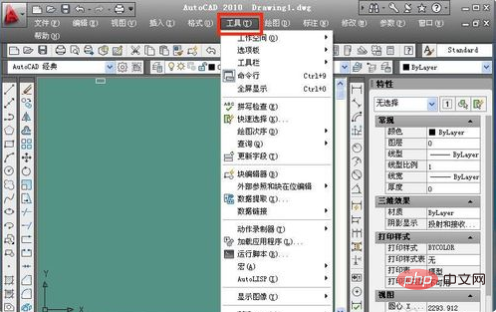
3. Click on the tool on the cad window and a drop-down menu will appear , use the mouse to click the option
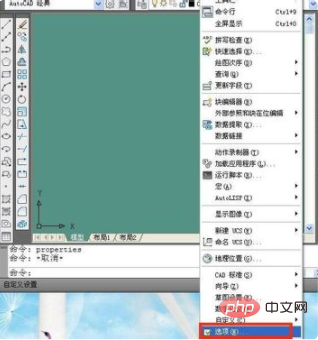
4. After clicking the option, the options window will appear. Use the mouse to click the display button
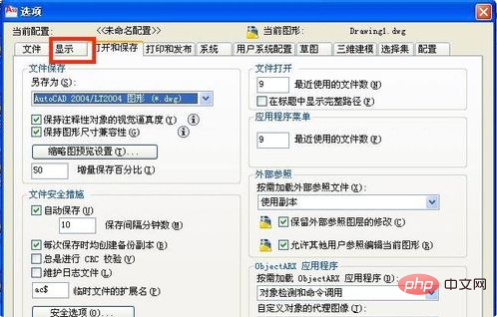
5. Click the display button to enter the display setting window. Under the cross cursor size on the right side of the display setting window, adjust the size of the cross cursor by moving the ruler
Related free learning recommendations: php programming(Video)
The above is the detailed content of How to set the cad mouse cross cursor. For more information, please follow other related articles on the PHP Chinese website!

Hot AI Tools

Undress AI Tool
Undress images for free

Undresser.AI Undress
AI-powered app for creating realistic nude photos

AI Clothes Remover
Online AI tool for removing clothes from photos.

Clothoff.io
AI clothes remover

Video Face Swap
Swap faces in any video effortlessly with our completely free AI face swap tool!

Hot Article
Hot Tools

Notepad++7.3.1
Easy-to-use and free code editor

SublimeText3 Chinese version
Chinese version, very easy to use

Zend Studio 13.0.1
Powerful PHP integrated development environment

Dreamweaver CS6
Visual web development tools

SublimeText3 Mac version
God-level code editing software (SublimeText3)


 Recommended Laravel's best expansion packs: 2024 essential tools
Apr 30, 2025 pm 02:18 PM
Recommended Laravel's best expansion packs: 2024 essential tools
Apr 30, 2025 pm 02:18 PM
The essential Laravel extension packages for 2024 include: 1. LaravelDebugbar, used to monitor and debug code; 2. LaravelTelescope, providing detailed application monitoring; 3. LaravelHorizon, managing Redis queue tasks. These expansion packs can improve development efficiency and application performance.
 Which of the top ten currency trading platforms in the world are the latest version of the top ten currency trading platforms
Apr 28, 2025 pm 08:09 PM
Which of the top ten currency trading platforms in the world are the latest version of the top ten currency trading platforms
Apr 28, 2025 pm 08:09 PM
The top ten cryptocurrency trading platforms in the world include Binance, OKX, Gate.io, Coinbase, Kraken, Huobi Global, Bitfinex, Bittrex, KuCoin and Poloniex, all of which provide a variety of trading methods and powerful security measures.
 How to implement style reuse in CSS?
May 21, 2025 pm 08:57 PM
How to implement style reuse in CSS?
May 21, 2025 pm 08:57 PM
The methods to implement style reuse in CSS are: 1. Use class selector, 2. Use BEM naming convention, and 3. Use CSS preprocessor. Through these methods, the amount of code can be reduced, maintainability and consistency can be improved. For example, using a class selector can apply the same style to multiple elements, while BEM and preprocessors provide more advanced ways of multiplexing and organization.
 Laravel integration with social media login (OAuth)
May 22, 2025 pm 09:27 PM
Laravel integration with social media login (OAuth)
May 22, 2025 pm 09:27 PM
Integrating social media login in the Laravel framework can be achieved by using the LaravelSocialite package. 1. Install the Socialite package: use composerrequirelaravel/socialite. 2. Configure the service provider and alias: add relevant configuration in config/app.php. 3. Set API credentials: Configure social media API credentials in .env and config/services.php. 4. Write controller method: Add redirection and callback methods to handle social media login process. 5. Handle FAQs: Ensure user uniqueness, data synchronization, security and error handling. 6. Optimization practice:
 How to customize Laravel's user authentication logic?
May 22, 2025 pm 09:36 PM
How to customize Laravel's user authentication logic?
May 22, 2025 pm 09:36 PM
Custom Laravel user authentication logic can be implemented through the following steps: 1. Add additional verification conditions when logging in, such as mailbox verification. 2. Create a custom Guard class and expand the authentication process. Custom authentication logic requires a deep understanding of Laravel's authentication system and pay attention to security, performance and maintenance.
 Common security threats and protection measures for Laravel applications
May 22, 2025 pm 09:33 PM
Common security threats and protection measures for Laravel applications
May 22, 2025 pm 09:33 PM
Common security threats in Laravel applications include SQL injection, cross-site scripting attacks (XSS), cross-site request forgery (CSRF), and file upload vulnerabilities. Protection measures include: 1. Use EloquentORM and QueryBuilder for parameterized queries to avoid SQL injection. 2. Verify and filter user input to ensure the security of output and prevent XSS attacks. 3. Set CSRF tokens in forms and AJAX requests to protect the application from CSRF attacks. 4. Strictly verify and process file uploads to ensure file security. 5. Regular code audits and security tests are carried out to discover and fix potential security vulnerabilities.
 What is Middleware in Laravel? How to use it?
May 29, 2025 pm 09:27 PM
What is Middleware in Laravel? How to use it?
May 29, 2025 pm 09:27 PM
Middleware is a filtering mechanism in Laravel that is used to intercept and process HTTP requests. Use steps: 1. Create middleware: Use the command "phpartisanmake:middlewareCheckRole". 2. Define processing logic: Write specific logic in the generated file. 3. Register middleware: Add middleware in Kernel.php. 4. Use middleware: Apply middleware in routing definition.
 How to manage Kubernetes nodes on Debian
May 16, 2025 pm 01:18 PM
How to manage Kubernetes nodes on Debian
May 16, 2025 pm 01:18 PM
Managing Kubernetes (K8S) nodes on a Debian system usually involves the following key steps: 1. Installing and configuring Kubernetes components preparation: Make sure that all nodes (including master nodes and worker nodes) have the Debian operating system installed and meet the basic requirements for installing a Kubernetes cluster, such as sufficient CPU, memory and disk space. Disable swap partition: In order to ensure that kubelet can run smoothly, it is recommended to disable swap partition. Set firewall rules: allow necessary ports, such as ports used by kubelet, kube-apiserver, kube-scheduler, etc. Install container