


Teach: Learn a Python trick every 30 seconds

Many friends who study Python video tutorial will encounter many problems in function implementation during the actual project. Some problems are not difficult, or they already exist. Great way to solve it. Of course, what makes perfect is that when we become proficient in coding, we will naturally be able to summarize some useful techniques, but it may not be so easy for those students who are just getting familiar with Python.
Recommendation (free): Python video tutorial
This time I recommend one for everyone to learn these skills A very good resource"30-seconds-of-python", all skills and methods can be obtained in just 30 seconds, and you can use your business time to accumulate them. Take a quick look below.
https://github.com/30-seconds...
Content directory
The following is the entire directory of learning Python in 30 seconds, divided into several major sections: List, Math, Object, String, Utility, the following is the organized thinking map.
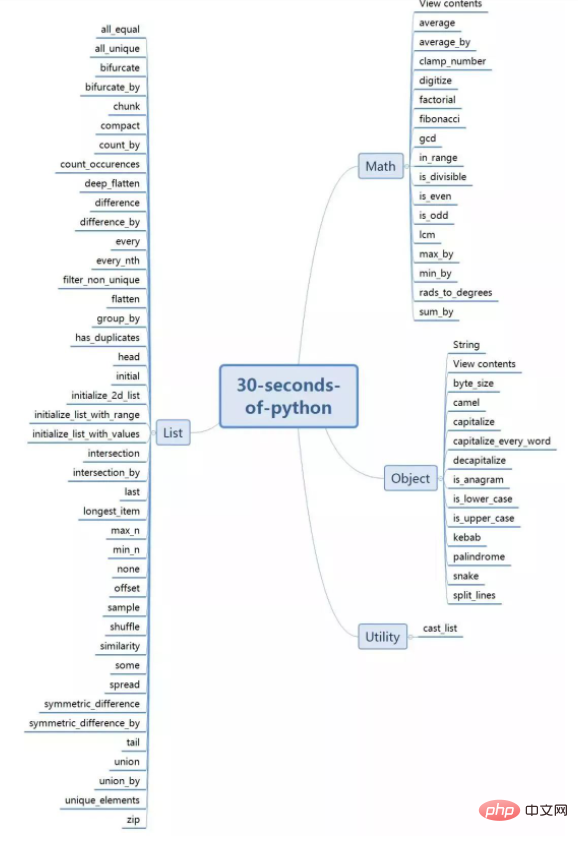
I have selected 10 practical and interesting methods to share with you. The rest can be learned by yourself if you are interested.
1. List: all_equal
Function implementation: Check whether all elements in a list are the same.
Interpretation: Use [1:] and [:-1] to compare all elements of the given list.
def all_equal(lst):
return lst[1:] == lst[:-1]
Example:
all_equal([1, 2, 3, 4, 5, 6]) # False
all_equal([1, 1, 1, 1]) # True
2. List: all_unique
Function implementation: If all values in the list are unique, return True, otherwise False
Interpretation: Use set set() to remove duplicates on the given list and compare its length with the original list.
def all_unique(lst):
return len(lst) == len(set(lst))
Example:
x = [1,2,3,4,5,6]
y = [1,2,2,3,4,5]
all_unique(x) # True
all_unique(y) # False
3. List: bifurcate
Function implementation: Group list values. If the element in filter is True, then the corresponding element belongs to the first group; otherwise, it belongs to the second group.
Interpretation: Use list comprehension and enumerate() to each group based on filter elements.
def bifurcate(lst, filter):
    return [
    [x for i,x in enumerate(lst) if filter[i] == True],
    [x for i,x in enumerate(lst) if filter[i] == False]
  ]
Example:
bifurcate(['beep', 'boop', 'foo', 'bar'], [True, True, False, True])

# [ ['beep', 'boop', 'bar'], ['foo'] ]
4. List: difference
Function implementation: Return the difference between two iterables.
Interpretation: Create a set of b, and use the list comprehension of a to retain elements that are not in _b.
def difference(a, b):
  _b = set(b)
return [item for item in a if item not in _b]
Example:
difference([1, 2, 3], [1, 2, 4]) # [3]
5. List: flatten
Function implementation: one-time integrated list.
Interpretation: Use nested lists to extract each value of the sublist.
def flatten(lst):
return [x for y in lst for x in y]
Example:
flatten([[1,2,3,4],[5,6,7,8]]) # [1, 2, 3, 4, 5, 6, 7, 8]
6. Math: digitize
Function implementation: Decompose a number and convert it into single digits.
Interpretation: After characterizing n, use the map() function combined with int to complete the conversion
def digitize(n):
return list(map(int, str(n)))
Example:
digitize(123) # [1, 2, 3]
7. List: shuffle
Function implementation: Randomly shuffle the order of list elements.
Interpretation: Use the Fisher-Yates algorithm to reorder the list elements.
from copy import deepcopy
from random import randint

def shuffle(lst):
  temp_lst = deepcopy(lst)
  m = len(temp_lst)
while (m):
    m -= 1
    i = randint(0, m)
    temp_lst[m], temp_lst[i] = temp_lst[i], temp_lst[m]
return temp_lst
Example:
foo = [1,2,3]
shuffle(foo) # [2,3,1] , foo = [1,2,3]
8. Math: clamp_number
Function implementation: Clamp the number num at the boundary value of a and b within the specified range.
Interpretation: If num falls within the range, return num; otherwise, return the closest number within the range.
def clamp_number(num,a,b):
return max(min(num, max(a,b)),min(a,b))
Example:
clamp_number(2, 3, 5) # 3
clamp_number(1, -1, -5) # -1
9. String: byte_size
Function implementation: Return the number of bytes in the string.
Interpretation: Use string.encode('utf-8')Decode the given string and return the length.
def byte_size(string):
    return len(string.encode('utf-8'))
Example:
byte_size('?') # 4
byte_size('Hello World') # 11
10. Math: gcd
Function implementation: Calculate the greatest common factor of several numbers.
Interpretation: Use reduce() and math.gcd to implement on the given list.
from functools import reduce
import math

def gcd(numbers):
    return reduce(math.gcd, numbers)
Example:
gcd([8,36,28]) # 4
The above are various tips for learning python in 30 seconds. How about it? Have you gained some new inspiration for some common operations? In addition, there are many other techniques that you can slowly learn. I hope it will be helpful to all readers.
The above is the detailed content of Teach: Learn a Python trick every 30 seconds. For more information, please follow other related articles on the PHP Chinese website!

Hot AI Tools

Undress AI Tool
Undress images for free

Undresser.AI Undress
AI-powered app for creating realistic nude photos

AI Clothes Remover
Online AI tool for removing clothes from photos.

Clothoff.io
AI clothes remover

Video Face Swap
Swap faces in any video effortlessly with our completely free AI face swap tool!

Hot Article
Hot Tools

Notepad++7.3.1
Easy-to-use and free code editor

SublimeText3 Chinese version
Chinese version, very easy to use

Zend Studio 13.0.1
Powerful PHP integrated development environment

Dreamweaver CS6
Visual web development tools

SublimeText3 Mac version
God-level code editing software (SublimeText3)
Hot Topics
 1793
1793
 16
1736
56
1587
29
267
587
16
1736
56
1587
29
267
587

 Can a Python class have multiple constructors?
Jul 15, 2025 am 02:54 AM
Can a Python class have multiple constructors?
Jul 15, 2025 am 02:54 AM
Yes,aPythonclasscanhavemultipleconstructorsthroughalternativetechniques.1.Usedefaultargumentsinthe__init__methodtoallowflexibleinitializationwithvaryingnumbersofparameters.2.Defineclassmethodsasalternativeconstructorsforclearerandscalableobjectcreati
 Python for loop range
Jul 14, 2025 am 02:47 AM
Python for loop range
Jul 14, 2025 am 02:47 AM
In Python, using a for loop with the range() function is a common way to control the number of loops. 1. Use when you know the number of loops or need to access elements by index; 2. Range(stop) from 0 to stop-1, range(start,stop) from start to stop-1, range(start,stop) adds step size; 3. Note that range does not contain the end value, and returns iterable objects instead of lists in Python 3; 4. You can convert to a list through list(range()), and use negative step size in reverse order.
 Accessing data from a web API in Python
Jul 16, 2025 am 04:52 AM
Accessing data from a web API in Python
Jul 16, 2025 am 04:52 AM
The key to using Python to call WebAPI to obtain data is to master the basic processes and common tools. 1. Using requests to initiate HTTP requests is the most direct way. Use the get method to obtain the response and use json() to parse the data; 2. For APIs that need authentication, you can add tokens or keys through headers; 3. You need to check the response status code, it is recommended to use response.raise_for_status() to automatically handle exceptions; 4. Facing the paging interface, you can request different pages in turn and add delays to avoid frequency limitations; 5. When processing the returned JSON data, you need to extract information according to the structure, and complex data can be converted to Data
 python one line if else
Jul 15, 2025 am 01:38 AM
python one line if else
Jul 15, 2025 am 01:38 AM
Python's onelineifelse is a ternary operator, written as xifconditionelsey, which is used to simplify simple conditional judgment. It can be used for variable assignment, such as status="adult"ifage>=18else"minor"; it can also be used to directly return results in functions, such as defget_status(age):return"adult"ifage>=18else"minor"; although nested use is supported, such as result="A"i
 How to read a JSON file in Python?
Jul 14, 2025 am 02:42 AM
How to read a JSON file in Python?
Jul 14, 2025 am 02:42 AM
Reading JSON files can be implemented in Python through the json module. The specific steps are: use the open() function to open the file, use json.load() to load the content, and the data will be returned in a dictionary or list form; if you process JSON strings, you should use json.loads(). Common problems include file path errors, incorrect JSON format, encoding problems and data type conversion differences. Pay attention to path accuracy, format legality, encoding settings, and mapping of boolean values and null.
 python case-insensitive string compare if
Jul 14, 2025 am 02:53 AM
python case-insensitive string compare if
Jul 14, 2025 am 02:53 AM
The most direct way to make case-insensitive string comparisons in Python is to use .lower() or .upper() to compare. For example: str1.lower()==str2.lower() can determine whether it is equal; secondly, for multilingual text, it is recommended to use a more thorough casefold() method, such as "straß".casefold() will be converted to "strasse", while .lower() may retain specific characters; in addition, it should be avoided to use == comparison directly, unless the case is confirmed to be consistent, it is easy to cause logical errors; finally, when processing user input, database or matching
 Python for loop to read file line by line
Jul 14, 2025 am 02:47 AM
Python for loop to read file line by line
Jul 14, 2025 am 02:47 AM
Using a for loop to read files line by line is an efficient way to process large files. 1. The basic usage is to open the file through withopen() and automatically manage the closing. Combined with forlineinfile to traverse each line. line.strip() can remove line breaks and spaces; 2. If you need to record the line number, you can use enumerate(file, start=1) to let the line number start from 1; 3. When processing non-ASCII files, you should specify encoding parameters such as utf-8 to avoid encoding errors. These methods are concise and practical, and are suitable for most text processing scenarios.
 How to use the map function in Python
Jul 15, 2025 am 02:52 AM
How to use the map function in Python
Jul 15, 2025 am 02:52 AM
Python's map() function implements efficient data conversion by acting as specified functions on each element of the iterable object in turn. 1. Its basic usage is map(function,iterable), which returns a "lazy load" map object, which is often converted to list() to view results; 2. It is often used with lambda, which is suitable for simple logic, such as converting strings to uppercase; 3. It can be passed in multiple iterable objects, provided that the number of function parameters matches, such as calculating the discounted price and discount; 4. Usage techniques include combining built-in functions to quickly type conversion, handling None situations similar to zip(), and avoiding excessive nesting to affect readability. Mastering map() can make the code more concise and professional
