

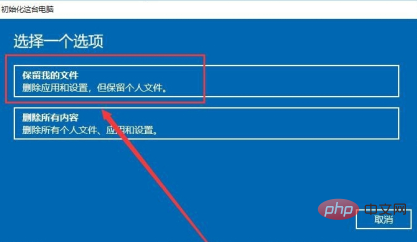
How to restore win8 to factory settings: 1. Click the windows icon to open settings; 2. Enter the update and security options and switch to the recovery column; 3. Find Reset this PC, click Start, and select [Keep Me file].

#The operating environment of this article: windows8 system, thinkpad t480 computer.
(Learning video sharing:Programming video)
Specific method:
1. First, know the Windows icon on your computer.
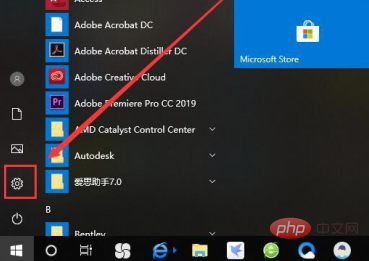
#2. Click the Windows icon, select Settings and open it.
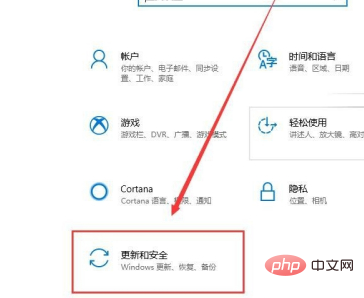
#3. After opening settings, select Update & Security.
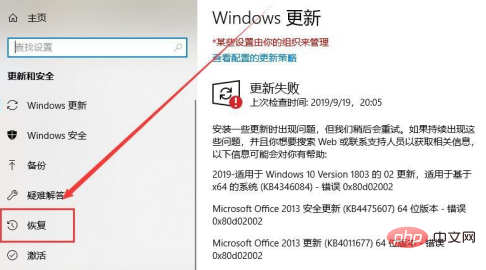
4. Click Restore.
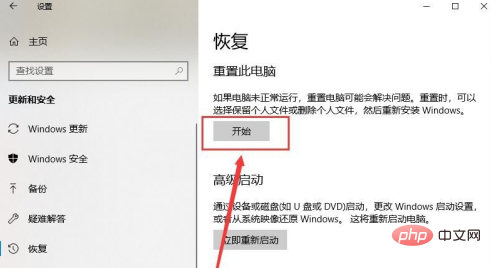
5. Then select Start.
Related recommendations:windows system
The above is the detailed content of How to restore factory settings in win8. For more information, please follow other related articles on the PHP Chinese website!
 How to solve the problem of forgetting the power-on password of Windows 8 computer
 Introduction to screenshot shortcut keys in win8
 Introduction to the opening location of win8 running
 What to do if win8wifi connection is not available
 lightbox.js
 What does independent direct connection mean?
 What are digital currency exchanges?
 How to turn off automatic updates in win10





















![[Web front-end] Node.js quick start](https://img.php.cn/upload/course/000/000/067/662b5d34ba7c0227.png)



