


The method for layui to get the select value: first open the corresponding template code file; then reference the layui plug-in; finally obtain the value of the drop-down box through the "var batch=$("#batch").val();" method Just value.

The operating environment of this tutorial: Windows 7 system, layui version 2.4, Dell G3 computer. This method is suitable for all brands of computers.
Recommended: "javascript basic tutorial""layUI tutorial"
layui gets the value selected in the select drop-down box:
Quote the layui plug-in to get the value of the drop-down box
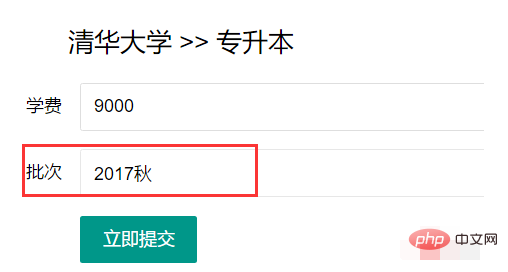
Template:
<!DOCTYPE html>
<html>
<head>
<meta charset="utf-8">
<meta name="viewport" content="width=device-width, initial-scale=1, maximum-scale=1">
<title>增加、修改学校/层次/专业</title>
<link rel="stylesheet" href="__ADMIN__/common/frame/layui/css/layui.css">
</head>
<body>
<div class="layui-fluid layui-form">
<form class="layui-form" action="" method="post">
<br>
<div style="padding-left: 100px; padding-bottom: 20px;"><h2>{$rs1.title} >> {$rs.title}</h2></div>
<div class="layui-form-item">
<label class="layui-form-label">学费</label>
<div class="layui-input-block">
<input type="text" name="price" required lay-verify="required" class="layui-input" value="{$rs.price}" readonly>
</div>
</div>
<div class="layui-form-item">
<label class="layui-form-label">批次</label>
<div class="layui-input-block">
<select name="batch" id="batch" lay-filter="batch" lay-verify="required" lay-search="required">
<option value="">请选择批次</option>
{volist name="batch_rs" id="batch"}
<option value="{$batch.id}" {if condition="$rsEdit.batch eq $batch.id"}selected{/if}>{$batch.title}</option>
{/volist}
</select>
</div>
</div>
<div class="layui-form-item">
<div class="layui-input-block">
<button type="button" id="editbatchschooltuition" class="layui-btn" lay-submit lay-filter="formDemo">立即提交</button>
</div>
</div>
</form>
</div>
<script src="__ADMIN__/common/frame/layui/layui.js"></script>
<script>
layui.use(['form', 'jquery'], function(){
var form = layui.form
,$= layui.$;
// var batch=$("#batch").val();
form.on('select', function(data){
console.log(data.elem); //得到select原始DOM对象
console.log(data.value); //得到被选中的值]
$("#batch").val(data.value)
console.log(data.othis); //得到美化后的DOM对象
});
$('#editbatchschooltuition').on('click', function(){
var batch=$("#batch").val();
alert(batch);
layer.ready(function(){
layer.open({
type: 2,
title: '增加',
maxmin: true,
area: ['750px', '400px'],
content: '{:url('main/addschool')}?id={$id}&price={$rs.price}&batch='+batch,
//content: '{:url('main/addschool')}',
cancel: function(){ //刷新网页
}
});
});
});
});
</script>
</body>
</html>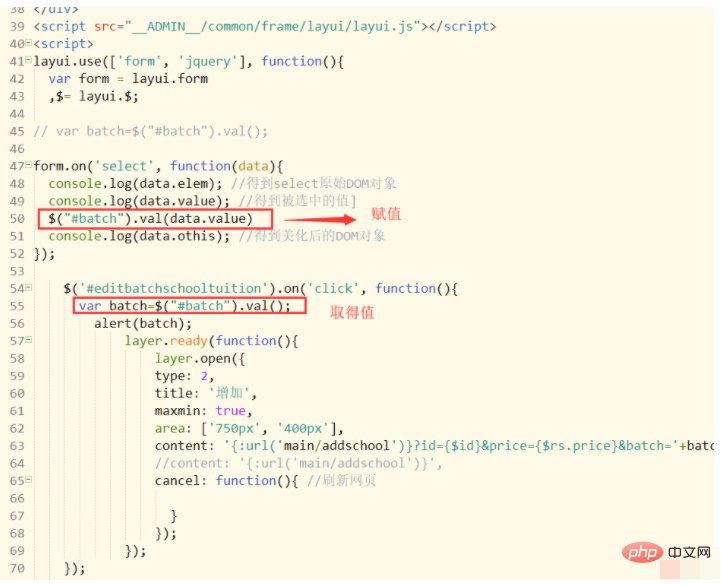
The above is the detailed content of How to get the select value in layui. For more information, please follow other related articles on the PHP Chinese website!
























![[Web front-end] Node.js quick start](https://img.php.cn/upload/course/000/000/067/662b5d34ba7c0227.png)



