


 Operation and Maintenance
Docker
What is the difference between containers and images in docker?
Operation and Maintenance
Docker
What is the difference between containers and images in docker?
What is the difference between containers and images in docker?

This article introduces the difference between containers and images in docker. I hope it can help you.
(Recommended tutorial: docker tutorial)
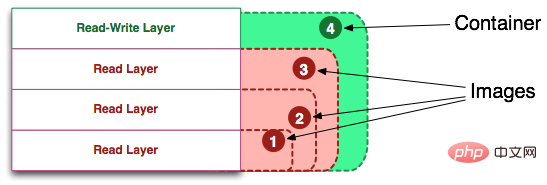
When I still had a little understanding of Docker technology, I found that I understood Docker's commands are very difficult. So, I spent a few weeks learning how Docker works, or more specifically, the union file system, and then looking back at the Docker commands, everything fell into place. , extremely simple.
Digression: Personally, the best way to master a technology and use it rationally is to have a deep understanding of the working principles behind the technology. Usually, the birth of a new technology is often accompanied by media hype and hype, which makes it difficult for users to see the true nature of the technology. Rather, new technologies always invent new terms or metaphors to help inform the
This is very helpful in the early stage, but it puts a layer of sandpaper on the principle of technology, which is not conducive to users mastering the true meaning of technology in the later stage.
Git is a good example. I couldn't use Git well before, so I spent some time learning the principles of Git. It was only then that I really understood the usage of Git. I firmly believe that only those who truly understand the internals of Git can master this tool.
Image Definition
Image is the unified perspective of a bunch of read-only layers. Maybe this definition is a bit difficult to understand. The following picture can help readers understand. Definition of mirror.
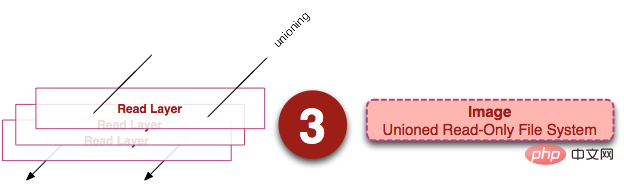
From the left we see multiple read-only layers, which overlap. Except for the bottom layer, all other layers will have a pointer pointing to the next layer. These layers are implementation details inside Docker and can be accessed on the file system of the host (Translator's Note: the machine running Docker). Union file system technology can integrate different layers into one file system, providing a unified perspective for these layers, thus hiding the existence of multiple layers. From the user's perspective, only one file exists system. We can see what this perspective looks like on the right side of the image.
You can find files about these layers on your host file system. Note that these layers are not visible inside a running container. On my host, I found that they exist in the /var/lib/docker/aufs directory.
sudo tree -L 1 /var/lib/docker/
/var/lib/docker/
├── aufs
├── containers
├── graph
├── init
├── linkgraph.db
├── repositories-aufs
├── tmp
├── trust
└── volumes
7 directories, 2 files
Container Definition
The definition of container (container) is almost exactly the same as that of image (image). It is also a unified perspective of a bunch of layers. The only difference is that the top layer of the container is readable and writable.
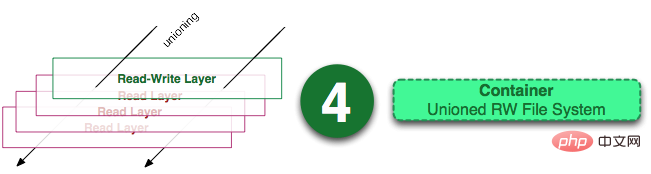
Careful readers may find that the definition of a container does not mention whether the container is running. Yes, this is intentional. It was this discovery that helped me understand a lot of my confusion.
Key points: container = image readable layer. And the definition of a container does not mention whether to run the container.
Next, we will discuss running containers.
Running Container Definition
A running container (running container) is defined as a readable and writable unified file system plus an isolated process space and the processes contained in it. The image below shows a running container.
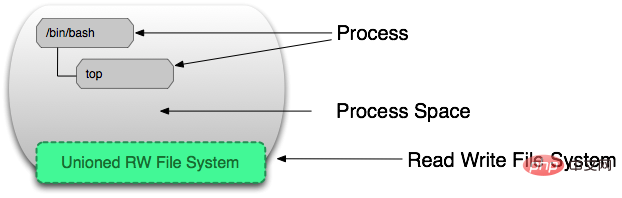
It is the file system isolation technology that makes Docker a promising technology. A process in a container may modify, delete, or create files, and these changes will affect the read-write layer. The picture below demonstrates this behavior.
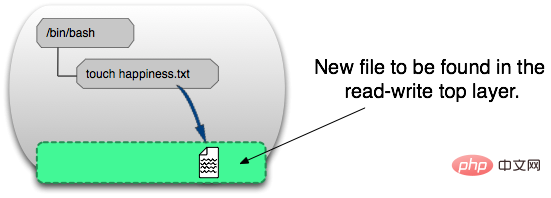
我们可以通过运行以下命令来验证我们上面所说的:
docker run ubuntu touch happiness.txt
即便是这个ubuntu容器不再运行,我们依旧能够在主机的文件系统上找到这个新文件。
find / -name happiness.txt
/var/lib/docker/aufs/diff/860a7b...889/happiness.txt
Image Layer Definition
为了将零星的数据整合起来,我们提出了镜像层(image layer)这个概念。下面的这张图描述了一个镜像层,通过图片我们能够发现一个层并不仅仅包含文件系统的改变,它还能包含了其他重要信息。

元数据(metadata)就是关于这个层的额外信息,它不仅能够让Docker获取运行和构建时的信息,还包括父层的层次信息。需要注意,只读层和读写层都包含元数据。
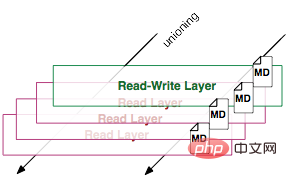
除此之外,每一层都包括了一个指向父层的指针。如果一个层没有这个指针,说明它处于最底层。

Metadata Location:
我发现在我自己的主机上,镜像层(image layer)的元数据被保存在名为”json”的文件中,比如说:
/var/lib/docker/graph/e809f156dc985.../json
e809f156dc985...就是这层的id
一个容器的元数据好像是被分成了很多文件,但或多或少能够在/var/lib/docker/containers/
全局理解(Tying It All Together)
现在,让我们结合上面提到的实现细节来理解Docker的命令。
docker create
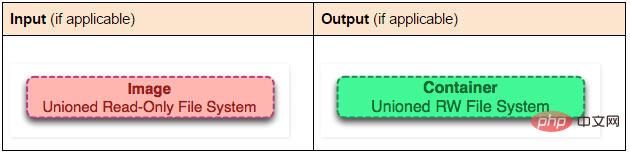
docker create 命令为指定的镜像(image)添加了一个可读写层,构成了一个新的容器。注意,这个容器并没有运行。

docker start
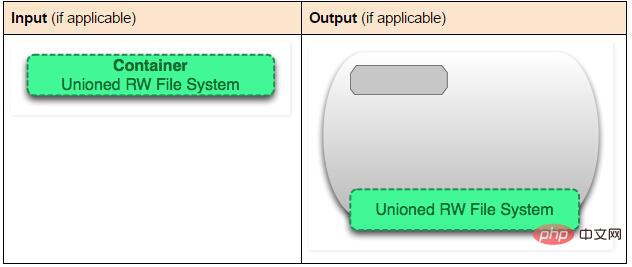
Docker start命令为容器文件系统创建了一个进程隔离空间。注意,每一个容器只能够有一个进程隔离空间。
docker run
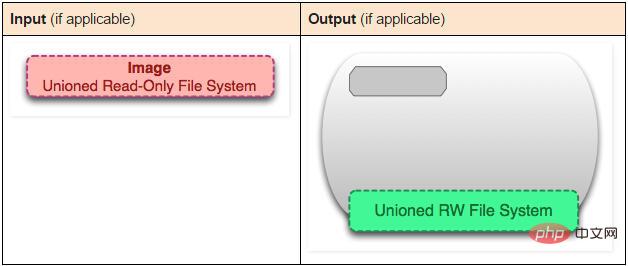
看到这个命令,读者通常会有一个疑问:docker start 和 docker run命令有什么区别。
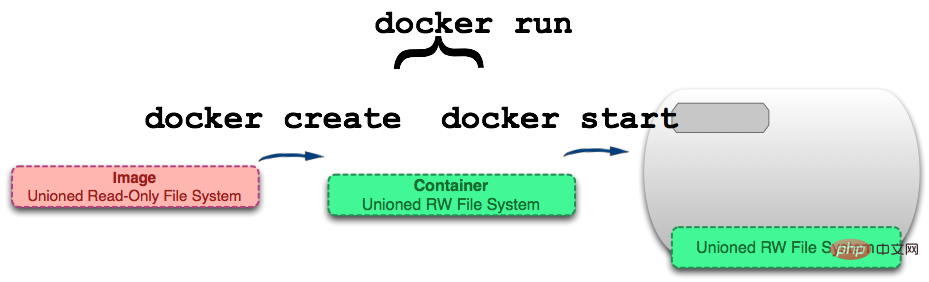
As you can see from the picture, the docker run command first creates a container using the image, and then runs the container. This command is very convenient and hides the details of the two commands, but on the other hand, it is easy for users to misunderstand.
Digression: Continuing our previous topic about Git, I think the docker run command is similar to the git pull command. The git pull command is a combination of git fetch and git merge. Similarly, docker run is a combination of docker create and docker start.
docker ps
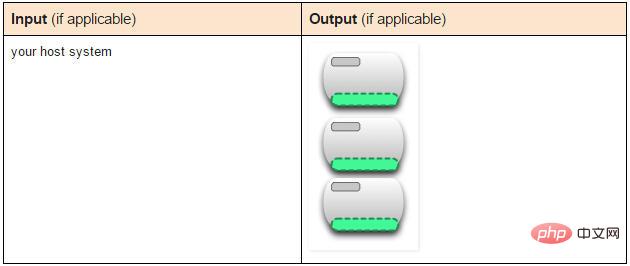
docker ps command will list all running containers. This hides the existence of non-running containers. If we want to find these containers, we need to use the following command.
docker ps –a
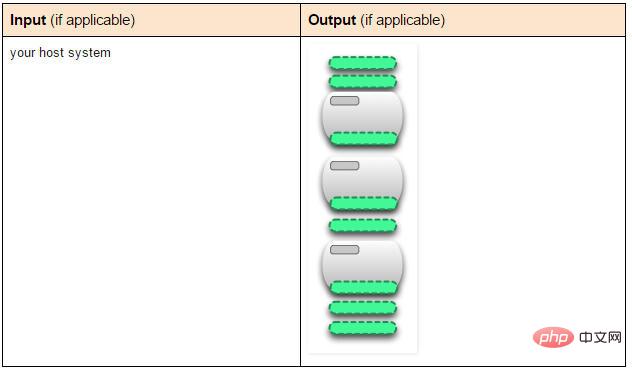
docker ps –a command will list all containers, whether they are running or stopped.
docker images
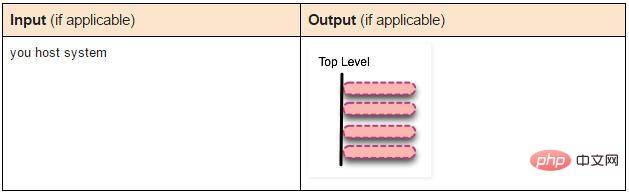
The docker images command will list all top-level images. In fact, here we have no way to distinguish between a mirror and a read-only layer, so we propose top-level mirroring. Only the image used when creating the container or the image directly pulled down can be called a top-level image, and there are multiple image layers hidden under each top-level image.
docker images –a
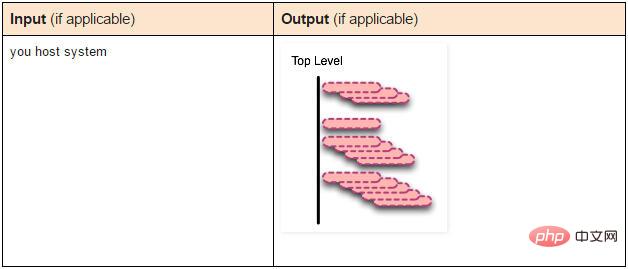
docker images –a command lists all images, which can also be said to list all readable images. layer. If you want to view all layers under a certain image-id, you can use docker history to view it.
docker stop
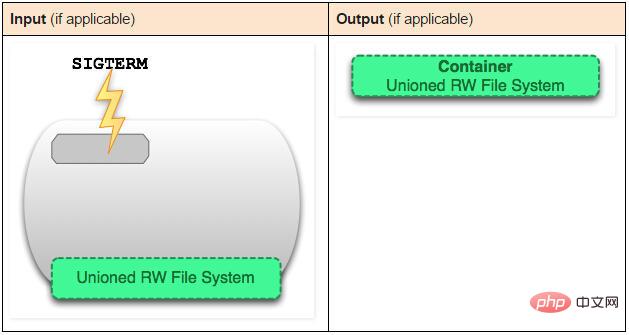
The docker stop command will send a SIGTERM signal to the running container and then stop all process.
docker kill
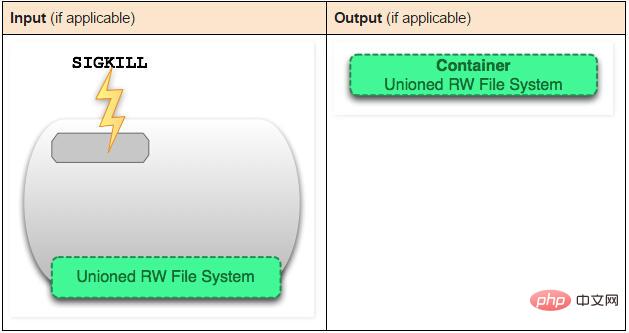
The docker kill command sends an unfriendly SIGKILL to all processes running in the container Signal.
docker pause
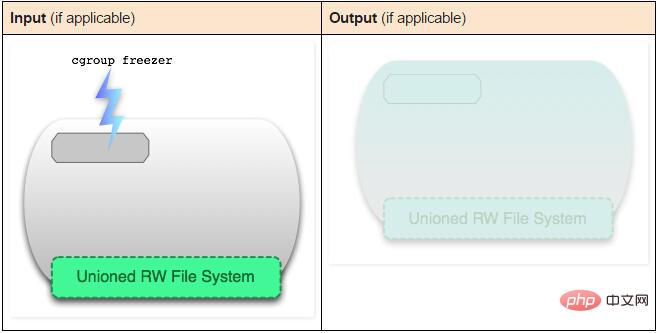
The docker stop and docker kill commands will send UNIX signals to the running process, docker The pause command is different. It uses the characteristics of cgroups to pause the running process space. You can find the specific internal principles here: www.kernel.org/doc/Doc..., but the disadvantage of this method is that sending a SIGTSTP signal is not simple enough for the process to understand, so that it cannot Halt all processes.
docker rm
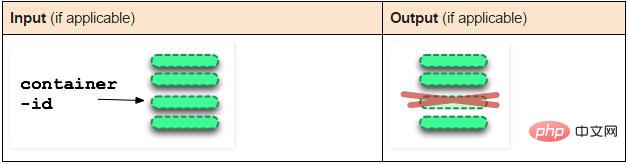
The docker rm command will remove the read-write layer that makes up the container. Note that this command can only be executed on non-running containers.
docker rmi
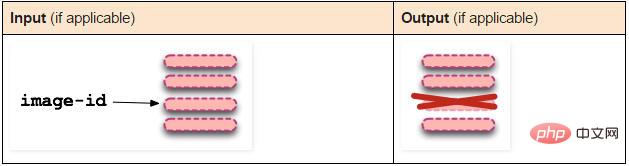
The docker rmi command removes a read-only layer that makes up the image. You can only use docker rmi to remove the top level layer (which can also be said to be a mirror). You can also use the -f parameter to force the removal of the middle read-only layer.
docker commit
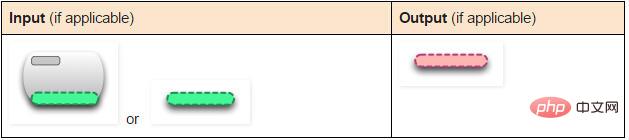
The docker commit command converts the read-write layer of the container into a read-only layer, so Convert a container into an immutable image. 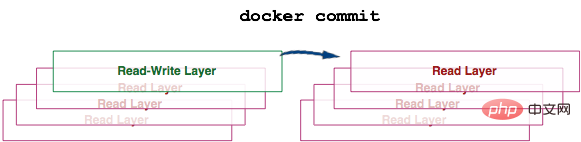
docker build
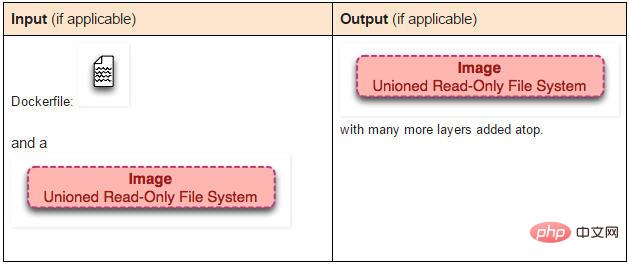
The docker build command is very interesting, it will execute multiple commands repeatedly.
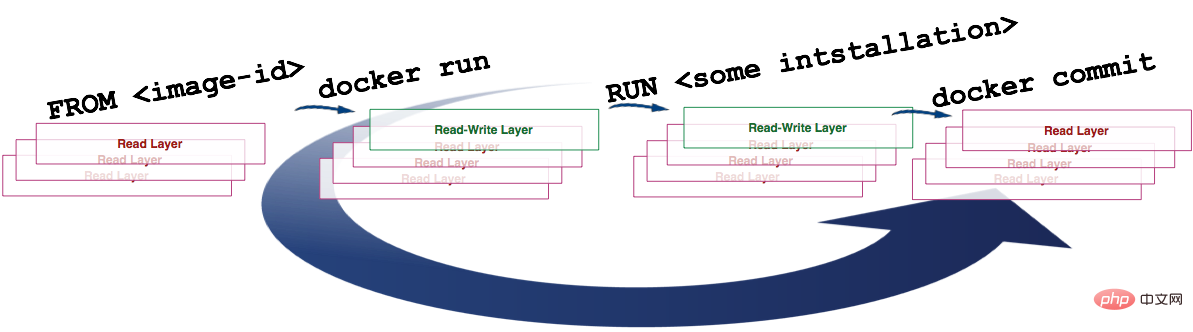
We can see from the picture above that the build command obtains the image according to the FROM instruction in the Dockerfile file, and then repeatedly 1) run (create and start) , 2) Modify, 3) Commit. Each step in the loop generates a new layer, so many new layers are created.
docker exec
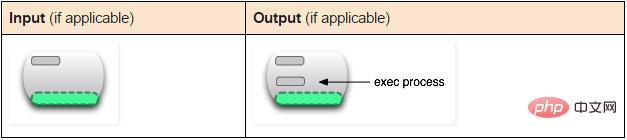
The docker exec command will execute a new process in the running container.
docker inspect or
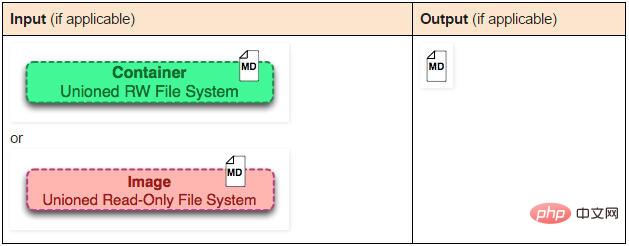
The docker inspect command will extract the top level of the container or image metadata.
docker save
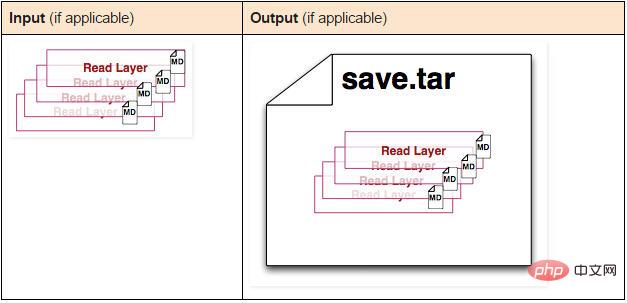
The docker save command will create a compressed image file, which can be stored on another host Used on Docker. Unlike the export command, this command saves metadata for each layer. This command only takes effect on images.
docker export
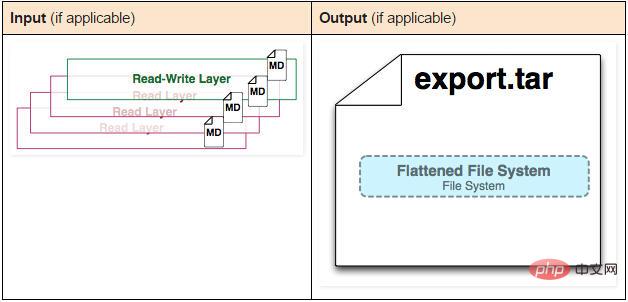
The docker export command creates a tar file and removes metadata and unnecessary Layer, integrates multiple layers into one layer, and only saves the content seen from the current unified perspective (Translator's Note: The container after expoxt is then imported into Docker, and only one image can be seen through the docker images –tree command; The image after saving is different, it can see the historical image of this image).
docker history
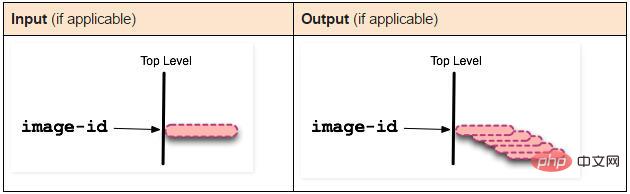
The docker history command recursively outputs the historical image of the specified image.
The above is the detailed content of What is the difference between containers and images in docker?. For more information, please follow other related articles on the PHP Chinese website!

Hot AI Tools

Undress AI Tool
Undress images for free

Undresser.AI Undress
AI-powered app for creating realistic nude photos

AI Clothes Remover
Online AI tool for removing clothes from photos.

Clothoff.io
AI clothes remover

Video Face Swap
Swap faces in any video effortlessly with our completely free AI face swap tool!

Hot Article
Hot Tools

Notepad++7.3.1
Easy-to-use and free code editor

SublimeText3 Chinese version
Chinese version, very easy to use

Zend Studio 13.0.1
Powerful PHP integrated development environment

Dreamweaver CS6
Visual web development tools

SublimeText3 Mac version
God-level code editing software (SublimeText3)


 How to deploy a PyTorch app on Ubuntu
May 29, 2025 pm 11:18 PM
How to deploy a PyTorch app on Ubuntu
May 29, 2025 pm 11:18 PM
Deploying a PyTorch application on Ubuntu can be done by following the steps: 1. Install Python and pip First, make sure that Python and pip are already installed on your system. You can install them using the following command: sudoaptupdatesudoaptinstallpython3python3-pip2. Create a virtual environment (optional) To isolate your project environment, it is recommended to create a virtual environment: python3-mvenvmyenvsourcemyenv/bin/activatet
 What is Docker BuildKit, and how does it improve build performance?
Jun 19, 2025 am 12:20 AM
What is Docker BuildKit, and how does it improve build performance?
Jun 19, 2025 am 12:20 AM
DockerBuildKit is a modern image building backend. It can improve construction efficiency and maintainability by 1) parallel processing of independent construction steps, 2) more advanced caching mechanisms (such as remote cache reuse), and 3) structured output improves construction efficiency and maintainability, significantly optimizing the speed and flexibility of Docker image building. Users only need to enable the DOCKER_BUILDKIT environment variable or use the buildx command to activate this function.
 How does Docker work with Docker Desktop?
Jun 15, 2025 pm 12:54 PM
How does Docker work with Docker Desktop?
Jun 15, 2025 pm 12:54 PM
DockerworkswithDockerDesktopbyprovidingauser-friendlyinterfaceandenvironmenttomanagecontainers,images,andresourcesonlocalmachines.1.DockerDesktopbundlesDockerEngine,CLI,Compose,andothertoolsintoonepackage.2.Itusesvirtualization(likeWSL2onWindowsorHyp
 How can you monitor the resource usage of a Docker container?
Jun 13, 2025 am 12:10 AM
How can you monitor the resource usage of a Docker container?
Jun 13, 2025 am 12:10 AM
To monitor Docker container resource usage, built-in commands, third-party tools, or system-level tools can be used. 1. Use dockerstats to monitor real-time: Run dockerstats to view CPU, memory, network and disk IO indicators, support filtering specific containers and recording regularly with watch commands. 2. Get container insights through cAdvisor: Deploy cAdvisor containers to obtain detailed performance data and view historical trends and visual information through WebUI. 3. In-depth analysis with system-level tools: use top/htop, iostat, iftop and other Linux tools to monitor resource consumption at the system level, and integrate Prometheu
 What is Kubernetes, and how does it relate to Docker?
Jun 21, 2025 am 12:01 AM
What is Kubernetes, and how does it relate to Docker?
Jun 21, 2025 am 12:01 AM
Kubernetes is not a replacement for Docker, but the next step in managing large-scale containers. Docker is used to build and run containers, while Kubernetes is used to orchestrate these containers across multiple machines. Specifically: 1. Docker packages applications and Kubernetes manages its operations; 2. Kubernetes automatically deploys, expands and manages containerized applications; 3. It realizes container orchestration through components such as nodes, pods and control planes; 4. Kubernetes works in collaboration with Docker to automatically restart failed containers, expand on demand, load balancing and no downtime updates; 5. Applicable to application scenarios that require rapid expansion, running microservices, high availability and multi-environment deployment.
 How does Docker differ from traditional virtualization?
Jul 08, 2025 am 12:03 AM
How does Docker differ from traditional virtualization?
Jul 08, 2025 am 12:03 AM
The main difference between Docker and traditional virtualization lies in the processing and resource usage of the operating system layer. 1. Docker containers share the host OS kernel, which is lighter, faster startup, and more resource efficiency; 2. Each instance of a traditional VM runs a full OS, occupying more space and resources; 3. The container usually starts in a few seconds, and the VM may take several minutes; 4. The container depends on namespace and cgroups to achieve isolation, while the VM obtains stronger isolation through hypervisor simulation hardware; 5. Docker has better portability, ensuring that applications run consistently in different environments, suitable for microservices and cloud environment deployment.
 How to troubleshoot Docker issues
Jul 07, 2025 am 12:29 AM
How to troubleshoot Docker issues
Jul 07, 2025 am 12:29 AM
When encountering Docker problems, you should first locate the problem, which is problems such as image construction, container operation or network configuration, and then follow the steps to check. 1. Check the container log (dockerlogs or docker-composelogs) to obtain error information; 2. Check the container status (dockerps) and resource usage (dockerstats) to determine whether there is an exception due to insufficient memory or port problems; 3. Enter the inside of the container (dockerexec) to verify the path, permissions and dependencies; 4. Review whether there are configuration errors in the Dockerfile and compose files, such as environment variable spelling or volume mount path problems, and recommend that cleanbuild avoid cache dryness
 How do you specify environment variables in a Docker container?
Jun 28, 2025 am 12:22 AM
How do you specify environment variables in a Docker container?
Jun 28, 2025 am 12:22 AM
There are three common ways to set environment variables in a Docker container: use the -e flag, define ENV instructions in a Dockerfile, or manage them through DockerCompose. 1. Adding the -e flag when using dockerrun can directly pass variables, which is suitable for temporary testing or CI/CD integration; 2. Using ENV in Dockerfile to set default values, which is suitable for fixed variables that are not often changed, but is not suitable for distinguishing different environment configurations; 3. DockerCompose can define variables through environment blocks or .env files, which is more conducive to development collaboration and configuration separation, and supports variable replacement. Choose the right method according to project needs or use multiple methods in combination
