


How to correctly deploy web projects with docker

The specific steps are as follows:
(Recommended tutorial: docker tutorial)
1: Create a directory dock at will and be ready The following files:
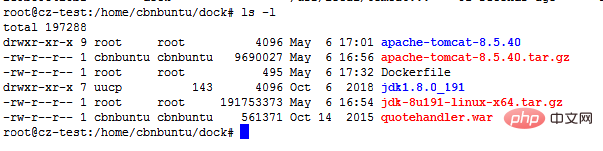
2. Write Dockerfile, through which you can quickly build a docker image
vi Dockerfile
Add the following configuration
FROM centos
MAINTAINER this is dock image <jsh>
ADD jdk1.8.0_191 /usr/local/java
ENV JAVA_HOME /usr/local/java
ENV JAVA_BIN /usr/local/java/bin
ENV JRE_HOME /usr/local/java/jre
ENV PATH $PATH:/usr/local/java/bin:/usr/local/java/jre/bin
ENV CLASSPATH /usr/local/java/jre/bin:/usr/local/java/lib:/usr/local/java/jre/lib/charsets.jar
ADD apache-tomcat-8.5.40 /usr/local/tomcat8
ENTRYPOINT ["/usr/local/tomcat8/bin/catalina.sh","run"]
ADD ./manager.war /usr/local/tomcat8/webapps
EXPOSE 8080
Explanation:
(1) FROM centos means to obtain the centos basic image from the docker official warehouse
(2) ADD jdk1.8.0_191 /usr/local/ will be in the current directory (same level as Dockerfile directory) to the /usr/local/ of the image
(3) ENV JAVA_HOME /usr/local/jdk1.8.0_191 Set Java environment variables
(4) EXPOSE 8080 The port exposed to the outside world for convenience External access
(5) CMD /usr/local/tomcat8/bin/catalina.sh run command is executed after the container is running. If there are multiple CMDs, only the last one is valid.
3. Build the image
Command:
docker build -t dock .
(space after dock.) Complete the automatic build
4. Run the container
Command:
docker run -d -p 8060:8080 dock
-d means running the container in the background and returns the container ID
-p Using port mapping, 8060:8080 means mapping the container's 8080 port to the host's 8060 port.
View all running containers
Command:
docker ps -all
5. Test deployment results IP:8060 If the tomcat page appears, it means the container was started successfully.
The above is the detailed content of How to correctly deploy web projects with docker. For more information, please follow other related articles on the PHP Chinese website!

Hot AI Tools

Undress AI Tool
Undress images for free

Undresser.AI Undress
AI-powered app for creating realistic nude photos

AI Clothes Remover
Online AI tool for removing clothes from photos.

Clothoff.io
AI clothes remover

Video Face Swap
Swap faces in any video effortlessly with our completely free AI face swap tool!

Hot Article
Hot Tools

Notepad++7.3.1
Easy-to-use and free code editor

SublimeText3 Chinese version
Chinese version, very easy to use

Zend Studio 13.0.1
Powerful PHP integrated development environment

Dreamweaver CS6
Visual web development tools

SublimeText3 Mac version
God-level code editing software (SublimeText3)


 How to develop a complete Python Web application?
May 23, 2025 pm 10:39 PM
How to develop a complete Python Web application?
May 23, 2025 pm 10:39 PM
To develop a complete Python Web application, follow these steps: 1. Choose the appropriate framework, such as Django or Flask. 2. Integrate databases and use ORMs such as SQLAlchemy. 3. Design the front-end and use Vue or React. 4. Perform the test, use pytest or unittest. 5. Deploy applications, use Docker and platforms such as Heroku or AWS. Through these steps, powerful and efficient web applications can be built.
 How to deploy a PyTorch app on Ubuntu
May 29, 2025 pm 11:18 PM
How to deploy a PyTorch app on Ubuntu
May 29, 2025 pm 11:18 PM
Deploying a PyTorch application on Ubuntu can be done by following the steps: 1. Install Python and pip First, make sure that Python and pip are already installed on your system. You can install them using the following command: sudoaptupdatesudoaptinstallpython3python3-pip2. Create a virtual environment (optional) To isolate your project environment, it is recommended to create a virtual environment: python3-mvenvmyenvsourcemyenv/bin/activatet
 Performance Tuning of Jenkins Deployment on Debian
May 28, 2025 pm 04:51 PM
Performance Tuning of Jenkins Deployment on Debian
May 28, 2025 pm 04:51 PM
Deploying and tuning Jenkins on Debian is a process involving multiple steps, including installation, configuration, plug-in management, and performance optimization. Here is a detailed guide to help you achieve efficient Jenkins deployment. Installing Jenkins First, make sure your system has a Java environment installed. Jenkins requires a Java runtime environment (JRE) to run properly. sudoaptupdatesudoaptininstallopenjdk-11-jdk Verify that Java installation is successful: java-version Next, add J
 How to implement automated deployment of Docker on Debian
May 28, 2025 pm 04:33 PM
How to implement automated deployment of Docker on Debian
May 28, 2025 pm 04:33 PM
Implementing Docker's automated deployment on Debian system can be done in a variety of ways. Here are the detailed steps guide: 1. Install Docker First, make sure your Debian system remains up to date: sudoaptupdatesudoaptupgrade-y Next, install the necessary software packages to support APT access to the repository via HTTPS: sudoaptinstallapt-transport-httpsca-certificatecurlsoftware-properties-common-y Import the official GPG key of Docker: curl-
 What is Docker BuildKit, and how does it improve build performance?
Jun 19, 2025 am 12:20 AM
What is Docker BuildKit, and how does it improve build performance?
Jun 19, 2025 am 12:20 AM
DockerBuildKit is a modern image building backend. It can improve construction efficiency and maintainability by 1) parallel processing of independent construction steps, 2) more advanced caching mechanisms (such as remote cache reuse), and 3) structured output improves construction efficiency and maintainability, significantly optimizing the speed and flexibility of Docker image building. Users only need to enable the DOCKER_BUILDKIT environment variable or use the buildx command to activate this function.
 How does Docker work with Docker Desktop?
Jun 15, 2025 pm 12:54 PM
How does Docker work with Docker Desktop?
Jun 15, 2025 pm 12:54 PM
DockerworkswithDockerDesktopbyprovidingauser-friendlyinterfaceandenvironmenttomanagecontainers,images,andresourcesonlocalmachines.1.DockerDesktopbundlesDockerEngine,CLI,Compose,andothertoolsintoonepackage.2.Itusesvirtualization(likeWSL2onWindowsorHyp
 How can you monitor the resource usage of a Docker container?
Jun 13, 2025 am 12:10 AM
How can you monitor the resource usage of a Docker container?
Jun 13, 2025 am 12:10 AM
To monitor Docker container resource usage, built-in commands, third-party tools, or system-level tools can be used. 1. Use dockerstats to monitor real-time: Run dockerstats to view CPU, memory, network and disk IO indicators, support filtering specific containers and recording regularly with watch commands. 2. Get container insights through cAdvisor: Deploy cAdvisor containers to obtain detailed performance data and view historical trends and visual information through WebUI. 3. In-depth analysis with system-level tools: use top/htop, iostat, iftop and other Linux tools to monitor resource consumption at the system level, and integrate Prometheu
 What is Kubernetes, and how does it relate to Docker?
Jun 21, 2025 am 12:01 AM
What is Kubernetes, and how does it relate to Docker?
Jun 21, 2025 am 12:01 AM
Kubernetes is not a replacement for Docker, but the next step in managing large-scale containers. Docker is used to build and run containers, while Kubernetes is used to orchestrate these containers across multiple machines. Specifically: 1. Docker packages applications and Kubernetes manages its operations; 2. Kubernetes automatically deploys, expands and manages containerized applications; 3. It realizes container orchestration through components such as nodes, pods and control planes; 4. Kubernetes works in collaboration with Docker to automatically restart failed containers, expand on demand, load balancing and no downtime updates; 5. Applicable to application scenarios that require rapid expansion, running microservices, high availability and multi-environment deployment.
