


How to create picture-in-picture effect in PR?

Steps: 1. Import the material in PR and drag the video to the timeline; 2. Use the "Razor Tool" to crop the video and drag a video to "Video Track 2"; 3. Right-click, click "Unlink", delete the sound and adjust the size; 4. Place it in a good position and modify it through the "Special Effects" function in "Effect Controls".

Steps:
Open the tool and select the video material to import
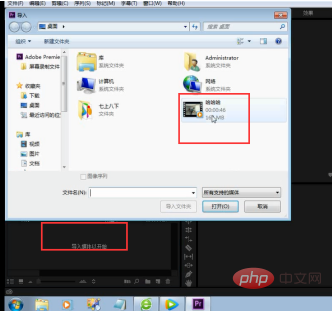
Use dragging method to drag the video into our timeline
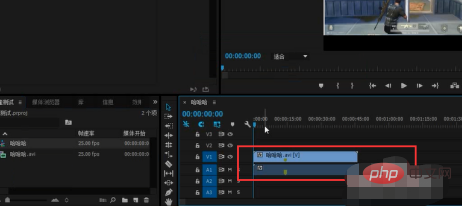
After that we can use the razor tool to crop the video and drag a part of the video screen Go to video track 2
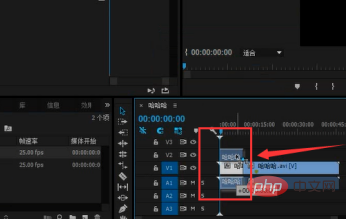
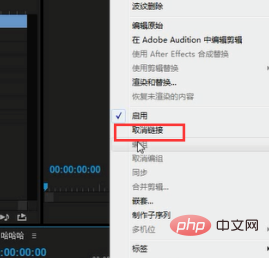
Right-click the mouse and select Unlink Delete Sound
Double-click the video to adjust the size
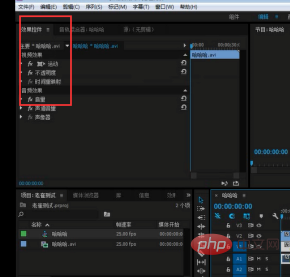
Then we will place the position according to our good looks
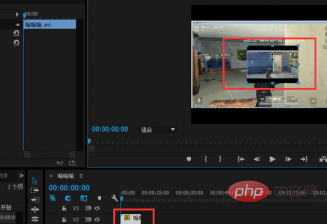
After the placement is completed, we can use the effect control Use the special effects function to perform good modifications
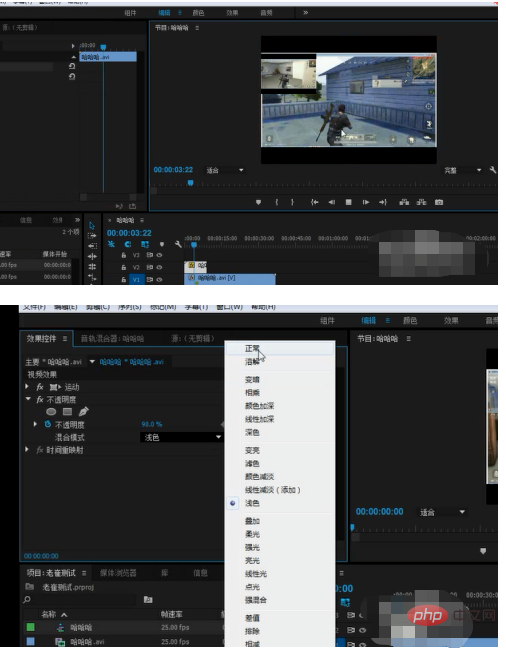
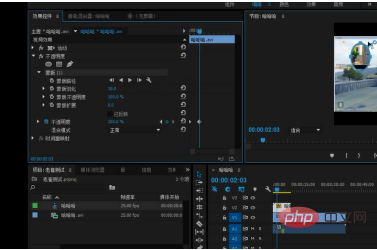
After modification, select save and export
Recommended tutorial: "prtutorial》
The above is the detailed content of How to create picture-in-picture effect in PR?. For more information, please follow other related articles on the PHP Chinese website!

Hot AI Tools

Undress AI Tool
Undress images for free

Undresser.AI Undress
AI-powered app for creating realistic nude photos

AI Clothes Remover
Online AI tool for removing clothes from photos.

Clothoff.io
AI clothes remover

Video Face Swap
Swap faces in any video effortlessly with our completely free AI face swap tool!

Hot Article
Hot Tools

Notepad++7.3.1
Easy-to-use and free code editor

SublimeText3 Chinese version
Chinese version, very easy to use

Zend Studio 13.0.1
Powerful PHP integrated development environment

Dreamweaver CS6
Visual web development tools

SublimeText3 Mac version
God-level code editing software (SublimeText3)


 How to solve the problem when pr has audio track but no sound
Jun 26, 2023 am 11:07 AM
How to solve the problem when pr has audio track but no sound
Jun 26, 2023 am 11:07 AM
PR has an audio track but no sound. Solution: 1. In the PR application, drag the material into the timeline; 2. In the edit menu, open the preferences; 3. In the preferences window, open the audio hardware item bar and find Default output option box; 4. In the option box, find the speaker option and click the OK button; 5. Return to the PR application, play it in the video preview window, and the sound will be broadcast.
 What is the full name of PR?
Aug 22, 2022 pm 03:53 PM
What is the full name of PR?
Aug 22, 2022 pm 03:53 PM
The full name of PR is "Adobe Premiere Pro"; PR is a video editing software developed by Adobe. It has good compatibility and can cooperate with other software launched by Adobe. It is widely used in advertising production and TV programs. making.
 What should I do if the compression type of the pr file is not supported?
Mar 23, 2023 pm 03:12 PM
What should I do if the compression type of the pr file is not supported?
Mar 23, 2023 pm 03:12 PM
Reasons and solutions for the unsupported compression type of PR files: 1. The streamlined version of PR has streamlined many video encoders. Reinstall and use the full version of Premiere; 2. Caused by irregular video encoding, you can use the format factory to Convert the video to WMV format.
 Where is the picture-in-picture in the computer version of the clipping - How to find the position of the picture-in-picture in the computer version of the clipping
Mar 04, 2024 pm 12:19 PM
Where is the picture-in-picture in the computer version of the clipping - How to find the position of the picture-in-picture in the computer version of the clipping
Mar 04, 2024 pm 12:19 PM
The article brought to you in this chapter is about the computer version of the computer version software. Do you know where the picture-in-picture is in the computer version of the computer version? Next, the editor will help you find the picture-in-picture position in the computer version of the computer version. Method, interested users can take a look below. First open the computer version of the clip. Click the Start Creating button. Click on the video material you want to import and add the video file you want to edit. Then drag the file to the editing area. The professional version of Cutting Computer does not have the picture-in-picture function, but we can achieve the picture-in-picture function by adding materials again. Also drag the newly added video file to the video editing track. In this way, select the material file and adjust the video size to realize the picture-in-picture function of the mobile phone.
 How to do a picture-in-picture Zoom meeting on iPhone
Apr 15, 2023 pm 11:43 PM
How to do a picture-in-picture Zoom meeting on iPhone
Apr 15, 2023 pm 11:43 PM
How to Set Zoom to Picture-in-Picture Mode on iPhone Make sure your iPhone is using the latest version of iOS and that the Zoom app is updated to the latest version available. The rest is simple: join the Zoom meeting as usual with the video as the home screen on your iPhone (i.e.; no chat, no participant list, etc.) Swipe up from the bottom of your iPhone as usual to return to the home screen The Zoom Meeting video window should automatically Minimize to Picture-in-Picture Video Just like any other Picture-in-Picture window, you can move it around the screen, increase and decrease the thumbnail size, and use other applications as the ZoomMeetingPiP window
 How do PR subtitles appear word for word?
Aug 11, 2023 am 10:04 AM
How do PR subtitles appear word for word?
Aug 11, 2023 am 10:04 AM
Methods for pr subtitles to appear verbatim: 1. Create a subtitle track; 2. Add subtitle text; 3. Adjust the duration; 4. Appear verbatim effect; 5. Adjust animation effects; 6. Adjust the position and transparency of subtitles; 7. Preview and export videos.
 What to do if there is an error when compiling a video in PR
Mar 22, 2023 pm 01:59 PM
What to do if there is an error when compiling a video in PR
Mar 22, 2023 pm 01:59 PM
Solution to the error when compiling a video in PR: 1. Open the Premiere post-editing software on your computer, and then select "General" in the right menu bar of the project settings; 2. Enter the general settings window of Premiere and select "Mercury only" Playback Engine Software"; 3. Click "Confirm" to solve the error when compiling the video in PR.
 What is the PR external sliding tool for?
Jun 30, 2023 am 11:47 AM
What is the PR external sliding tool for?
Jun 30, 2023 am 11:47 AM
The PR external sliding tool is used to help public relations practitioners perform PR work better. Its specific functions are: 1. Help public relations practitioners conduct media monitoring and analysis; 2. Help public relations practitioners conduct public opinion monitoring and analysis; 3. Help public relations practitioners Practitioners conduct media relationship management; 4. Help public relations practitioners write and publish press releases; 5. Help public relations practitioners perform data analysis and report generation.
