



What should I do if mysql cannot be started on Linux?
In the one-click lnmp environment installed by the company, when I started mysql, I found that mysql.sock did not exist.
Then I searched and finally found it in /usr/local/mysql/bin /mysql_safe Restart
Then start service mysql start

View service mysql status

There are various opinions on the Internet. In fact, it is better to find it in your own installation directory, and then slowly solve it
At this time, I entered mysql and found that the password was wrong. Then I tried the initial password. Root found a new problem

This directly enters /etc/my.cnf for editing
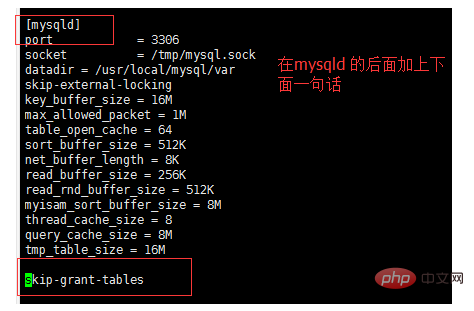
Restart mysql again

Then you can enter this time Enter mysql

update user set password=password("") where user="root";
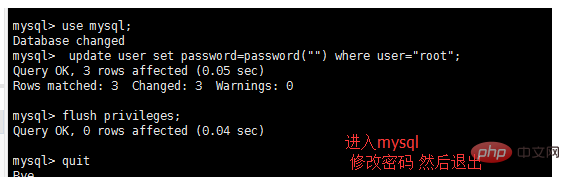
and then return Go to the vim /etc/my.cnf and comment out the sentence you just added. Restart mysql again and it will be ok.
create database [dataname] Create a database
show databases; Check it out You can perform database operations
Recommended learning: "linux tutorial"
The above is the detailed content of What to do if Linux cannot start mysql. For more information, please follow other related articles on the PHP Chinese website!































![[Web front-end] Node.js quick start](https://img.php.cn/upload/course/000/000/067/662b5d34ba7c0227.png)



