


 Backend Development
PHP7
Laravel + Alibaba Cloud OSS completes the image and text separation architecture
Backend Development
PHP7
Laravel + Alibaba Cloud OSS completes the image and text separation architecture
Laravel + Alibaba Cloud OSS completes the image and text separation architecture

This case uses Laravel5.6 Alibaba Cloud OSS to complete the image upload function. It is full of practical information and can be completed by following the steps.
Before deploying the environment, we need to register an account on the Alibaba Cloud platform. Both personal and company accounts are acceptable. After the registration is completed, copy the access_key and access_secret configuration in the project and it is completed. Basic settings for the project.
1. Create a new project and install the Laravel5.6 version of the framework code
1. Environment configuration requirements
Laravel has some system requirements, your server meets the following requirements:
PHP >= 7.1.3
OpenSSL PHP
PHP PDO Extension
PHP Mbstring extension
PHP Tokenizer extension
PHP XML extension
PHP Ctype extension
PHP JSON extension
Remarks: You The above configuration requirements need to be met. This will not be explained in detail. Please refer to the PHP syntax for details.
2. Install the Laravel5.6 framework
Laravel5.6 Use Composer to manage Project dependencies. Therefore, before using Laravel5.6, please make sure that Composer is installed on your machine.
composer -v
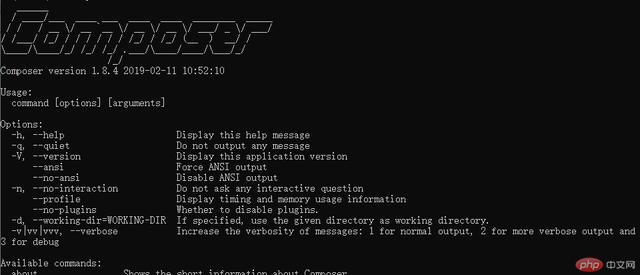
Note: Please refer to the link above for the specific installation of composer. You can install it according to the document. Next, we will install the Larvael5.6 framework specifically and enter the content in the control window ( My Windows operating system), wait for the installation to complete.
composer create-project --prefer-dist laravel/laravel blog
After the installation is complete, execute the following code to set a random string key for the application.
php artisan key:generate
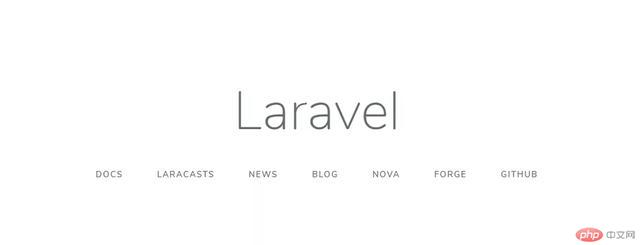
Enter in the browser: http://localhost/blog/public/index.php. If you see the following interface, the access is normal.
3. Configure Alibaba Cloud component package in composer.json
Add "jacobcyl/ in require ali-oss-storage": "^2.1"
"require": {
      "php": "^7.1.3",
      "fideloper/proxy": "^4.0",
      "laravel/framework": "5.8.*",
      "laravel/tinker": "^1.0",
      "jacobcyl/ali-oss-storage": "^2.1"
   },
Then execute the command:
composer update
composer dumpautoload
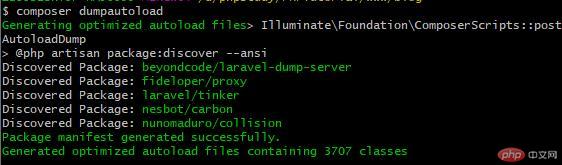
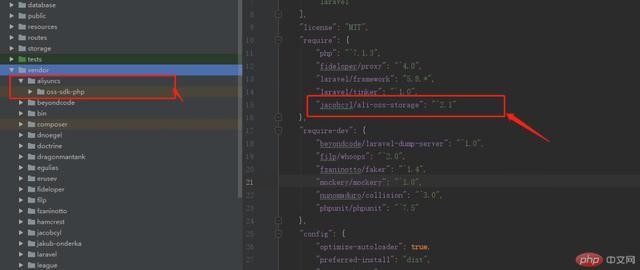
4. Configure Alibaba Cloud access_key and access_secret configuration (OSS self-activation)
This is very important: I wrote a separate file to do it ConfigurationThe first step: Add:Jacobcyl\AliOSS\AliOssServiceProvider::class,under providers in config/app.php Step 2: Add
'oss' => [
    'driver' => 'oss',
    'access_id' => env('OSS_ACCESS_ID', '填你自己的'),
    'access_key' => env('OSS_ACCESS_KEY', '填你自己的'),
    'bucket' => env('OSS_BUCKET', '填你自己的'),
    'endpoint' => env('OSS_ENDPOINT', 'oss-cn-hangzhou.aliyuncs.com'),
    'isCName' => false,
    'debug' => true,
],
# under disks in app/filesystems.php ##Step 3: Create a new file alioss.php file<?php
return [
'OSS_ACCESS_ID' => env('OSS_ACCESS_ID', '填你自己的'),
'OSS_ACCESS_KEY'=> env('OSS_ACCESS_KEY', '填你自己的'),
'OSS_ENDPOINT' => env('OSS_ENDPOINT', 'oss-cn-hangzhou.aliyuncs.com'),
'OSS_BUCKET' => env('OSS_BUCKET', '填你自己的'),
'OSS_HOST' => 'https://填你自己的.oss-cn-hangzhou.aliyuncs.com',//前台显示域名
'OSS_URL' => 'https://填你自己的.oss-cn-hangzhou.aliyuncs.com', // CDN域名,没有CDN就和OSS_HOST一致即可
];The file has been loaded at this point.
2. Write the interface controller methodNew controller: UploadsController inherits the Controller class for easy operation.
Step 1: Write API routing
Route::post('/index/image', '\App\Http\Controllers\Index\UploadsController@index');Step 2: Write controller and upload images (core code)
public function index(Request $request) {
      $disk = \Storage::disk('oss');
      if (!isset($request->image)) {
      return $this->array_format('图片信息错误' . __LINE__, 414);
      }
      switch ($request->source) {
      case 'file':
      if (!($request->hasFile('image') && $request->file('image')->isValid())) {
      return $this->array_format('图片信息错误' . __LINE__, 414);
      }
            $file = $request->file('image');
            $image_str = @file_get_contents($file->getPathname());
            $base64_str = base64_encode($image_str);
            break;
        case 'url':
          $image_str = @file_get_contents($request->image);
          $base64_str = base64_encode($image_str);
          break;
        case 'base64':
          $base64_str = $request->image;
          break;
        default:
          return $this->array_format('图片类型错误', 414);
          break;
      }
      //获取图片信息
      $image_info = $this->base64_image_format($base64_str);
      if (!$image_info) {
      return $this->array_format('图片信息错误' . __LINE__, 414);
      }
      if ($image_info['image_size'] > 10 * 1024 * 1024) {
      return $this->array_format('图片信息太大', 414);
      }
      $image_path = 'uploads/image/'. date('Ym');
      $image_name = $image_path . '/' . md5($image_info['image_str']) . '.' . $image_info['image_suffix'];
      //上传图片
      $temp = $disk->put($image_name, $image_info['image_str']);
      if (!$temp) {
      return $this->array_format('上传失败', 414);
      }
      return $this->array_format('上传成功', 200, [
          'image_name' => $image_name,
          'image_url' => $disk->url($image_name),
      ]);
}
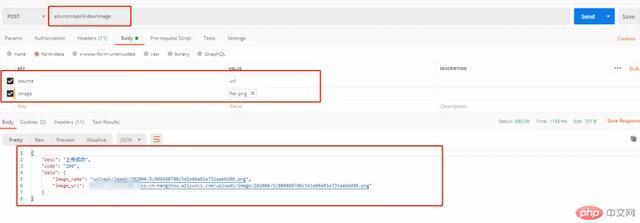
4. Postman Tool interface test
 public account (
) reply "Alibaba Cloud OSS" and download the case source code.
The above is the detailed content of Laravel + Alibaba Cloud OSS completes the image and text separation architecture. For more information, please follow other related articles on the PHP Chinese website!

Hot AI Tools

Undress AI Tool
Undress images for free

Undresser.AI Undress
AI-powered app for creating realistic nude photos

AI Clothes Remover
Online AI tool for removing clothes from photos.

Clothoff.io
AI clothes remover

Video Face Swap
Swap faces in any video effortlessly with our completely free AI face swap tool!

Hot Article
Hot Tools

Notepad++7.3.1
Easy-to-use and free code editor

SublimeText3 Chinese version
Chinese version, very easy to use

Zend Studio 13.0.1
Powerful PHP integrated development environment

Dreamweaver CS6
Visual web development tools

SublimeText3 Mac version
God-level code editing software (SublimeText3)

