


Click on the print area in the page layout tab

Then click on the file option in the upper left corner

(Recommended learning: html introductory tutorial)
Select the print preview in the print window in the pop-up window

After entering the print preview page, find the page settings on the toolbar of this page, click to enter

After entering the page settings, select Adjust to in the zoom Print the entire worksheet on one page

After confirming, now output it as PDF in the file and start converting excel to PDF
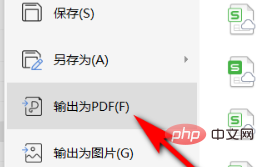
Recommended related tutorials: excel tutorial
The above is the detailed content of How to convert pdf in excel without pagination. For more information, please follow other related articles on the PHP Chinese website!
 Compare the similarities and differences between two columns of data in excel
 excel duplicate item filter color
 How to copy an Excel table to make it the same size as the original
 Excel table slash divided into two
 Excel diagonal header is divided into two
 Absolute reference input method
 Convert pdf to cad drawings
 java export excel






















![[Web front-end] Node.js quick start](https://img.php.cn/upload/course/000/000/067/662b5d34ba7c0227.png)



