

How to set up dual-screen display in win7:
1. Right-click on a blank space on the desktop and select Display Settings.
#2. First click on the logo to identify the two monitors.
#3. Select the icon you want to use as your main monitor, check Make it my main monitor, and click Apply.
This monitor will become your main monitor.
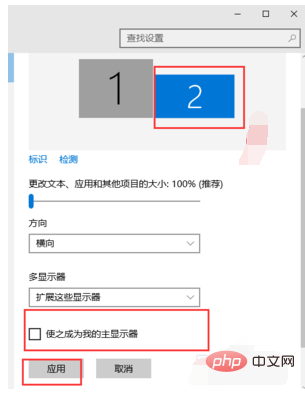
#4. For multiple monitors, choose to expand these monitors. Click Apply.

5, click on monitor 1, don’t let go, drag the position, you can drag monitor 1 to the top, bottom, left, and right of monitor 2, drag specifically Where you go depends on your mood and needs.
For more related content, please pay attention to thewindows tutorialcolumn on the php Chinese website!
The above is the detailed content of How to set up dual screen display in win7?. For more information, please follow other related articles on the PHP Chinese website!
 How to create virtual wifi in win7
 How to change file type in win7
 How to set up hibernation in Win7 system
 How to open Windows 7 Explorer
 How to solve the problem of not being able to create a new folder in Win7
 Solution to Win7 folder properties not sharing tab page
 Win7 prompts that application data cannot be accessed. Solution
 The difference between win7 32-bit and 64-bit





















![[Web front-end] Node.js quick start](https://img.php.cn/upload/course/000/000/067/662b5d34ba7c0227.png)



