


The difference between physical (mac) address and IP address


The difference between MAC address and IP address is as follows:
1. Difference in address length
1. MAC The length of the address is 48 bits (6 bytes), usually expressed as 12 hexadecimal numbers, and each two hexadecimal numbers are separated by colons, such as: 00:50:29:5A:8H:1E It's just a MAC address.
2. The IP address is 32 bits, consisting of four 8-bit groups separated by dots. For example, 192.168.0.1 is an IP address. This writing method is called dotted decimal format.
2. Differences in addressing protocol layer
1. The MAC address is applied to the second layer of OSI, which is the data link layer. The data link layer protocol enables data to be passed from one node to another node on the same link (via MAC address).
2. The IP address is applied to the third layer of OSI, which is the network layer. The network layer protocol allows data to be transferred from one network to another (ARP finds the MAC address of the intermediate node based on the destination IP address, and transmits it through the intermediate node, thereby finally reaching the destination network).
3. The allocation basis is different.
1. The allocation of MAC address is based on the manufacturer.
The MAC address is written inside the hardware when it is produced by the network equipment manufacturer. This address has nothing to do with the network, that is, no matter where the hardware with this address (such as a hub, network card, router, etc.) is connected to the network, it will have the same MAC address and is immutable.
2. IP address allocation is based on network topology.
The IP address consists of two parts: the network address and the host address. The number of bits allocated to these two parts varies with the address class (Class A, Class B, Class C, etc.).
The above is the detailed content of The difference between physical (mac) address and IP address. For more information, please follow other related articles on the PHP Chinese website!

Hot AI Tools

Undresser.AI Undress
AI-powered app for creating realistic nude photos

AI Clothes Remover
Online AI tool for removing clothes from photos.

Undress AI Tool
Undress images for free

Clothoff.io
AI clothes remover

AI Hentai Generator
Generate AI Hentai for free.

Hot Article
Hot Tools

Notepad++7.3.1
Easy-to-use and free code editor

SublimeText3 Chinese version
Chinese version, very easy to use

Zend Studio 13.0.1
Powerful PHP integrated development environment

Dreamweaver CS6
Visual web development tools

SublimeText3 Mac version
God-level code editing software (SublimeText3)
Hot Topics
 1379
1379
 52
52

 How to set Xiaohongshu not to display IP address? How does it change the id to locate the city?
Mar 27, 2024 pm 03:00 PM
How to set Xiaohongshu not to display IP address? How does it change the id to locate the city?
Mar 27, 2024 pm 03:00 PM
Xiaohongshu is a popular social e-commerce platform where users can share their daily life and discover their favorite products. Some users are more sensitive to personal privacy and hope that their IP address will not be displayed on Xiaohongshu to protect their online privacy. So, how to set Xiaohongshu not to display the IP address? This article will answer this question in detail. 1. How to set Xiaohongshu not to display the IP address? 1. Modify Xiaohongshu settings: Open Xiaohongshu APP, click "Me" in the lower right corner to enter the personal center. Then click on the avatar to enter account settings. In the account settings, find "Privacy Settings" and click to enter. Here, you can find the setting options for IP address, just turn it off. 2. Clear cache: Sometimes, Xiaohongshu may display an error
 How to view all IP addresses in LAN using cmd
Feb 20, 2023 pm 02:22 PM
How to view all IP addresses in LAN using cmd
Feb 20, 2023 pm 02:22 PM
How to view all IP addresses on the LAN using cmd: 1. Press the "Win+R" shortcut key to open the "Run" window; 2. After entering "CMD" in the "Run" window, press the Enter key; 3. In the open "Command" In the "Prompt" interface, enter the command "arp -a" and press the Enter key; 4. From the returned results, you can see the IP addresses of all computers in the local LAN that communicate with the machine.
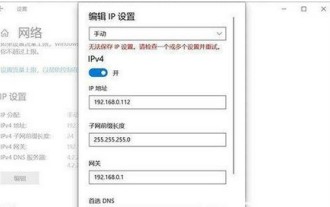 How to solve the problem that Windows 10 IP address cannot be saved after setting it
Jul 08, 2023 pm 12:33 PM
How to solve the problem that Windows 10 IP address cannot be saved after setting it
Jul 08, 2023 pm 12:33 PM
Sometimes everyone encounters the need to manually modify the IP address, but some Windows 10 customers report that the IP address cannot be saved after setting it. How to solve this situation? The IP address is stored basically because there is an error in filling in your IP address. You can check whether the subnet prefix has been written with the subnet mask. If so, change it back. After the change, you can save it normally. IP address. How to solve the problem that the Windows 10 IP address cannot be saved after it is set: The error picture is as follows: The prompt "Unable to save the IP setting, please check one or more settings and try" caused by filling in the error. This is the subnet prefix length, not the subnet mask. as the picture shows. As shown in the picture above, many users actually write out the subnet prefix as the subnet mask.
 Where is the IP address of Xiaomi mobile phone?
Feb 29, 2024 pm 06:10 PM
Where is the IP address of Xiaomi mobile phone?
Feb 29, 2024 pm 06:10 PM
Where is the IP address of Xiaomi mobile phone? You can check the IP address on Xiaomi mobile phone, but most users don’t know where to check the IP address. Next is the graphic tutorial on how to check the IP address of Xiaomi mobile phone brought by the editor. Interested users come and take a look! Where is the IP address of Xiaomi mobile phone? 1. First open the settings function in Xiaomi mobile phone, select [My Device] and click to enter; 2. Then on the My Device function page, click [All Parameters] service; 3. Then on the All Parameters page , slide to the bottom and select [Status Information]; 4. Finally, you can see the IP address in the status information interface.
 Where to change the IP address of Xianyu_Share how to change the IP address of Xianyu
Mar 20, 2024 pm 05:06 PM
Where to change the IP address of Xianyu_Share how to change the IP address of Xianyu
Mar 20, 2024 pm 05:06 PM
Xianyu is a very practical second-hand trading platform. Here we can buy many different products and sell our own idle items. What if we want to modify our address? Let’s take a look with the editor below! Share how to modify the Xianyu IP address. First, open the Xianyu software. After entering the homepage, you can see seafood market, recommendations, address and other options in the upper left corner. Click "Address". 2. Then on the address page, we click the [Down Arrow] next to the address; 3. After the final click, we click on the city on the city selection page;
 How to change the location of Douyin IP address? Why does the IP address change location?
Mar 21, 2024 pm 06:30 PM
How to change the location of Douyin IP address? Why does the IP address change location?
Mar 21, 2024 pm 06:30 PM
Users share their lives, show off their talents, and interact with netizens across the country and even the world through Douyin. Some users wish to change their IP addresses on Douyin due to reasons such as privacy protection or geographical restrictions. So, how does the Douyin IP address change its location? 1. How to change the location of Douyin IP address? A proxy server is an intermediary service used to forward user requests to the Internet and return responses. By configuring a proxy server, users can hide their real IP addresses and change their IP addresses. This approach helps protect user privacy and improves network security. Proxy servers can also be used to access restricted content or bypass geolocation restrictions. Overall, using a proxy server is a practical network tool that can help users browse the Internet more safely and freely.
 Every host on the Internet has a unique address identifier called
Aug 22, 2022 pm 03:24 PM
Every host on the Internet has a unique address identifier called
Aug 22, 2022 pm 03:24 PM
Each host has a unique address identifier called an "IP address." The IP address is a unified address format provided by the IP protocol. It assigns a unique logical address to each network and each host on the Internet to shield the differences in physical addresses. Because of this unique address, it is ensured that users can efficiently and conveniently select the objects they need from thousands of computers when operating on connected computers.
 How many binary digits does an IP address consist of?
Mar 01, 2023 pm 04:35 PM
How many binary digits does an IP address consist of?
Mar 01, 2023 pm 04:35 PM
An IP address is composed of 32 or 128-bit binary numbers. IP address is a unified address format provided by the IP protocol. There are two types of IP addresses: 1. IPv4 address, consisting of 32-bit binary numbers, expressed in dotted decimal notation, divided into eight bits, that is, four 0~255 Decimal number; 2. IPv6 address consists of 128-bit binary numbers, expressed in dotted hexadecimal, divided into eight bits, that is, sixteen hexadecimal numbers from 0x00 to 0xff.