


How to use averageif function


How to use averageif function?
AVERAGEIF is a computer function that returns the average (arithmetic mean) of all cells in a range that meet given conditions. If the cell in the condition is an empty cell, AVERAGEIF treats it as a 0 value.
Recommended tutorial: excel tutorial
Grammar
AVERAGEIF(range, criteria, [average_range])
AVERAGEIF function syntax has the following parameters:
Range is required. One or more cells that contain a number or a name, array, or reference that contains a number to be averaged.
Criteria required. A condition in the form of a number, expression, cell reference, or text that defines the cells for which the average will be calculated. For example, the condition could be expressed as 32, "32", ">32", "apple", or B4.
Average_range is optional. The actual group of cells for which the average is calculated. If omitted, range is used.
Description
Ignore cells in the range that contain TRUE or FALSE.
If the cell in average_range is an empty cell, AVERAGEIF will ignore it.
If range is a null value or a text value, AVERAGEIF will return the error value #DIV0!.
If the cell in the condition is an empty cell, AVERAGEIF will treat it as a 0 value.
If there is no cell in the range that meets the condition, AVERAGEIF will return the error value #DIV/0!.
You can use wildcard characters, namely question mark (?) and asterisk (*), in your criteria. A question mark matches any single character; an asterisk matches any string of characters. If you want to find an actual question mark or asterisk, type a tilde (~) before the character.
Average_range does not need to have the same size and shape as range. Determine the actual cells for calculating the average by using the upper-left cell in average_range as the starting cell and then including cells that correspond to the size and shape of the range.
Example
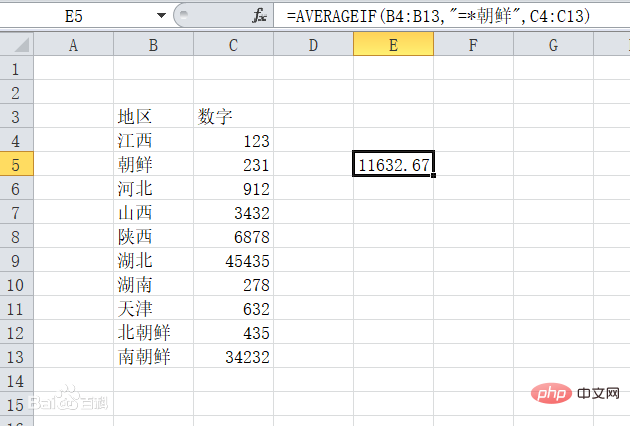
As shown in the following figure, if you want to find the average of the numbers in all places containing the word "Korean", you can use this function, the specific formula =AVERAGEIF(B4:B13,"=*North Korea",C4:C13), the * here can represent one or more characters, in this case it represents the words "South" and "North", no Hard to get results.
 ##
##
The above is the detailed content of How to use averageif function. For more information, please follow other related articles on the PHP Chinese website!

Hot AI Tools

Undress AI Tool
Undress images for free

Undresser.AI Undress
AI-powered app for creating realistic nude photos

AI Clothes Remover
Online AI tool for removing clothes from photos.

Clothoff.io
AI clothes remover

Video Face Swap
Swap faces in any video effortlessly with our completely free AI face swap tool!

Hot Article
Hot Tools

Notepad++7.3.1
Easy-to-use and free code editor

SublimeText3 Chinese version
Chinese version, very easy to use

Zend Studio 13.0.1
Powerful PHP integrated development environment

Dreamweaver CS6
Visual web development tools

SublimeText3 Mac version
God-level code editing software (SublimeText3)

