


Python real-time data collection-novel coronavirus


Python real-time data collection-new coronavirus
Source code source : https://github.com/Programming-With-Love/2019-nCoV
The epidemic data time is: 2020.2.1
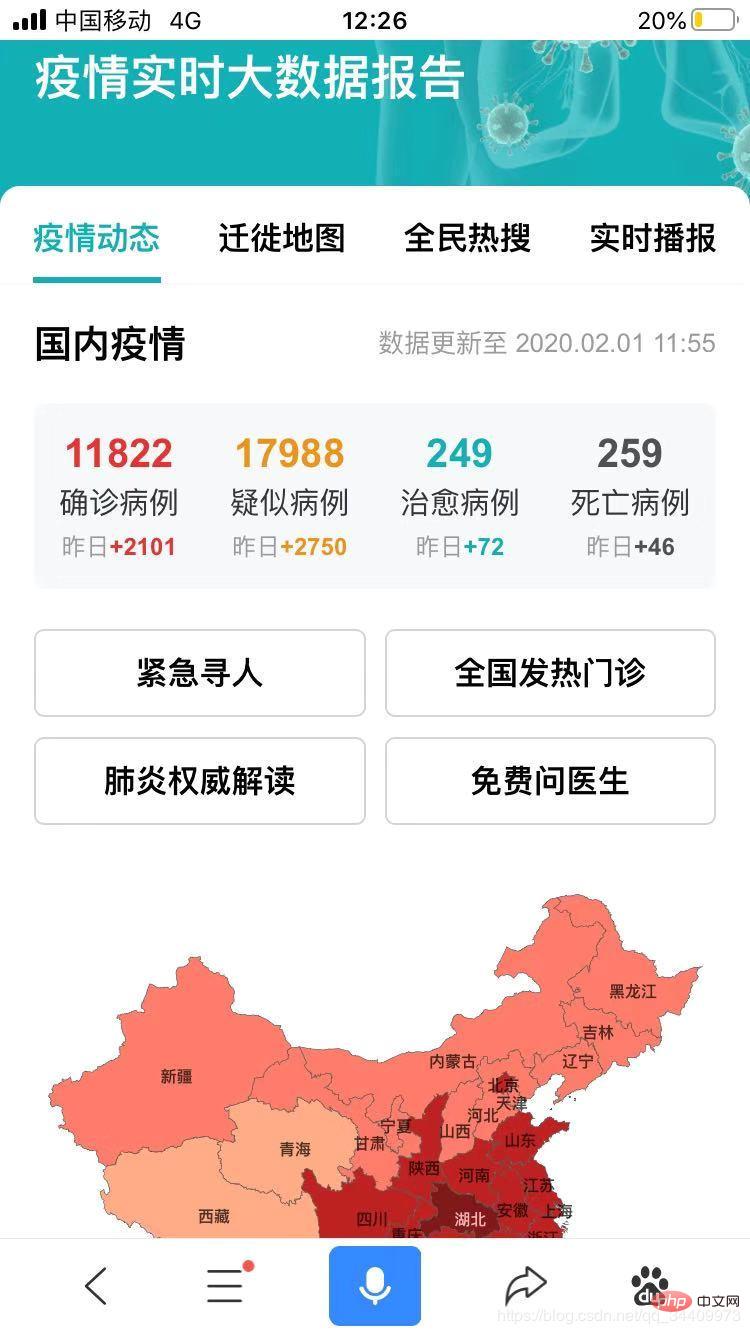
Related screenshots of the project:
National Data Display
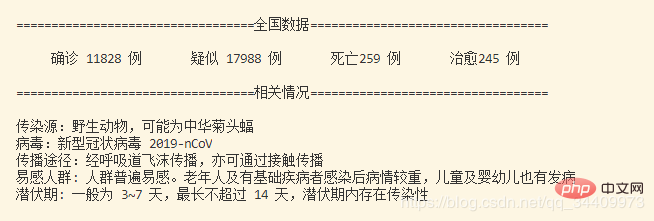
National Data Display
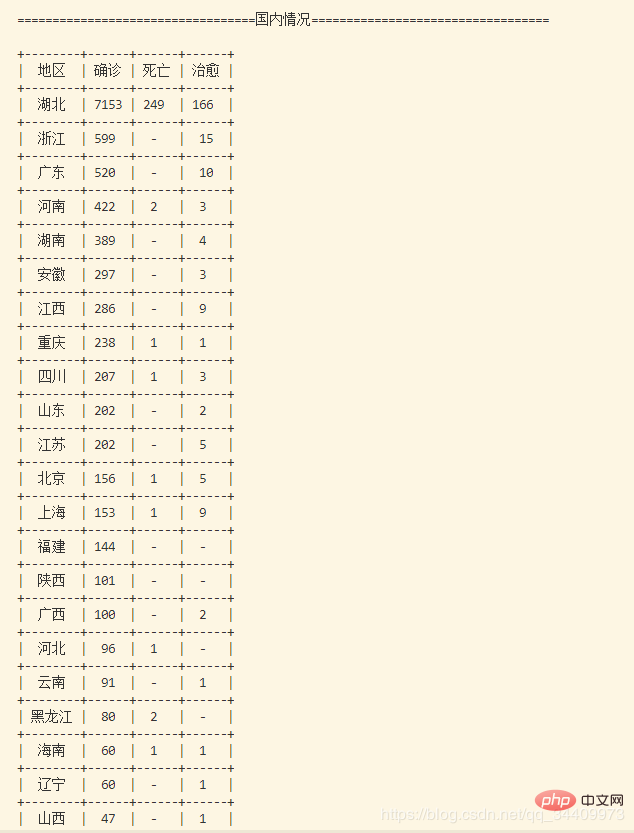
Foreign data display
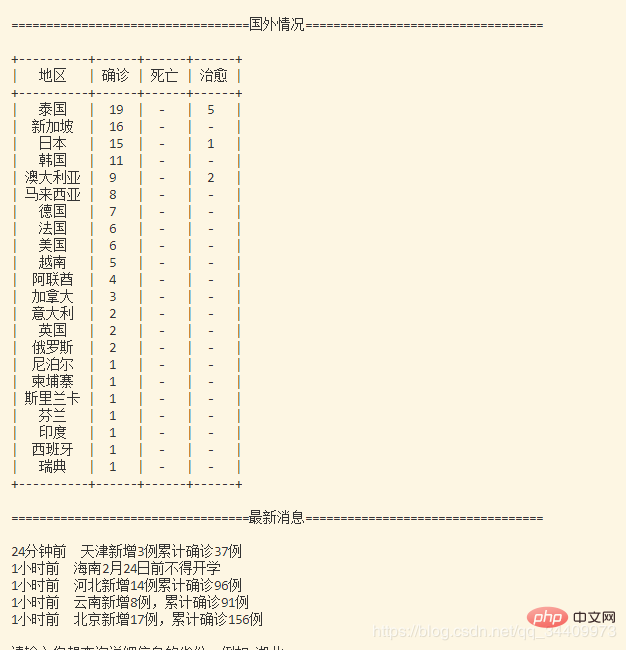
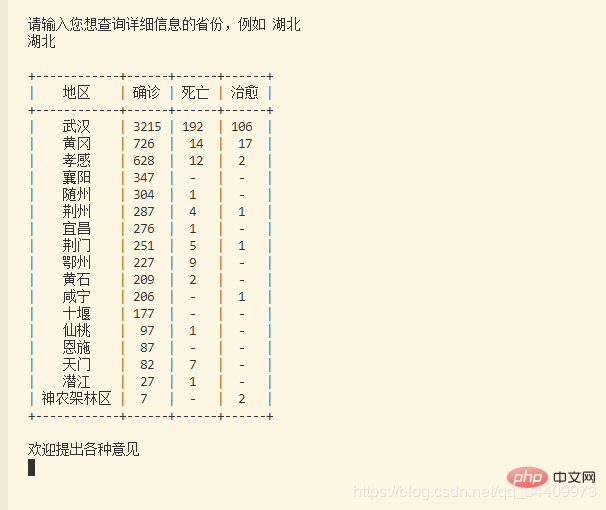
View detailed data of the specified area
##Source code, pay attention to installing the required modules (such as pip install module name)
import requests
import re
from bs4 import BeautifulSoup
from time import sleep
import json
from prettytable import ALL
from prettytable import PrettyTable
hubei = {}
guangdong = {}
zhejiang = {}
beijing = {}
shanghai = {}
hunan = {}
anhui = {}
chongqing = {}
sichuan = {}
shandong = {}
guangxi = {}
fujian = {}
jiangsu = {}
henan = {}
hainan = {}
tianjin = {}
jiangxi = {}
shanxi1 = {} # 陕西
guizhou = {}
liaoning = {}
xianggang = {}
heilongjiang = {}
aomen = {}
xinjiang = {}
gansu = {}
yunnan = {}
taiwan = {}
shanxi2 = {} # 山西
jilin = {}
hebei = {}
ningxia = {}
neimenggu = {}
qinghai = {} # none
xizang = {} # none
provinces_idx = [hubei, guangdong, zhejiang, chongqing, hunan, anhui, beijing,
shanghai, henan, guangxi, shandong, jiangxi, jiangsu, sichuan,
liaoning, fujian, heilongjiang, hainan, tianjin, hebei, shanxi2,
yunnan, xianggang, shanxi1, guizhou, jilin, gansu, taiwan,
xinjiang, ningxia, aomen, neimenggu, qinghai, xizang]
map = {
'湖北':0, '广东':1, '浙江':2, '北京':3, '上海':4, '湖南':5, '安徽':6, '重庆':7,
'四川':8, '山东':9, '广西':10, '福建':11, '江苏':12, '河南':13, '海南':14,
'天津':15, '江西':16, '陕西':17, '贵州':18, '辽宁':19, '香港':20, '黑龙江':21,
'澳门':22, '新疆':23, '甘肃':24, '云南':25, '台湾':26, '山西':27, '吉林':28,
'河北':29, '宁夏':30, '内蒙古':31, '青海':32, '西藏':33
}
def getTime(text):
TitleTime = str(text)
TitleTime = re.findall('<span>(.*?)</span>', TitleTime)
return TitleTime[0]
def getAllCountry(text):
AllCountry = str(text)
AllCountry = AllCountry.replace("[<p class=\"confirmedNumber___3WrF5\"><span class=\"content___2hIPS\">", "")
AllCountry = AllCountry.replace("<span style=\"color: #4169e2\">", "")
AllCountry = re.sub("</span>", "", AllCountry)
AllCountry = AllCountry.replace("</p>]", "")
AllCountry = AllCountry.replace("<span style=\"color: rgb(65, 105, 226);\">", "")
AllCountry = re.sub("<span>", "", AllCountry)
AllCountry = re.sub("<p>", "", AllCountry)
AllCountry = re.sub("</p>", "", AllCountry)
return AllCountry
def query(province):
table = PrettyTable(['地区', '确诊', '死亡', '治愈'])
for (k, v) in province.items():
name = k
table.add_row([name, v[0] if v[0] != 0 else '-', v[1] if v[1] != 0 else '-', v[2] if v[2] != 0 else '-'])
if len(province.keys()) != 0:
print(table)
else:
print("暂无")
def getInfo(text):
text = str(text)
text = re.sub("<p class=\"descText___Ui3tV\">", "", text)
text = re.sub("</p>", "", text)
return text
def is_json(json_str):
try:
json.loads(json_str)
except ValueError:
return False
return True
def ff(str, num):
return str[:num] + str[num+1:]
def main():
url = "https://3g.dxy.cn/newh5/view/pneumonia"
try:
headers = {}
headers['user-agent'] = 'Mozilla/5.0 (Windows NT 10.0; Win64; x64) AppleWebKit/537.36 (KHTML, like Gecko) Chrome/70.0.3538.77 Safari/537.36' #http头大小写不敏感
headers['accept'] = 'text/html,application/xhtml+xml,application/xml;q=0.9,image/webp,image/apng,*/*;q=0.8'
headers['Connection'] = 'keep-alive'
headers['Upgrade-Insecure-Requests'] = '1'
r = requests.get(url, headers=headers)
r.raise_for_status()
r.encoding = r.apparent_encoding
soup = BeautifulSoup(r.text,'lxml')
table = PrettyTable(['地区', '确诊', '死亡', '治愈'])
table.hrules = ALL
#### 截至时间
# TitleTime = getTime(soup.select('.title___2d1_B'))
print()
# print(" ",TitleTime + "\n")
while True:
r = requests.get("https://service-f9fjwngp-1252021671.bj.apigw.tencentcs.com/release/pneumonia")
json_str = json.loads(r.text)
if json_str['error'] == 0:
break
print("==================================全国数据==================================")
print()
print(" 确诊 " + str(json_str['data']['statistics']['confirmedCount']) + " 例"
+ " " + "疑似 " + str(json_str['data']['statistics']['suspectedCount']) + " 例"
+ " " + "死亡" + str(json_str['data']['statistics']['deadCount']) + " 例"
+ " " + "治愈" + str(json_str['data']['statistics']['curedCount']) + " 例\n")
print("==================================相关情况==================================")
print()
print("传染源:" + json_str['data']['statistics']['infectSource'])
print("病毒:" + json_str['data']['statistics']['virus'])
print("传播途径:" + json_str['data']['statistics']['passWay'])
print(json_str['data']['statistics']['remark1'])
print(json_str['data']['statistics']['remark2'] + "\n")
print("==================================国内情况==================================")
print()
json_provinces = re.findall("{\"provinceName\":(.*?)]}", str(soup))
idx = 0
for province in json_provinces:
if is_json(province):
pass
else:
province = "{\"provinceName\":" + province + "]}"
province = json.loads(province)
province_name = province['provinceShortName'] if province['provinceShortName'] != 0 else '-'
confirmed = province['confirmedCount'] if province['confirmedCount'] != 0 else '-'
suspected = province['suspectedCount'] if province['suspectedCount'] != 0 else '-'
cured = province['curedCount'] if province['curedCount'] != 0 else '-'
dead = province['deadCount'] if province['deadCount'] != 0 else '-'
table.add_row([province_name, confirmed, dead, cured])
map[province_name] = idx
idx = idx + 1
for city in province['cities']:
provinces_idx[map[province_name]][city['cityName']] = [city['confirmedCount'], city['deadCount'], city['curedCount']]
print(table)
print()
print("==================================国外情况==================================")
print()
json_provinces = str(re.findall("\"id\":949(.*?)]}", str(soup)))
json_provinces = json_provinces[:1] + "{\"id\":949" + json_provinces[2:]
json_provinces = json_provinces[:len(json_provinces) - 2] + json_provinces[len(json_provinces) - 1:]
provinces = json.loads(json_provinces)
table = PrettyTable(['地区', '确诊', '死亡', '治愈'])
for province in provinces:
confirmed = province['confirmedCount'] if province['confirmedCount'] != 0 else '-'
dead = province['deadCount'] if province['deadCount'] != 0 else '-'
cured = province['curedCount'] if province['curedCount'] != 0 else '-'
table.add_row([province['provinceName'], confirmed, dead, cured])
print(table)
print()
print("==================================最新消息==================================")
print()
idx = 0
for news in json_str['data']['timeline']:
if idx == 5:
break
print(news['pubDateStr'] + " " + news['title'])
idx = idx + 1
print()
key = input("请输入您想查询详细信息的省份,例如 湖北\n")
print()
if key in map.keys():
query(provinces_idx[map[key]])
else:
print("暂无相关信息")
print("\n欢迎提出各种意见")
except:
print("连接失败")
if __name__ == '__main__':
main()
sleep(30) Finally, I wish everyone is immune to all kinds of poisons. Come on, China! ! We will definitely get through this! !
The above is the detailed content of Python real-time data collection-novel coronavirus. For more information, please follow other related articles on the PHP Chinese website!

Hot AI Tools

Undress AI Tool
Undress images for free

Undresser.AI Undress
AI-powered app for creating realistic nude photos

AI Clothes Remover
Online AI tool for removing clothes from photos.

Clothoff.io
AI clothes remover

Video Face Swap
Swap faces in any video effortlessly with our completely free AI face swap tool!

Hot Article
Hot Tools

Notepad++7.3.1
Easy-to-use and free code editor

SublimeText3 Chinese version
Chinese version, very easy to use

Zend Studio 13.0.1
Powerful PHP integrated development environment

Dreamweaver CS6
Visual web development tools

SublimeText3 Mac version
God-level code editing software (SublimeText3)
Hot Topics
 1793
1793
 16
1736
56
1587
29
267
587
16
1736
56
1587
29
267
587

 Can a Python class have multiple constructors?
Jul 15, 2025 am 02:54 AM
Can a Python class have multiple constructors?
Jul 15, 2025 am 02:54 AM
Yes,aPythonclasscanhavemultipleconstructorsthroughalternativetechniques.1.Usedefaultargumentsinthe__init__methodtoallowflexibleinitializationwithvaryingnumbersofparameters.2.Defineclassmethodsasalternativeconstructorsforclearerandscalableobjectcreati
 Python for loop range
Jul 14, 2025 am 02:47 AM
Python for loop range
Jul 14, 2025 am 02:47 AM
In Python, using a for loop with the range() function is a common way to control the number of loops. 1. Use when you know the number of loops or need to access elements by index; 2. Range(stop) from 0 to stop-1, range(start,stop) from start to stop-1, range(start,stop) adds step size; 3. Note that range does not contain the end value, and returns iterable objects instead of lists in Python 3; 4. You can convert to a list through list(range()), and use negative step size in reverse order.
 Accessing data from a web API in Python
Jul 16, 2025 am 04:52 AM
Accessing data from a web API in Python
Jul 16, 2025 am 04:52 AM
The key to using Python to call WebAPI to obtain data is to master the basic processes and common tools. 1. Using requests to initiate HTTP requests is the most direct way. Use the get method to obtain the response and use json() to parse the data; 2. For APIs that need authentication, you can add tokens or keys through headers; 3. You need to check the response status code, it is recommended to use response.raise_for_status() to automatically handle exceptions; 4. Facing the paging interface, you can request different pages in turn and add delays to avoid frequency limitations; 5. When processing the returned JSON data, you need to extract information according to the structure, and complex data can be converted to Data
 python one line if else
Jul 15, 2025 am 01:38 AM
python one line if else
Jul 15, 2025 am 01:38 AM
Python's onelineifelse is a ternary operator, written as xifconditionelsey, which is used to simplify simple conditional judgment. It can be used for variable assignment, such as status="adult"ifage>=18else"minor"; it can also be used to directly return results in functions, such as defget_status(age):return"adult"ifage>=18else"minor"; although nested use is supported, such as result="A"i
 How to read a JSON file in Python?
Jul 14, 2025 am 02:42 AM
How to read a JSON file in Python?
Jul 14, 2025 am 02:42 AM
Reading JSON files can be implemented in Python through the json module. The specific steps are: use the open() function to open the file, use json.load() to load the content, and the data will be returned in a dictionary or list form; if you process JSON strings, you should use json.loads(). Common problems include file path errors, incorrect JSON format, encoding problems and data type conversion differences. Pay attention to path accuracy, format legality, encoding settings, and mapping of boolean values and null.
 Python for loop to read file line by line
Jul 14, 2025 am 02:47 AM
Python for loop to read file line by line
Jul 14, 2025 am 02:47 AM
Using a for loop to read files line by line is an efficient way to process large files. 1. The basic usage is to open the file through withopen() and automatically manage the closing. Combined with forlineinfile to traverse each line. line.strip() can remove line breaks and spaces; 2. If you need to record the line number, you can use enumerate(file, start=1) to let the line number start from 1; 3. When processing non-ASCII files, you should specify encoding parameters such as utf-8 to avoid encoding errors. These methods are concise and practical, and are suitable for most text processing scenarios.
 python case-insensitive string compare if
Jul 14, 2025 am 02:53 AM
python case-insensitive string compare if
Jul 14, 2025 am 02:53 AM
The most direct way to make case-insensitive string comparisons in Python is to use .lower() or .upper() to compare. For example: str1.lower()==str2.lower() can determine whether it is equal; secondly, for multilingual text, it is recommended to use a more thorough casefold() method, such as "straß".casefold() will be converted to "strasse", while .lower() may retain specific characters; in addition, it should be avoided to use == comparison directly, unless the case is confirmed to be consistent, it is easy to cause logical errors; finally, when processing user input, database or matching
 How to use the map function in Python
Jul 15, 2025 am 02:52 AM
How to use the map function in Python
Jul 15, 2025 am 02:52 AM
Python's map() function implements efficient data conversion by acting as specified functions on each element of the iterable object in turn. 1. Its basic usage is map(function,iterable), which returns a "lazy load" map object, which is often converted to list() to view results; 2. It is often used with lambda, which is suitable for simple logic, such as converting strings to uppercase; 3. It can be passed in multiple iterable objects, provided that the number of function parameters matches, such as calculating the discounted price and discount; 4. Usage techniques include combining built-in functions to quickly type conversion, handling None situations similar to zip(), and avoiding excessive nesting to affect readability. Mastering map() can make the code more concise and professional
