


 Operation and Maintenance
Windows Operation and Maintenance
Solution to blue screen 0*0000003b when computer starts up
Operation and Maintenance
Windows Operation and Maintenance
Solution to blue screen 0*0000003b when computer starts up
Solution to blue screen 0*0000003b when computer starts up


Computer blue screen, error code: 0*0000003B is caused by system file damage. Your system may be infected with a virus. It is recommended to reset your computer. The steps are as follows: (The demonstration uses WIN10 system, the operation is roughly the same for other Windows versions)
Recommended: Windows Operation and Maintenance Tutorial
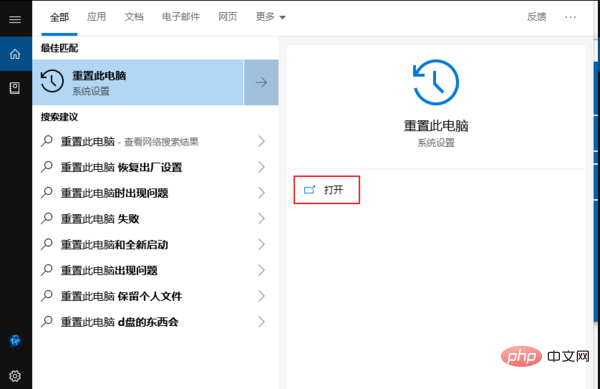
1. Start-> Search for "Reset this computer" and click on the right side "Open" button.
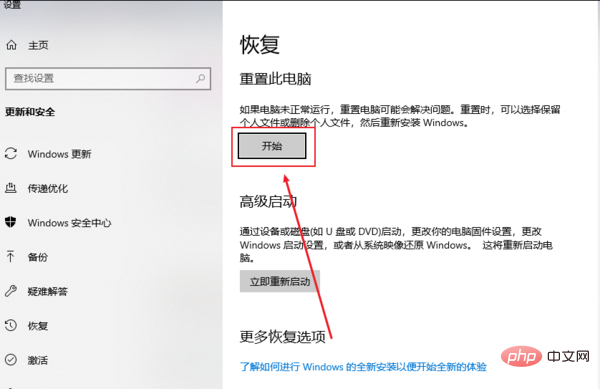
#2. Select "Start" in Reset this PC.
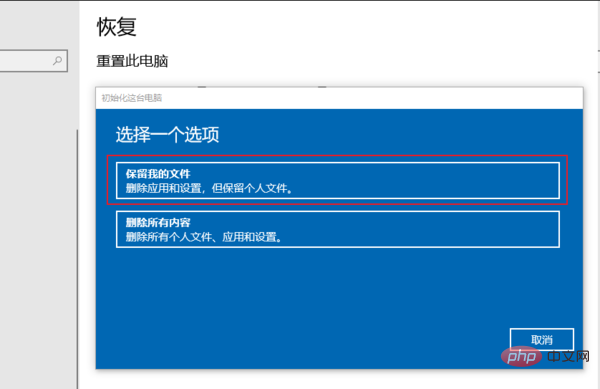
#3. Select the first item in the pop-up dialog box: Keep my files, and finally wait for the system reset to complete.
The above is the detailed content of Solution to blue screen 0*0000003b when computer starts up. For more information, please follow other related articles on the PHP Chinese website!

Hot AI Tools

Undress AI Tool
Undress images for free

Undresser.AI Undress
AI-powered app for creating realistic nude photos

AI Clothes Remover
Online AI tool for removing clothes from photos.

Clothoff.io
AI clothes remover

Video Face Swap
Swap faces in any video effortlessly with our completely free AI face swap tool!

Hot Article
Hot Tools

Notepad++7.3.1
Easy-to-use and free code editor

SublimeText3 Chinese version
Chinese version, very easy to use

Zend Studio 13.0.1
Powerful PHP integrated development environment

Dreamweaver CS6
Visual web development tools

SublimeText3 Mac version
God-level code editing software (SublimeText3)


 How to buy Bitcoin BTC? How to deposit and withdraw Bitcoin safest?
Aug 21, 2025 am 06:39 AM
How to buy Bitcoin BTC? How to deposit and withdraw Bitcoin safest?
Aug 21, 2025 am 06:39 AM
This article mainly explores the purchasing methods of digital asset Bitcoin (BTC), and provides detailed guidance and suggestions on the security issues of its storage and extraction, aiming to help users establish a safe and reliable asset management system.
 The computer's system tray icon is messy, how to organize it?
Aug 21, 2025 pm 08:12 PM
The computer's system tray icon is messy, how to organize it?
Aug 21, 2025 pm 08:12 PM
Hide the system tray icon without affecting the program operation, only removes the visual display; 2. Completely clean up and disable non-essential startup items through the task manager; 3. Resolve the mess and uninstall the software and develop the habit of canceling the bundling and checking during installation, so as to achieve the dual goals of visual refreshing and resource optimization.
 How to save Bitcoin to your hard drive?
Aug 19, 2025 pm 06:06 PM
How to save Bitcoin to your hard drive?
Aug 19, 2025 pm 06:06 PM
Saving Bitcoin to the hard drive means using the Cold Money Bao to store the private key to ensure the security of the assets. The specific steps include: preparing the hardware device and installing the corresponding application, opening the receiving function to select an account, connecting to unlock the Ledger device and entering the crypto asset application, verifying the address consistency between the device and the software, copying the address after confirming and sharing it with the sender. It is recommended to re-verify the address accuracy before each use.
 Win7 system taskbar icon display abnormally_Win7 tray icon garbled repair steps
Aug 21, 2025 pm 08:18 PM
Win7 system taskbar icon display abnormally_Win7 tray icon garbled repair steps
Aug 21, 2025 pm 08:18 PM
How to fix the abnormal display of Win7 taskbar icons include rebuilding the icon cache, adjusting display settings, checking system files, cleaning the registry and anti-virus. 1. Delete the IconCache.db file and restart to rebuild the icon cache; 2. Adjust the icon size and font settings through "personalization"; 3. Run the sfc/scannow command to check and repair the system files; 4. Add the IsShortcut key value to the registry; 5. Comprehensive anti-virus to ensure system security. Causes include cache corruption, virus infection, system file or registry issues, and hardware failures. Prevention methods include regular cleaning of junk files, updating anti-virus software, carefully installing software, backup system and updating drivers. Other uncommon tips include using system restore, uninstalling and beautifying software
 How to save Bitcoin to hard drive How to save Bitcoin to hard drive
Aug 19, 2025 pm 06:00 PM
How to save Bitcoin to hard drive How to save Bitcoin to hard drive
Aug 19, 2025 pm 06:00 PM
Saving Bitcoin to the hard disk is actually to save a private key or mnemonic word. Create an account through a desktop account and back it up to an encrypted hard disk, and then withdraw it from the exchange to the account, so that the assets are controlled by the user independently and improve security.
 How to fix the computer's mouse wheel fails?
Aug 21, 2025 pm 07:57 PM
How to fix the computer's mouse wheel fails?
Aug 21, 2025 pm 07:57 PM
1. The failure of the mouse wheel is usually caused by software conflicts, driving problems or dust accumulation; 2. The resolution steps are to restart the computer, check the mouse settings, update or reinstall the driver, and replace the USB interface; 3. If it is invalid, clean the dust in the roller gap, and disassemble and clean the encoder or sensor if necessary; 4. Physical wear or circuit failure requires replacement of the mouse.
 Bitcoin download official entrance Bitcoin official website login entrance 2025 share
Aug 21, 2025 pm 07:21 PM
Bitcoin download official entrance Bitcoin official website login entrance 2025 share
Aug 21, 2025 pm 07:21 PM
Bitcoin has no official login portal, and users mainly manage assets through trading platforms or personal accounts. In 2025, the mainstream exchanges are still Binance, Ouyi, and Huobi. If you choose a platform, you need to pay attention to security, compliance, user experience, fees and customer service. After registering, complete the identity verification and bind the payment method to buy and sell Bitcoin. In addition, users can independently control assets through desktop, mobile or hardware accounts, of which the hardware accounts are the safest. Because of the high threshold, it is no longer suitable for individual participation.
 Win8 computer system tray icon disappears_How to deal with the loss of win8 notification area icons
Aug 21, 2025 pm 08:15 PM
Win8 computer system tray icon disappears_How to deal with the loss of win8 notification area icons
Aug 21, 2025 pm 08:15 PM
The disappearance of the system tray icon is usually caused by setting problems, system errors or program conflicts. Solutions include checking notification area settings, restarting the explorer, updating the graphics card driver, running the system file checker, checking startup items, and running a security scan. 1. First check the notification area settings, right-click the taskbar and select "Properties", click "Custom" in the "Notification Area", and change the hidden icon to "Show Icons and Notifications". 2. If it is invalid, restart "Windows Explorer" through Task Manager. 3. Update the graphics card driver and run the system file checker. 4. Use msconfig to check suspicious startup items and services. 5. Perform a full antivirus scan to eliminate malware. To prevent the Win8 system tray icon from disappearing again, it should be determined
