


Learn how to build a chat room program using swoole in one article


1. Create a websocket server
swoole has built-in websocket server function since version 1.7.9. We With just a few lines of simple PHP code, you can create an asynchronous non-blocking multi-process WebSocket server.
First, we create a new project in the apache workspace, named swoole, and then create a new ws-server.php file in it. This php file mainly creates a websocket server and responds to user requests. , the content is as follows:
<?php
//创建websocket服务器对象,监听0.0.0.0:9502端口
$ws_server = new swoole_websocket_server('192.168.1.169', 9502);
//设置server运行时的各项参数
$ws_server->set(array(
'daemonize' => true, //是否作为守护进程
));
//监听WebSocket连接打开事件
$ws_server->on('open', function ($ws, $request) {
file_put_contents( __DIR__ .'/log.txt' , $request->fd);
//$ws->push($request->fd, "Hello, Welcome\n");
});
//监听WebSocket消息事件
$ws_server->on('message', function ($ws, $frame) {
pushMessage($ws,$frame);
});
//监听WebSocket连接关闭事件
$ws_server->on('close', function ($ws, $fd) {
echo "client-{$fd} is closed\n";
});
$ws_server->start();
//消息推送
function pushMessage($ws,$frame){
$data = $frame->data;
$msg = file_get_contents( __DIR__ .'/log.txt');
for ($i=1 ; $i<= $msg ; $i++) {
$ws->push($i, $frame->fd.' : '.$data);
}
}The above code creates a WebSocket server, its IP address is 192.168.1.169, and the port is 9502. This information can be adjusted according to the actual situation.
2. Create a chat interactive page
Similarly, in the swoole directory, we create a new chat.html file, which is a purely static html5 page. The function is to interact with the websocket server through the WebSocket protocol of html5. Its content is as follows:
<!DOCTYPE html>
<html>
<head>
<title></title>
<meta charset="UTF-8">
<script type="text/javascript">
if(window.WebSocket){
var webSocket = new WebSocket("ws://192.168.1.169:9502");
webSocket.onopen = function (event) {
//webSocket.send("Hello,WebSocket!");
};
webSocket.onmessage = function (event) {
var content = document.getElementById('content');
content.innerHTML = content.innerHTML.concat('<p style="margin-left:20px;height:20px;line-height:20px;">
用户id-'+event.data+'</p>');
}
var sendMessage = function(){
var data = document.getElementById('message').value;
webSocket.send(data);
}
}else{
console.log("您的浏览器不支持WebSocket");
}
</script>
</head>
<body>
<div style="width:600px;margin:0 auto;border:1px solid #ccc;">
<div id="content" style="overflow-y:auto;height:300px;"></div>
<hr/>
<div style="height:40px">
<input type="text" id="message" style="margin-left:10px;height:25px;width:450px;">
<button οnclick="sendMessage()" style="height:28px;width:75px;">发送</button>
</div>
</div>
</body>
</html>3. Test
So far, the two files we need are It has been created, let's test whether it works as expected.
3.1 Start the WebSocket server
Switch to the root directory of the project, and then execute the ws-server.php script through the php command line to start the WebSocket server. The entire command is as follows:
cd /var/www/html/swoole
php ws-server.php
As shown in the picture:

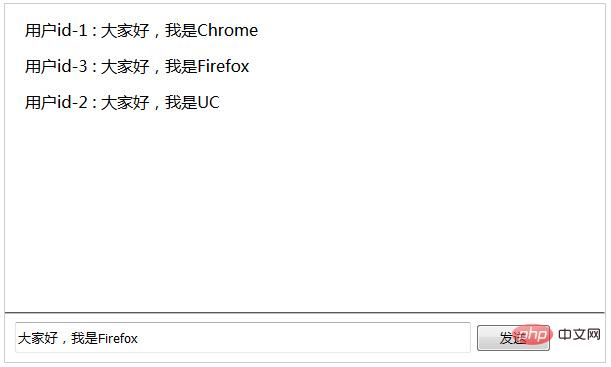
swoole introductory tutorials, welcome to learn online!
This article is reproduced from: https://blog.csdn.net/tdcqfyl/article/details/52370804The above is the detailed content of Learn how to build a chat room program using swoole in one article. For more information, please follow other related articles on the PHP Chinese website!

Hot AI Tools

Undresser.AI Undress
AI-powered app for creating realistic nude photos

AI Clothes Remover
Online AI tool for removing clothes from photos.

Undress AI Tool
Undress images for free

Clothoff.io
AI clothes remover

AI Hentai Generator
Generate AI Hentai for free.

Hot Article
Hot Tools

Notepad++7.3.1
Easy-to-use and free code editor

SublimeText3 Chinese version
Chinese version, very easy to use

Zend Studio 13.0.1
Powerful PHP integrated development environment

Dreamweaver CS6
Visual web development tools

SublimeText3 Mac version
God-level code editing software (SublimeText3)
Hot Topics
 1378
1378
 52
52

 How to use swoole coroutine in laravel
Apr 09, 2024 pm 06:48 PM
How to use swoole coroutine in laravel
Apr 09, 2024 pm 06:48 PM
Using Swoole coroutines in Laravel can process a large number of requests concurrently. The advantages include: Concurrent processing: allows multiple requests to be processed at the same time. High performance: Based on the Linux epoll event mechanism, it processes requests efficiently. Low resource consumption: requires fewer server resources. Easy to integrate: Seamless integration with Laravel framework, simple to use.
 How to use Swoole to implement a high-performance HTTP reverse proxy server
Nov 07, 2023 am 08:18 AM
How to use Swoole to implement a high-performance HTTP reverse proxy server
Nov 07, 2023 am 08:18 AM
How to use Swoole to implement a high-performance HTTP reverse proxy server Swoole is a high-performance, asynchronous, and concurrent network communication framework based on the PHP language. It provides a series of network functions and can be used to implement HTTP servers, WebSocket servers, etc. In this article, we will introduce how to use Swoole to implement a high-performance HTTP reverse proxy server and provide specific code examples. Environment configuration First, we need to install the Swoole extension on the server
 Which one is better, swoole or workerman?
Apr 09, 2024 pm 07:00 PM
Which one is better, swoole or workerman?
Apr 09, 2024 pm 07:00 PM
Swoole and Workerman are both high-performance PHP server frameworks. Known for its asynchronous processing, excellent performance, and scalability, Swoole is suitable for projects that need to handle a large number of concurrent requests and high throughput. Workerman offers the flexibility of both asynchronous and synchronous modes, with an intuitive API that is better suited for ease of use and projects that handle lower concurrency volumes.
 How to restart the service in swoole framework
Apr 09, 2024 pm 06:15 PM
How to restart the service in swoole framework
Apr 09, 2024 pm 06:15 PM
To restart the Swoole service, follow these steps: Check the service status and get the PID. Use "kill -15 PID" to stop the service. Restart the service using the same command that was used to start the service.
 How does swoole_process allow users to switch?
Apr 09, 2024 pm 06:21 PM
How does swoole_process allow users to switch?
Apr 09, 2024 pm 06:21 PM
Swoole Process allows users to switch. The specific steps are: create a process; set the process user; start the process.
 Which one has better performance, swoole or java?
Apr 09, 2024 pm 07:03 PM
Which one has better performance, swoole or java?
Apr 09, 2024 pm 07:03 PM
Performance comparison: Throughput: Swoole has higher throughput thanks to its coroutine mechanism. Latency: Swoole's coroutine context switching has lower overhead and smaller latency. Memory consumption: Swoole's coroutines occupy less memory. Ease of use: Swoole provides an easier-to-use concurrent programming API.
 Swoole in action: How to use coroutines for concurrent task processing
Nov 07, 2023 pm 02:55 PM
Swoole in action: How to use coroutines for concurrent task processing
Nov 07, 2023 pm 02:55 PM
Swoole in action: How to use coroutines for concurrent task processing Introduction In daily development, we often encounter situations where we need to handle multiple tasks at the same time. The traditional processing method is to use multi-threads or multi-processes to achieve concurrent processing, but this method has certain problems in performance and resource consumption. As a scripting language, PHP usually cannot directly use multi-threading or multi-process methods to handle tasks. However, with the help of the Swoole coroutine library, we can use coroutines to achieve high-performance concurrent task processing. This article will introduce
 Swoole Advanced: How to Optimize Server CPU Utilization
Nov 07, 2023 pm 12:27 PM
Swoole Advanced: How to Optimize Server CPU Utilization
Nov 07, 2023 pm 12:27 PM
Swoole is a high-performance PHP network development framework. With its powerful asynchronous mechanism and event-driven features, it can quickly build high-concurrency and high-throughput server applications. However, as the business continues to expand and the amount of concurrency increases, the CPU utilization of the server may become a bottleneck, affecting the performance and stability of the server. Therefore, in this article, we will introduce how to optimize the CPU utilization of the server while improving the performance and stability of the Swoole server, and provide specific optimization code examples. one,
