


sublime text3 simplified Chinese version Chinese tutorial


Today it suddenly occurred to me that there seems to be a powerful compiler sublime text 3, but this is a foreign compiler, but you don’t have to worry;
This compiler has Supports Chinese compilation:
The following column will introduce the Chinese translation method to you in the sublime tutorial column.
1:
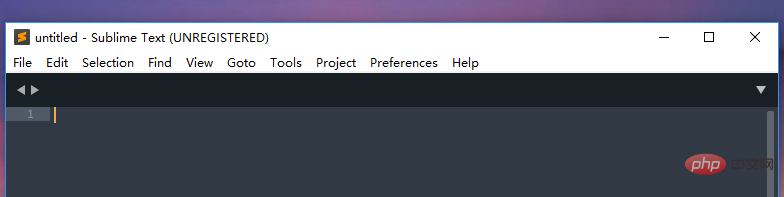
Start and enter the sublime main interface;
2:
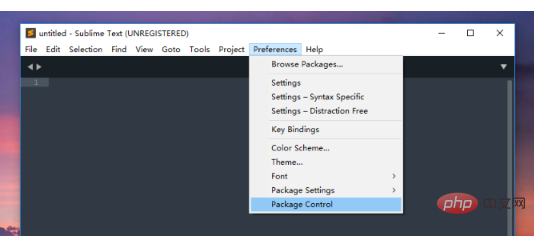
As shown in the picture, click "Preferences" in the menu bar, find "package control" in the pop-up options;
The following can only be described in text:
3:
Click on the blue one; a page will appear
Go to the next step and select "install package";
4:
Continue to the next step , try to enter "localization", because I have already installed it,
so the drop-down will no longer display the plug-in name,
5:
After installation, you can Check to see if there is this plug-in;
6:
You can find the language information in the help bar with simplified Chinese characters
Click to get the Chinese version .
The above is the detailed content of sublime text3 simplified Chinese version Chinese tutorial. For more information, please follow other related articles on the PHP Chinese website!

Hot AI Tools

Undress AI Tool
Undress images for free

Undresser.AI Undress
AI-powered app for creating realistic nude photos

AI Clothes Remover
Online AI tool for removing clothes from photos.

Clothoff.io
AI clothes remover

Video Face Swap
Swap faces in any video effortlessly with our completely free AI face swap tool!

Hot Article
Hot Tools

Notepad++7.3.1
Easy-to-use and free code editor

SublimeText3 Chinese version
Chinese version, very easy to use

Zend Studio 13.0.1
Powerful PHP integrated development environment

Dreamweaver CS6
Visual web development tools

SublimeText3 Mac version
God-level code editing software (SublimeText3)


 How to run Python code in Sublime Text
Aug 04, 2025 pm 04:25 PM
How to run Python code in Sublime Text
Aug 04, 2025 pm 04:25 PM
EnsurePythonisinstalledandaddedtoPATHbycheckingversioninterminal;2.Savefilewith.pyextension;3.UseCtrl Btorunviadefaultbuildsystem;4.CreateacustombuildsystemifneededbygoingtoTools>BuildSystem>NewBuildSystem,enteringthecorrectcmdforyourPythonvers
 How to run Python code in Sublime Text?
Aug 16, 2025 am 04:58 AM
How to run Python code in Sublime Text?
Aug 16, 2025 am 04:58 AM
Make sure that Python is installed and added to the system PATH, run python--version or python3--version verification through the terminal; 2. Save the Python file as a .py extension, such as hello.py; 3. Create a custom build system in SublimeText, Windows users use {"cmd":["python","-u","$file"]}, macOS/Linux users use {"cmd":["python3
 How to debug Python code in Sublime Text?
Aug 14, 2025 pm 04:51 PM
How to debug Python code in Sublime Text?
Aug 14, 2025 pm 04:51 PM
UseSublimeText’sbuildsystemtorunPythonscriptsandcatcherrorsbypressingCtrl Baftersettingthecorrectbuildsystemorcreatingacustomone.2.Insertstrategicprint()statementstocheckvariablevalues,types,andexecutionflow,usinglabelsandrepr()forclarity.3.Installth
 How to create a Python project in Sublime Text?
Aug 16, 2025 am 08:53 AM
How to create a Python project in Sublime Text?
Aug 16, 2025 am 08:53 AM
InstallSublimeTextandPython,thenconfigureabuildsystembycreatingaPython3.sublime-buildfilewiththeappropriatecmdandselectorsettingstoenablerunningPythonscriptsviaCtrl B.2.OrganizeyourprojectbycreatingadedicatedfolderwithPythonfilesandsupportingdocument
 How to run a Python script and see the output in a separate panel in Sublime Text?
Aug 17, 2025 am 06:06 AM
How to run a Python script and see the output in a separate panel in Sublime Text?
Aug 17, 2025 am 06:06 AM
ToseePythonoutputinaseparatepanelinSublimeText,usethebuilt-inbuildsystembysavingyourfilewitha.pyextensionandpressingCtrl B(orCmd B).2.EnsurethecorrectbuildsystemisselectedbygoingtoTools→BuildSystem→Pythonandconfirming"Python"ischecked.3.Ifn
 How to build and run Python in Sublime Text?
Aug 22, 2025 pm 03:37 PM
How to build and run Python in Sublime Text?
Aug 22, 2025 pm 03:37 PM
EnsurePythonisinstalledbyrunningpython--versionorpython3--versionintheterminal;ifnotinstalled,downloadfrompython.organdaddtoPATH.2.InSublimeText,gotoTools>BuildSystem>NewBuildSystem,replacecontentwith{"cmd":["python","-
 How to configure Sublime Text for Pygame development?
Aug 17, 2025 pm 12:23 PM
How to configure Sublime Text for Pygame development?
Aug 17, 2025 pm 12:23 PM
Install Python and Pygame, verify the installation by running importpygame and printing the version number; 2. Install PackageControl in SublimeText to manage plugins; 3. Install practical plugins such as Anaconda (or LSP), SublimeREPL, PythonExec, BracketHighlighter and ColorHighlighter through CommandPalette; 4. Create a custom build system Python_Pygame.sublime-build, and use "cmd":["python&
 How to run pytest in Sublime Text?
Aug 14, 2025 pm 02:29 PM
How to run pytest in Sublime Text?
Aug 14, 2025 pm 02:29 PM
CreateanewbuildsysteminSublimeTextviaTools>BuildSystem>NewBuildSystem,thenreplacethecontentwithaJSONconfigurationforpytestincludingvariantsforrunningalltests,verboseoutput,andcoverage.2.SavethefileasPytest.sublime-buildinthePackages/User/direct
