


How to set up a scheduled task to back up data and website files

The following section of the Pagoda Panel uses the tutorial column to introduce how to create scheduled tasks for backing up data and website files. I hope it will be helpful to friends in need!

Create scheduled tasks for backing up data and website files
Log in to the Pagoda Web Panel>> Click on the left menu bar " "Scheduled Task">> When adding a scheduled task, select "Backup Website" for the task type, "Daily" for the execution cycle, and "Everyday" for the execution period. It is recommended that the time be set after 2 a.m. to back up to "Server Disk" at less frequent times. Just keep the latest 3 copies by default, and then click the [Add] button. See the figure below for details:
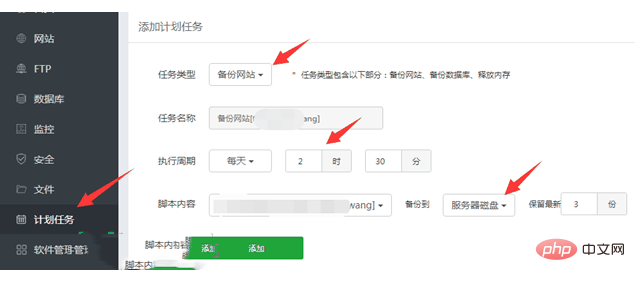
#After successfully adding the scheduled task, you can see the backup website plan we just added in the "Task List" below. In the same way, select "Backup Database" in the task type. The execution cycle time should not be the same. It is better to separate the two scheduled tasks by 30 minutes.

According to the prompts on the Pagoda panel: Insufficient disk capacity, incorrect database password, unstable network and other reasons may lead to incomplete data backup. Therefore, in order to ensure nothing goes wrong, when the backup is added The task should be run manually once and check whether the backup package is complete. However, [Pagoda Panel] In actual operation, when we successfully create a scheduled task, it will be automatically backed up once (PS: If there is no backup, you can click the "Execute" button on the right side of the corresponding task to back up).
The above is the detailed content of How to set up a scheduled task to back up data and website files. For more information, please follow other related articles on the PHP Chinese website!

Hot AI Tools

Undress AI Tool
Undress images for free

Undresser.AI Undress
AI-powered app for creating realistic nude photos

AI Clothes Remover
Online AI tool for removing clothes from photos.

Clothoff.io
AI clothes remover

Video Face Swap
Swap faces in any video effortlessly with our completely free AI face swap tool!

Hot Article
Hot Tools

Notepad++7.3.1
Easy-to-use and free code editor

SublimeText3 Chinese version
Chinese version, very easy to use

Zend Studio 13.0.1
Powerful PHP integrated development environment

Dreamweaver CS6
Visual web development tools

SublimeText3 Mac version
God-level code editing software (SublimeText3)


 How to configure UFW firewall through Pagoda panel
Jun 21, 2023 am 09:08 AM
How to configure UFW firewall through Pagoda panel
Jun 21, 2023 am 09:08 AM
Configuring a firewall on a Linux server is very important, as it can effectively protect the server from malicious attacks. On the Ubuntu operating system, we can use UFW firewall to protect the security of the server. In this article, we will introduce how to configure UFW firewall using Pagoda panel. Step 1: Install Pagoda Panel First, we need to install Pagoda Panel on Ubuntu. You can download the installation package of Pagoda Panel for free from the Pagoda official website, and then run the following command in the command line to install Pagoda Panel: $wget
 A brief analysis of the problem that the server cannot be remote after installing Pagoda
Nov 23, 2022 pm 04:56 PM
A brief analysis of the problem that the server cannot be remote after installing Pagoda
Nov 23, 2022 pm 04:56 PM
This article uses the Pagoda Panel Tutorial column to introduce to you the problem that server2022 cannot be remote after installing Pagoda. I wonder if you have encountered such a problem? Let me show you how I handle it!
 How to set the speed limit of the virtual host through the Pagoda panel
Jun 21, 2023 am 11:17 AM
How to set the speed limit of the virtual host through the Pagoda panel
Jun 21, 2023 am 11:17 AM
Pagoda Panel is a very excellent server management panel under Linux system. It has powerful functions and friendly interface, which can help users manage servers easily. In the process of using the Pagoda Panel, it is sometimes necessary to limit the speed of the virtual host to ensure the stability and fluency of the server. This article will introduce how to set the speed limit of the virtual host through the Pagoda panel to achieve a good user experience. 1. Overview of Speed Limit Speed limit refers to limiting the host bandwidth and ensuring the normal operation of the server by controlling the host traffic. exist
 How to use the Pagoda panel to set up domain name resolution
Jun 21, 2023 am 09:19 AM
How to use the Pagoda panel to set up domain name resolution
Jun 21, 2023 am 09:19 AM
With the development and popularization of the Internet, domain names have become an indispensable part of our online world. However, many people are still confused about the settings of domain name resolution. Today, we will introduce how to use the Pagoda panel to set up domain name resolution. What is DNS? Domain name resolution is the process of binding a domain name to the IP address of the website or server it represents. It is a process that converts human-readable domain names into computer-readable IP addresses. The main components of domain name resolution are: domain name registration, DNS resolution and we
 Introduction to the WebDAV file management function of Pagoda Panel
Jun 21, 2023 am 11:33 AM
Introduction to the WebDAV file management function of Pagoda Panel
Jun 21, 2023 am 11:33 AM
Introduction to the WebDAV file management function of Pagoda Panel WebDAV is a file management technology based on the HTTP protocol. It allows users to access files on the network through the HTTP protocol and manage these files. With the support of WebDAV technology, we can build a Web server to provide various network services. Pagoda Panel is a popular web server management tool that provides a wealth of functional modules, among which the WebDAV file management function is one of them. Below, this article
 How to use Pagoda Panel for reverse proxy cache configuration
Jun 21, 2023 pm 01:06 PM
How to use Pagoda Panel for reverse proxy cache configuration
Jun 21, 2023 pm 01:06 PM
With the continuous development of the Internet, the number of visits to the website is increasing, which also puts forward higher requirements for the performance of the website. Reverse proxy caching can improve the access speed of the website, reduce the load on the server, and provide users with a better access experience. This article will introduce how to use the Pagoda panel for reverse proxy cache configuration. 1. What is reverse proxy cache? Reverse proxy cache refers to adding a reverse proxy server between the server and the client. When the client initiates a request to the server, the request is not sent directly to the server, but is first sent to the reverse proxy server. To the agent
 What should I do if I get an error when deploying thinkphp5 in Pagoda?
Dec 19, 2022 am 11:04 AM
What should I do if I get an error when deploying thinkphp5 in Pagoda?
Dec 19, 2022 am 11:04 AM
Solution to the error reported when deploying thinkphp5 in Pagoda: 1. Open the Pagoda server, install the php pathinfo extension and enable it; 2. Configure the ".access" file with the content "RewriteRule ^(.*)$ index.php?s=/$1 [QSA ,PT,L]”; 3. In website management, just enable thinkphp’s pseudo-static.
 How to use Pagoda Panel for MySQL management
Jun 21, 2023 am 09:44 AM
How to use Pagoda Panel for MySQL management
Jun 21, 2023 am 09:44 AM
Pagoda Panel is a powerful panel software that can help us quickly deploy, manage and monitor servers, especially small businesses or individual users who often need to build websites, database management and server maintenance. Among these tasks, MySQL database management is an important job in many cases. So how to use the Pagoda panel for MySQL management? Next, we will introduce it step by step. Step 1: Install Pagoda Panel. Before starting to use Pagoda Panel for MySQL management, you first need to install Pagoda Panel.
