


How to adjust font size in notepad


How to enlarge or reduce the font size in notepad? When programming and developing Notepad, it is very difficult to read the code. How to modify the font size of the code? Let’s take a look at the detailed tutorial below. Friends who need it can refer to the
recommended tutorial: notepad graphic tutorial
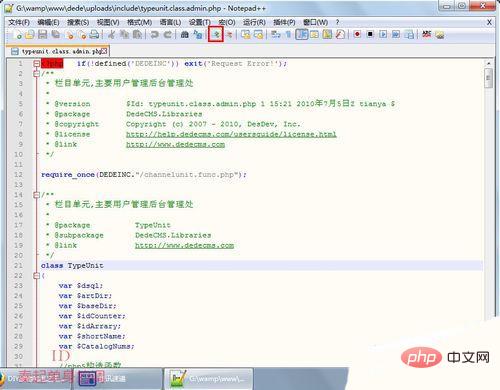
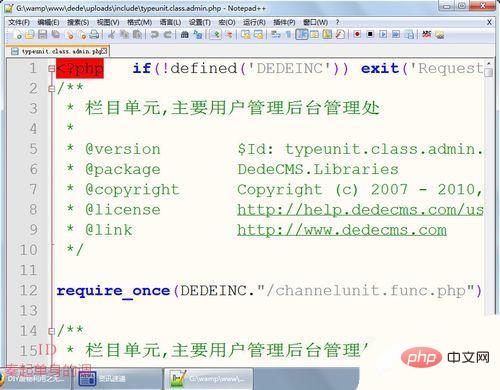
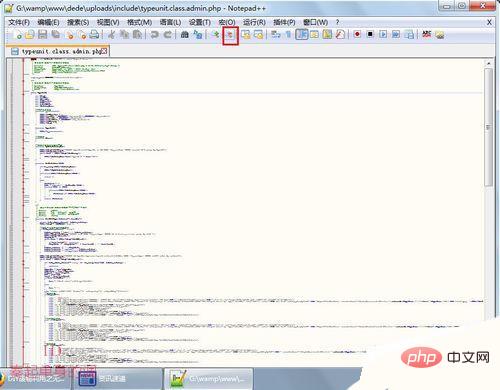
1. Open the notepad software. There are buttons to enlarge and reduce the font in the toolbar. Click once to enlarge or reduce the font by one pixel
Extended information
## Notepad is a text editor under the Windows operating system (Software copyright license: GPL), has a complete Chinese cultural interface and supports multi-language writing (UTF8 technology).Notepad is more powerful than Notepad in Windows. In addition to being used to create general plain text description files, it is also very suitable for writing computer program codes. Notepad not only has syntax highlighting, but also has a syntax folding function, and supports macros and plug-in modules that expand basic functions.
●Built-in support for up to 27 syntax highlighting displays (including various common source codes and scripts, which can well support .info file viewing), and also supports custom languages;
●Can automatically detect file types, display nodes according to keywords, nodes can be folded/opened freely, and indentation guide lines can also be displayed, and the code is displayed with a sense of hierarchy;
●Double windows can be opened, in Multiple sub-windows can be opened in the sub-window and the display ratio;
●Provides some useful tools, such as adjacent row swap positions, macro functions, etc...
●The selected item can be displayed The number of bytes of the text (instead of the number of words displayed by the general editor, which is very convenient in some cases, such as software localization);
●Regular matching strings and batch replacement;
●Powerful plug-in mechanism expands editing capabilities, such as Zen Coding.
The above is the detailed content of How to adjust font size in notepad. For more information, please follow other related articles on the PHP Chinese website!

Hot AI Tools

Undress AI Tool
Undress images for free

Undresser.AI Undress
AI-powered app for creating realistic nude photos

AI Clothes Remover
Online AI tool for removing clothes from photos.

Clothoff.io
AI clothes remover

Video Face Swap
Swap faces in any video effortlessly with our completely free AI face swap tool!

Hot Article
Hot Tools

Notepad++7.3.1
Easy-to-use and free code editor

SublimeText3 Chinese version
Chinese version, very easy to use

Zend Studio 13.0.1
Powerful PHP integrated development environment

Dreamweaver CS6
Visual web development tools

SublimeText3 Mac version
God-level code editing software (SublimeText3)


 How to format json in notepad
Apr 16, 2025 pm 07:48 PM
How to format json in notepad
Apr 16, 2025 pm 07:48 PM
Use the JSON Viewer plug-in in Notepad to easily format JSON files: Open a JSON file. Install and enable the JSON Viewer plug-in. Go to "Plugins" > "JSON Viewer" > "Format JSON". Customize indentation, branching, and sorting settings. Apply formatting to improve readability and understanding, thus simplifying processing and editing of JSON data.
 How to run java code in notepad
Apr 16, 2025 pm 07:39 PM
How to run java code in notepad
Apr 16, 2025 pm 07:39 PM
Although Notepad cannot run Java code directly, it can be achieved by using other tools: using the command line compiler (javac) to generate a bytecode file (filename.class). Use the Java interpreter (java) to interpret bytecode, execute the code, and output the result.
 How to run python with notepad
Apr 16, 2025 pm 07:33 PM
How to run python with notepad
Apr 16, 2025 pm 07:33 PM
Running Python code in Notepad requires the Python executable and NppExec plug-in to be installed. After installing Python and adding PATH to it, configure the command "python" and the parameter "{CURRENT_DIRECTORY}{FILE_NAME}" in the NppExec plug-in to run Python code in Notepad through the shortcut key "F6".
 How to use notepad
Apr 16, 2025 pm 08:09 PM
How to use notepad
Apr 16, 2025 pm 08:09 PM
Notepad is a free text editor for Windows, which offers a variety of features such as: 1) syntax highlighting, 2) autocomplete, 3) macro recording, 4) plug-in extensions, 5) customizable interfaces and settings.
 How to automatically type notepad
Apr 16, 2025 pm 08:06 PM
How to automatically type notepad
Apr 16, 2025 pm 08:06 PM
Notepad itself does not have automatic layout function. We can use a third-party text editor, such as Sublime Text, to perform the following steps to achieve automatic typography: 1. Install and open the text editor. 2. Open the file that needs to be automatically typed. 3. Find and select the automatic layout function. 4. The editor will automatically type the text. 5. You can customize the layout rules as needed. Automatic typography can save time and ensure text consistency and professionalism.
 How to set notepad into Chinese
Apr 16, 2025 pm 07:30 PM
How to set notepad into Chinese
Apr 16, 2025 pm 07:30 PM
How to set Chinese display in Notepad: Open Notepad. Click the "Format" menu. Select Font. Select Chinese fonts in the Font dialog box. Click OK.
 How to use notepad plugin
Apr 16, 2025 pm 07:36 PM
How to use notepad plugin
Apr 16, 2025 pm 07:36 PM
To use Notepad plugins, install them from the plugin manager and restart the editor. You can use plug-ins through menu items, shortcut keys, or custom toolbars. Useful plug-in examples include: Find in Files, AutoHide, Hex Editor, XML Tools, and TabMix Plus, which are used to search multiple files, automatically hide toolbars, edit binary files, edit XML documents, and improve tab management.
 How to set important Git configuration global properties
Apr 17, 2025 pm 12:21 PM
How to set important Git configuration global properties
Apr 17, 2025 pm 12:21 PM
There are many ways to customize a development environment, but the global Git configuration file is one that is most likely to be used for custom settings such as usernames, emails, preferred text editors, and remote branches. Here are the key things you need to know about global Git configuration files.
