


What is the apache port number?


In the WEB SERVER world, whether it is Microsoft's IIS or the world's number one Apache, the default web service port number after installation is 80.
After Apache is installed, there will be a text document such as httpd.conf in the conf folder under its installation directory. It is the configuration file of Apache and is used to direct the operation of Apache and the default web service of Apache. The port number is of course configured (modified) here.
To modify this file, you must first open it, just double-click it, then press the Ctrl F key combination on the keyboard at the same time, and enter Listen 80 in the pop-up "Find" dialog box:
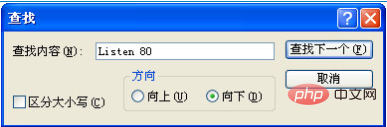
In the found "Listen 80" string (this is the only one), change 80 to 8000 or 8080. In short, it can be any number you like (about the port number) The knowledge is not within the scope of this article, you can learn about it yourself, and the ports cannot be used randomly).
There is a string of characters like "#Listen 12.34.56.78:80" above "Listen 80". The 80 here does not have to change with the 80 in "Listen 80". It can be changed or not. , this is just a sample.
After completing the above operation, press the Ctrl S key combination on the keyboard at the same time to save, and then close to complete the modification of the Apache default web service port number. Be sure to stop (STOP) the Apache service once and then restart Start (START) to make the changes just made take effect.
But please note that if you change the default port number (for example, change Listen 80 to Listen 8080);
then you will not be able to access http://localhost or http: //127.0.0.1 to open the web page located on the Apache server. You must add a colon port number after the address, such as http://localhost:8080 or http://127.0.0.1:8080. Only in this way can you access the web page located on the Apache server. Web pages in the server.
For more Apache related knowledge, please visit the Apache usage tutorial column!
The above is the detailed content of What is the apache port number?. For more information, please follow other related articles on the PHP Chinese website!

Hot AI Tools

Undress AI Tool
Undress images for free

Undresser.AI Undress
AI-powered app for creating realistic nude photos

AI Clothes Remover
Online AI tool for removing clothes from photos.

Clothoff.io
AI clothes remover

Video Face Swap
Swap faces in any video effortlessly with our completely free AI face swap tool!

Hot Article
Hot Tools

Notepad++7.3.1
Easy-to-use and free code editor

SublimeText3 Chinese version
Chinese version, very easy to use

Zend Studio 13.0.1
Powerful PHP integrated development environment

Dreamweaver CS6
Visual web development tools

SublimeText3 Mac version
God-level code editing software (SublimeText3)


 How to install a Let's Encrypt SSL certificate on Apache?
Aug 04, 2025 am 09:47 AM
How to install a Let's Encrypt SSL certificate on Apache?
Aug 04, 2025 am 09:47 AM
Install Certbot and its Apache plug-in; 2. Run Certbot to obtain the certificate and configure the domain name; 3. Optionally configure automatic redirection from HTTP to HTTPS; 4. Set up automatic renewal and pass dry-run test; 5. Verify the installation and ensure the normal reload configuration of Apache. After the certificate is successfully deployed, renewal will be automatically managed. After the entire process is completed, secure HTTPS access can be achieved.
 Apache performance tuning best practices
Aug 05, 2025 am 06:59 AM
Apache performance tuning best practices
Aug 05, 2025 am 06:59 AM
UseEventMPMforhigh-concurrencyworkloads,especiallywithPHP-FPM,orPreforkonlyifrequiredbynon-thread-safemodules.2.EnableKeepAlivewithMaxKeepAliveRequestssetto100andKeepAliveTimeoutbetween2–5secondstobalanceconnectionreuseandresourceusage.3.ConfigureEve
 How to upgrade Apache to the latest version?
Aug 04, 2025 pm 03:18 PM
How to upgrade Apache to the latest version?
Aug 04, 2025 pm 03:18 PM
Checkcurrentapacheversionusinghttpd-Vorapache2-VandverifyServicStatusviaSystl.2.ondebian/Ubuntu, UpgradeusingsudoApdat EandsudoAptinstallapache2, Optionallyaddingtheppa: Ondrej/Apache2ForneWerversions.3.Onrhel/Centos/Fedora, USESUDODNFUPDATADADAGSUD
 How to resolve apache cannot load libphp.so into server
Aug 08, 2025 am 06:07 AM
How to resolve apache cannot load libphp.so into server
Aug 08, 2025 am 06:07 AM
First,verifythelibphp.sofileexistsusingfindorlocatecommands;ifmissing,reinstallPHPwithApachesupportviapackagemanager.2.CheckApacheconfigurationfilesforcorrectLoadModuledirectivepathandremoveduplicates.3.EnsureApacheandPHPversionsandarchitecturesmatch
 Where is the Apache configuration file?
Aug 08, 2025 am 01:20 AM
Where is the Apache configuration file?
Aug 08, 2025 am 01:20 AM
OnDebian/Ubuntu,themainApacheconfigurationfileis/etc/apache2/apache2.conf,withadditionalconfigurationsin/etc/apache2/sites-available/and/etc/apache2/conf-available/.2.OnRHEL/CentOS/Fedora,itistypically/etc/httpd/conf/httpd.conf,withextrafilesin/etc/h
 What is the default Apache port?
Aug 14, 2025 pm 01:02 PM
What is the default Apache port?
Aug 14, 2025 pm 01:02 PM
ThedefaultApacheportforHTTPis80.1.Port80isusedforunencryptedHTTPtrafficandisthestandardforwebserversincludingApache.2.WhenaURLisenteredwithoutaspecifiedport,browsersautomaticallyconnecttoport80.3.ForHTTPStraffic,thedefaultportis443,commonlyconfigured
 How to fix apache not recognizing .htaccess files
Aug 21, 2025 am 04:39 AM
How to fix apache not recognizing .htaccess files
Aug 21, 2025 am 04:39 AM
EnsureAllowOverrideissettoAllinthedirectoryconfigurationinsteadofNoneinApache’sconfigfile.2.Placethe.htaccessfileinthecorrectdirectorywithpropernameandchmod644permissions.3.ConfirmAccessFileNameissetto.htaccessandnotoverridden.4.Testfor.htaccesssynta
 Solving apache misconfigured for ssl
Aug 11, 2025 pm 01:29 PM
Solving apache misconfigured for ssl
Aug 11, 2025 pm 01:29 PM
Enablethemod_sslmoduleusingsudoa2enmodsslandrestartApachewithsudosystemctlrestartapache2;onRHEL/CentOS,installitviasudoyuminstallmod_sslorsudodnfinstallmod_ssl.2.EnsureacorrectblockexistswithSSLEngineon,validSSLCertificateFile,SSLCertificateKeyFile,a
