


Practical project in vue+iview+less+echarts (detailed tutorial)

This article is a summary of the author’s experience and pitfalls after learning vue iview less echarts to create a small system. It is worth learning and reference.
First of all, let’s share the source code: https://github.com/kunfan96/vue-admin
For a novice like me who just started using Vue to do projects, in the component data definition I made a lot of mistakes, especially on this page
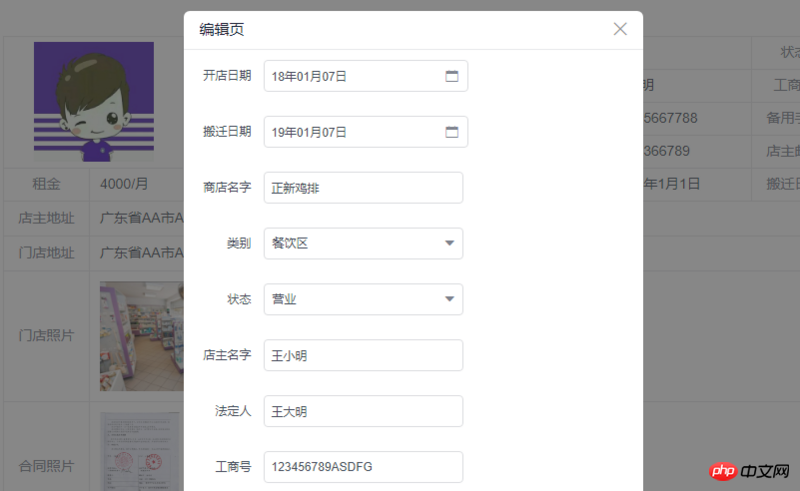
when I redefined the predetermined data when performing data selection, resulting in very messy data, specifically in storeDetail. Lines 14--321 of vue, I feel that it is very necessary to cut out so much data, and use js to perform calculations to complete the data. This relatively reduces the background tasks a lot, but only increases the amount of front-end rendering data
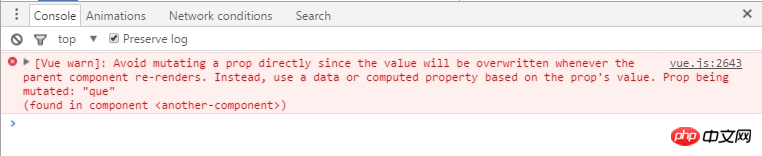
Data communication issues between parent and child components
When I first started writing Modal, the data shared by the modal parent and child components was switched on and off. Then when it was closed, the child component changed the data passed by the parent component. An error will be reported, which is the value of props
Component naming method
Here I have defined the folders myself using big camel case naming, such as the folders Store and Shop, and the files and variables using small camel case naming, if storeDetail.vue, parcelList.vueUse flex more
In 2018, flex will be the mainstream, and there is no need to pay attention to compatibility issues. Pay more attention to the grid layout, which may also become popularMulti-use lazy loading
Using lazy loading is convenient and can bring a better user experience when the bandwidth is low. Referring to the iview admin code, I unified the usage of lazy loading as{
path:"/parcel-list",
meta:{
group:"parcel",
item:"parcel-list"
},
component: resolve =>import('@/pages/Parcel/parcelList')
}Sidebar refresh problem
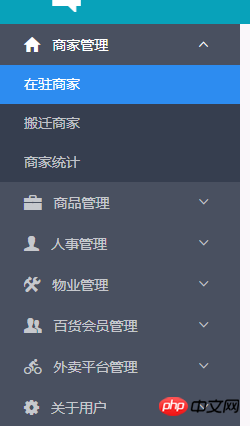
meta:{
  group:"",
  item:""
}Remember npm run build
iview has some problems. Sometimes it is necessary to modify the Modal style. I clearly changed the npm run dev style successfully after modifying the style (without scoped) tag. , but the style is restored after the build. Later, the style can be modified successfully by placing it in the static folder. Also, the table cannot be centered after the build. In short, it is a good thing to discover and solve the multi-build problem early (don’t forget to Department~~~)Use of Echarts in VUE
There is a pitfall here. When instantiating echarts, there is a piece of code in chart.vue
<p :id="chart.id"></p>
 let myChart=this.$echarts.init(document.getElementById(this.chart.id))
Write more public components
The essence of the framework is to reduce code. When the public components are written and called, use data rendering. Okay, this can greatly reduce the amount of code, and it is also in line with the idea of MVVMThe above is what I compiled for everyone, I hope it will be helpful to everyone in the future. Related articles:What are the process steps for publishing a vue project online through Baidu’s BAE after being packaged?
What are the steps to use content projection to input the ngForOf template to the component through Angular?
What are the steps to set the request and return the interceptor through axios global request parameters?
The above is the detailed content of Practical project in vue+iview+less+echarts (detailed tutorial). For more information, please follow other related articles on the PHP Chinese website!

Hot AI Tools

Undresser.AI Undress
AI-powered app for creating realistic nude photos

AI Clothes Remover
Online AI tool for removing clothes from photos.

Undress AI Tool
Undress images for free

Clothoff.io
AI clothes remover

AI Hentai Generator
Generate AI Hentai for free.

Hot Article
Hot Tools

Notepad++7.3.1
Easy-to-use and free code editor

SublimeText3 Chinese version
Chinese version, very easy to use

Zend Studio 13.0.1
Powerful PHP integrated development environment

Dreamweaver CS6
Visual web development tools

SublimeText3 Mac version
God-level code editing software (SublimeText3)
Hot Topics
 1378
1378
 52
52

 How to add functions to buttons for vue
Apr 08, 2025 am 08:51 AM
How to add functions to buttons for vue
Apr 08, 2025 am 08:51 AM
You can add a function to the Vue button by binding the button in the HTML template to a method. Define the method and write function logic in the Vue instance.
 How to reference js file with vue.js
Apr 07, 2025 pm 11:27 PM
How to reference js file with vue.js
Apr 07, 2025 pm 11:27 PM
There are three ways to refer to JS files in Vue.js: directly specify the path using the <script> tag;; dynamic import using the mounted() lifecycle hook; and importing through the Vuex state management library.
 How to use watch in vue
Apr 07, 2025 pm 11:36 PM
How to use watch in vue
Apr 07, 2025 pm 11:36 PM
The watch option in Vue.js allows developers to listen for changes in specific data. When the data changes, watch triggers a callback function to perform update views or other tasks. Its configuration options include immediate, which specifies whether to execute a callback immediately, and deep, which specifies whether to recursively listen to changes to objects or arrays.
 How to use bootstrap in vue
Apr 07, 2025 pm 11:33 PM
How to use bootstrap in vue
Apr 07, 2025 pm 11:33 PM
Using Bootstrap in Vue.js is divided into five steps: Install Bootstrap. Import Bootstrap in main.js. Use the Bootstrap component directly in the template. Optional: Custom style. Optional: Use plug-ins.
 How to return to previous page by vue
Apr 07, 2025 pm 11:30 PM
How to return to previous page by vue
Apr 07, 2025 pm 11:30 PM
Vue.js has four methods to return to the previous page: $router.go(-1)$router.back() uses <router-link to="/" component window.history.back(), and the method selection depends on the scene.
 Vue realizes marquee/text scrolling effect
Apr 07, 2025 pm 10:51 PM
Vue realizes marquee/text scrolling effect
Apr 07, 2025 pm 10:51 PM
Implement marquee/text scrolling effects in Vue, using CSS animations or third-party libraries. This article introduces how to use CSS animation: create scroll text and wrap text with <div>. Define CSS animations and set overflow: hidden, width, and animation. Define keyframes, set transform: translateX() at the beginning and end of the animation. Adjust animation properties such as duration, scroll speed, and direction.
 How to query the version of vue
Apr 07, 2025 pm 11:24 PM
How to query the version of vue
Apr 07, 2025 pm 11:24 PM
You can query the Vue version by using Vue Devtools to view the Vue tab in the browser's console. Use npm to run the "npm list -g vue" command. Find the Vue item in the "dependencies" object of the package.json file. For Vue CLI projects, run the "vue --version" command. Check the version information in the <script> tag in the HTML file that refers to the Vue file.
 How to use function intercept vue
Apr 08, 2025 am 06:51 AM
How to use function intercept vue
Apr 08, 2025 am 06:51 AM
Function interception in Vue is a technique used to limit the number of times a function is called within a specified time period and prevent performance problems. The implementation method is: import the lodash library: import { debounce } from 'lodash'; Use the debounce function to create an intercept function: const debouncedFunction = debounce(() => { / Logical / }, 500); Call the intercept function, and the control function is called at most once in 500 milliseconds.
