


 Web Front-end
JS Tutorial
How to handle repeated submission of data when the Vue button is clicked multiple times
Web Front-end
JS Tutorial
How to handle repeated submission of data when the Vue button is clicked multiple times
How to handle repeated submission of data when the Vue button is clicked multiple times

This time I will show you how to handle multiple clicks of the vue button and repeated submission of data. What are the precautions for dealing with multiple clicks of the vue button? . Here is a practical case. Let’s take a look. .
This is actually a very detailed issue. If we operate a button, then bind the event when the button is clicked.
Events are divided into two situations:
•The first one: No data type operation
•The second type: Operation data type
<template>
 <button @click="submit()" :disabled="isDisable">点击</button>
</template>
<script>
 export default {
  name: 'TestButton',
  data: function () {
   return {
    isDisable: false
   }
  },
  methods: {
   submit() {
    this.isDisable = true
    setTimeout(() => {
     this.isDisable = false
    }, 1000)
   }
  },
 }
</script>here We control isDisable to set disabled to control whether the button is clickable or unclickable. The default isDisable: value is false and the button can be clicked. When we click this button, first set the button's binding isDisable to true, and immediately set it to false after 1 second. So the user only has one second to operate this button.
The following is an example code for everyone
Button in vue multiple clicks to submit the example code
sendComment () {
this.disabled = true
if (this.text == ''){
this.$message({
type:'error',
message:'输入内容不能为空',
})
this.disabled = false
}else{
this.$post('/xx/xx/IdleGoodsComment',{
goods_id:this.$route.params.id,
content:this.text,
user_id:window.uId,
type:1
}).then((res) => {
if(res){
this.getDetail()
setTimeout(()=>{
this.disabled=false
this.getCommentList()
this.text = ''}
,2000)
this.disabled = true
}
})
}
}implementation Principle: The buttonattribute is changed through the timer. After clicking, the button attribute is set to disable
The disable attribute of the vue-bound button is: disabled:'Variable name'
I believe you have mastered the method after reading the case in this article. For more exciting information, please pay attention to other related articles on the php Chinese website!
Recommended reading:
Detailed explanation of the steps to implement a simple calculator in JS
React routing management Detailed explanation of the steps to use React Router
The above is the detailed content of How to handle repeated submission of data when the Vue button is clicked multiple times. For more information, please follow other related articles on the PHP Chinese website!

Hot AI Tools

Undresser.AI Undress
AI-powered app for creating realistic nude photos

AI Clothes Remover
Online AI tool for removing clothes from photos.

Undress AI Tool
Undress images for free

Clothoff.io
AI clothes remover

AI Hentai Generator
Generate AI Hentai for free.

Hot Article
Hot Tools

Notepad++7.3.1
Easy-to-use and free code editor

SublimeText3 Chinese version
Chinese version, very easy to use

Zend Studio 13.0.1
Powerful PHP integrated development environment

Dreamweaver CS6
Visual web development tools

SublimeText3 Mac version
God-level code editing software (SublimeText3)
Hot Topics
 1385
1385
 52
52

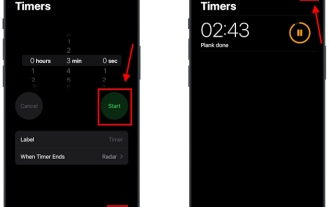 How to set multiple timers on iPhone iOS 17
Sep 18, 2023 am 09:01 AM
How to set multiple timers on iPhone iOS 17
Sep 18, 2023 am 09:01 AM
In iOS 17, you can set multiple timers on your iPhone using the Clock app, or use Siri to set it hands-free. We discuss both in this article. Let's take a look at them. Set Multiple Timers on iPhone Using the Clock App Open the Clock app on your iPhone and tap the Timers tab in the lower right corner. Now, set the hours, minutes, and seconds. You can use the "Label" and "When does the timer end" options to set a name for the timer and a preferred tone when the timer completes. This will help you differentiate between timers. Once done, click the "Start" button. Then, click the "+" icon in the upper right corner. Now, repeat the above steps to set multiple timers on iPhone. You can also browse
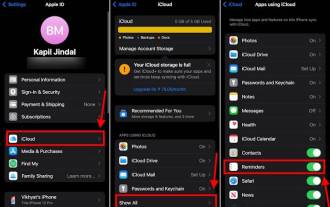 How to Make a Shopping List in the iOS 17 Reminders App on iPhone
Sep 21, 2023 pm 06:41 PM
How to Make a Shopping List in the iOS 17 Reminders App on iPhone
Sep 21, 2023 pm 06:41 PM
How to Make a GroceryList on iPhone in iOS17 Creating a GroceryList in the Reminders app is very simple. You just add a list and populate it with your items. The app automatically sorts your items into categories, and you can even work with your partner or flat partner to make a list of what you need to buy from the store. Here are the full steps to do this: Step 1: Turn on iCloud Reminders As strange as it sounds, Apple says you need to enable reminders from iCloud to create a GroceryList on iOS17. Here are the steps for it: Go to the Settings app on your iPhone and tap [your name]. Next, select i
![How to set up my business card in Contacts on iPhone [2023]](https://img.php.cn/upload/article/000/465/014/169538863364905.jpg?x-oss-process=image/resize,m_fill,h_207,w_330) How to set up my business card in Contacts on iPhone [2023]
Sep 22, 2023 pm 09:17 PM
How to set up my business card in Contacts on iPhone [2023]
Sep 22, 2023 pm 09:17 PM
With My Business Cards in iOS, you can create a personalized contact card that Siri and other services recognize and associate with you and your phone number. With the introduction of contact posters in iOS17, My Cards becomes very important as it is now used to create your contact posters. If you're eager to get your contact poster up and running, you have to start by setting up My Business Card. We'll walk through how to create a My Business Card and how to make it work smoothly with Siri and your contact poster. How to Set Up My Business Cards in Contacts on iPhone [2023] If you are setting up My Business Cards on your iPhone for the first time, you must do it through the Contacts app only
![How to turn off alarms on iPhone [2023]](https://img.php.cn/upload/article/000/465/014/169259550735100.png?x-oss-process=image/resize,m_fill,h_207,w_330) How to turn off alarms on iPhone [2023]
Aug 21, 2023 pm 01:25 PM
How to turn off alarms on iPhone [2023]
Aug 21, 2023 pm 01:25 PM
Since the advent of smartphones, they have undoubtedly replaced alarm clocks. If you own an iPhone, you can use the Clock app to easily set as many alarms for multiple occasions throughout the day. The app lets you configure the alarm time, the tone, how often it repeats, and whether you want to delay them using the Snooze option. If you want to turn off the alarm you have set, the following post should help you disable and delete regular alarms and wake-up alarms on your iPhone. How to Turn Off a Regular Alarm on iPhone By default, when you add an alarm on the Clock app or ask Siri to add an alarm for you, you're actually creating a regular alarm. You can create as many alarm clocks on your iPhone as you like and put them
 How to solve the problem of infinite loop of opening web pages in Edge browser
Dec 25, 2023 pm 01:19 PM
How to solve the problem of infinite loop of opening web pages in Edge browser
Dec 25, 2023 pm 01:19 PM
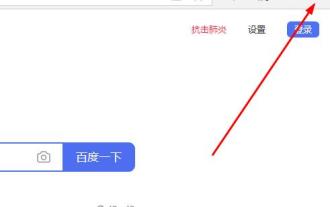
Many friends who use the edge browser on win10 have encountered the problem of web pages opening repeatedly, which is a headache. So how to solve it? Let’s take a look at the detailed solutions below. What to do if the edge browser keeps opening web pages repeatedly: 1. Enter the edge browser and click the three dots in the upper right corner. 2. Click "Settings" in the taskbar. 3. Find "Microsoft edge opening method". 4. Click the drop-down menu and select "Start Page". 5. Restart the browser after completion to solve the problem.
 How to change contact photos on iPhone
Jun 08, 2023 pm 03:44 PM
How to change contact photos on iPhone
Jun 08, 2023 pm 03:44 PM
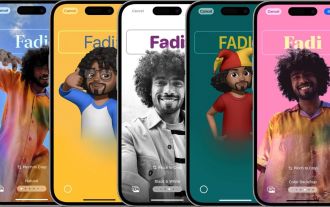
iOS17 is finally here, and it includes a lot of new features. Let's learn how to change contact photos on iPhone in today's tutorial. Apple's recent WWDC 2023 event unveiled a slew of exciting products and upcoming software updates. One of the notable features of iOS 17 is the option to customize your contact photos and posters, providing a unique way to greet others when they receive a call from you on their iPhone. This innovative feature for iOS is designed to make phone calls more personal and user-friendly, allowing you to choose how they appear on the recipient's screen. If you're eager to get your hands on this new feature and greet your loved ones in a personalized way when making calls, here's how to add it to your iPhone
 MySQL transaction processing: the difference between automatic submission and manual submission
Mar 16, 2024 am 11:33 AM
MySQL transaction processing: the difference between automatic submission and manual submission
Mar 16, 2024 am 11:33 AM
MySQL transaction processing: the difference between automatic submission and manual submission. In the MySQL database, a transaction is a set of SQL statements. Either all executions are successful or all executions fail, ensuring the consistency and integrity of the data. In MySQL, transactions can be divided into automatic submission and manual submission. The difference lies in the timing of transaction submission and the scope of control over the transaction. The following will introduce the difference between automatic submission and manual submission in detail, and give specific code examples to illustrate. 1. Automatically submit in MySQL, if it is not displayed
 How to implement the click-to-zoom-in and zoom-out function of images through Vue?
Aug 18, 2023 pm 08:43 PM
How to implement the click-to-zoom-in and zoom-out function of images through Vue?
Aug 18, 2023 pm 08:43 PM
How to implement the click-to-zoom-in and zoom-out function of images through Vue? In modern web development, clicking to zoom in and out of images is a common requirement. As a popular front-end framework, Vue provides rich functions and concise syntax, which can easily implement this function. This article will introduce how to implement the click-to-zoom-in and zoom-out function of images through Vue, and provide code examples. First, we need a component that contains multiple images. You can use Vue's v-for directive to dynamically render the image list. The following is a simple
