


 Backend Development
PHP Tutorial
Examples of using Qiniu cloud storage developed by ThinkPHP (pictures and text)
Backend Development
PHP Tutorial
Examples of using Qiniu cloud storage developed by ThinkPHP (pictures and text)
Examples of using Qiniu cloud storage developed by ThinkPHP (pictures and text)

This article is about the methods and specific examples of using Qiniu cloud storage in the thinkphp development series. It is very simple. Friends in need can refer to it

ThinkPHP development-- Using Qiniu Cloud Storage
Qiniu Cloud Storage is one of the thinkphp storage type options. How to use it? Okay, let’s not get too involved. Here is a detailed introduction to how to use it
The first thing is to register a Qiniu account.
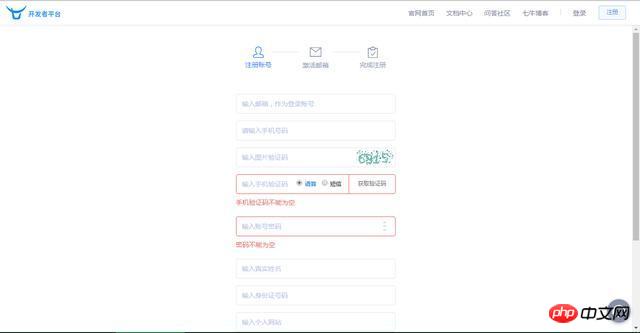
ThinkPHP development--use Qiniu Cloud Storage
then log in
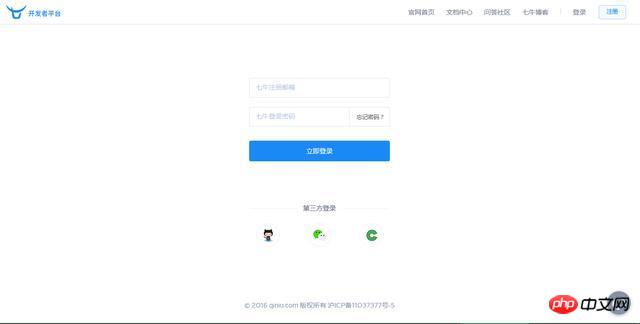
ThinkPHP Development--Use Qiniu Cloud Storage
Then select Add Resources and select Object Storage
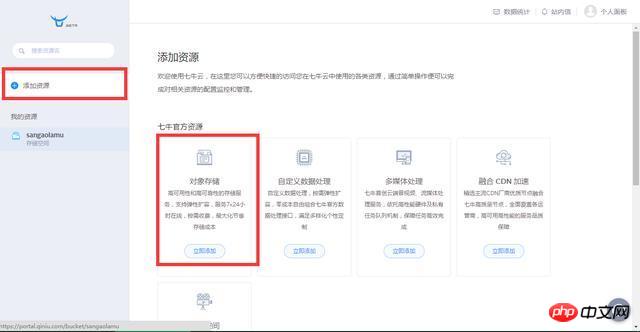
ThinkPHP Development--Use Qiniu Cloud Storage
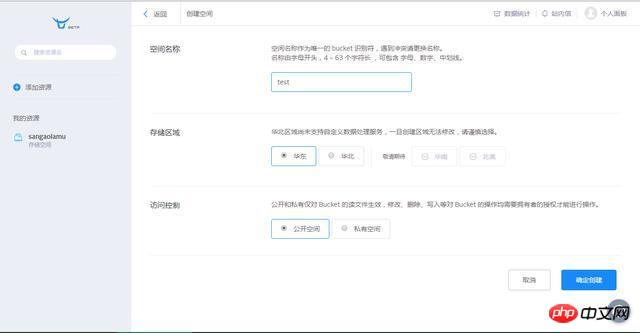
ThinkPHP development--using Qiniu Cloud Storage
Then fill in the space name (i.e. bucket, this name will be used later), and the access control is public (Choose public access for ease of operation. Of course, you can also choose private, but authorization is required when requesting resources.) Confirm creation.
Enter the resource you just created and record the domain name
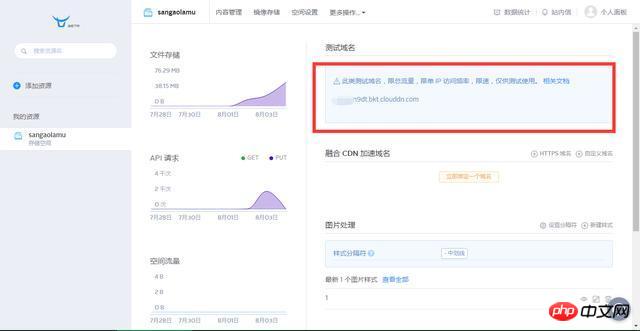
ThinkPHP development--use Qiniu Cloud Storage
Select in the personal panel Key Management Here you can get your AccessKey and SecretKey. The preparations are done, the following is the specific configuration and code implementation.
Make the following configuration in the configuration file config.php
'config_qiniu' => array( 'accessKey' => '', //这里填七牛AK 'secretKey' => '', //这里填七牛SK 'domain' => '',//这里是域名 'bucket' => 'sangaolamu'//这里是七牛中的“空间” ), 'config' => array( 'maxSize' => 5*1024*1024, 'rootPath' => './Uploads/', 'savePath' => '', 'saveName' => array('uniqid',''), 'exts' => array('jpg', 'gif', 'png', 'jpeg'), 'autoSub' => true, 'subName' => array('date','Ymd'), ), //然后在需要调用上传的地方将原来上传到本地代码片段修改为以下代码 $config = C('config'); $config_qiniu = C('config_qiniu'); $upload = new ThinkUpload($config,'Qiniu',$config_qiniu); $info = $upload->upload();
$info is the information returned after uploading, where url is the address of the file, in the form of [url ] => http://ob9pbn9dt.bkt.clouddn.com/20160802_57a05d764e1f4.jpg, save this field, and access this address when accessing later. At this point, the file has been uploaded to Qiniu Cloud for storage. I will give examples of how to delete and other operations later.
The above is the detailed content of Examples of using Qiniu cloud storage developed by ThinkPHP (pictures and text). For more information, please follow other related articles on the PHP Chinese website!

Hot AI Tools

Undresser.AI Undress
AI-powered app for creating realistic nude photos

AI Clothes Remover
Online AI tool for removing clothes from photos.

Undress AI Tool
Undress images for free

Clothoff.io
AI clothes remover

AI Hentai Generator
Generate AI Hentai for free.

Hot Article
Hot Tools

Notepad++7.3.1
Easy-to-use and free code editor

SublimeText3 Chinese version
Chinese version, very easy to use

Zend Studio 13.0.1
Powerful PHP integrated development environment

Dreamweaver CS6
Visual web development tools

SublimeText3 Mac version
God-level code editing software (SublimeText3)
Hot Topics
 1378
1378
 52
52

 PHP 8.4 Installation and Upgrade guide for Ubuntu and Debian
Dec 24, 2024 pm 04:42 PM
PHP 8.4 Installation and Upgrade guide for Ubuntu and Debian
Dec 24, 2024 pm 04:42 PM
PHP 8.4 brings several new features, security improvements, and performance improvements with healthy amounts of feature deprecations and removals. This guide explains how to install PHP 8.4 or upgrade to PHP 8.4 on Ubuntu, Debian, or their derivati
 How To Set Up Visual Studio Code (VS Code) for PHP Development
Dec 20, 2024 am 11:31 AM
How To Set Up Visual Studio Code (VS Code) for PHP Development
Dec 20, 2024 am 11:31 AM
Visual Studio Code, also known as VS Code, is a free source code editor — or integrated development environment (IDE) — available for all major operating systems. With a large collection of extensions for many programming languages, VS Code can be c
 How do you parse and process HTML/XML in PHP?
Feb 07, 2025 am 11:57 AM
How do you parse and process HTML/XML in PHP?
Feb 07, 2025 am 11:57 AM
This tutorial demonstrates how to efficiently process XML documents using PHP. XML (eXtensible Markup Language) is a versatile text-based markup language designed for both human readability and machine parsing. It's commonly used for data storage an
 PHP Program to Count Vowels in a String
Feb 07, 2025 pm 12:12 PM
PHP Program to Count Vowels in a String
Feb 07, 2025 pm 12:12 PM
A string is a sequence of characters, including letters, numbers, and symbols. This tutorial will learn how to calculate the number of vowels in a given string in PHP using different methods. The vowels in English are a, e, i, o, u, and they can be uppercase or lowercase. What is a vowel? Vowels are alphabetic characters that represent a specific pronunciation. There are five vowels in English, including uppercase and lowercase: a, e, i, o, u Example 1 Input: String = "Tutorialspoint" Output: 6 explain The vowels in the string "Tutorialspoint" are u, o, i, a, o, i. There are 6 yuan in total
 Explain JSON Web Tokens (JWT) and their use case in PHP APIs.
Apr 05, 2025 am 12:04 AM
Explain JSON Web Tokens (JWT) and their use case in PHP APIs.
Apr 05, 2025 am 12:04 AM
JWT is an open standard based on JSON, used to securely transmit information between parties, mainly for identity authentication and information exchange. 1. JWT consists of three parts: Header, Payload and Signature. 2. The working principle of JWT includes three steps: generating JWT, verifying JWT and parsing Payload. 3. When using JWT for authentication in PHP, JWT can be generated and verified, and user role and permission information can be included in advanced usage. 4. Common errors include signature verification failure, token expiration, and payload oversized. Debugging skills include using debugging tools and logging. 5. Performance optimization and best practices include using appropriate signature algorithms, setting validity periods reasonably,
 7 PHP Functions I Regret I Didn't Know Before
Nov 13, 2024 am 09:42 AM
7 PHP Functions I Regret I Didn't Know Before
Nov 13, 2024 am 09:42 AM
If you are an experienced PHP developer, you might have the feeling that you’ve been there and done that already.You have developed a significant number of applications, debugged millions of lines of code, and tweaked a bunch of scripts to achieve op
 Explain late static binding in PHP (static::).
Apr 03, 2025 am 12:04 AM
Explain late static binding in PHP (static::).
Apr 03, 2025 am 12:04 AM
Static binding (static::) implements late static binding (LSB) in PHP, allowing calling classes to be referenced in static contexts rather than defining classes. 1) The parsing process is performed at runtime, 2) Look up the call class in the inheritance relationship, 3) It may bring performance overhead.
 What are PHP magic methods (__construct, __destruct, __call, __get, __set, etc.) and provide use cases?
Apr 03, 2025 am 12:03 AM
What are PHP magic methods (__construct, __destruct, __call, __get, __set, etc.) and provide use cases?
Apr 03, 2025 am 12:03 AM
What are the magic methods of PHP? PHP's magic methods include: 1.\_\_construct, used to initialize objects; 2.\_\_destruct, used to clean up resources; 3.\_\_call, handle non-existent method calls; 4.\_\_get, implement dynamic attribute access; 5.\_\_set, implement dynamic attribute settings. These methods are automatically called in certain situations, improving code flexibility and efficiency.
