


Tips on mysql preprocessing technology

Let’s first look at the traditional method of operating a database.
There are two traditional methods of operating the database:
First write a sql statement, and then use mysqli->query($sql) To operate the database (the author uses the mysqli extension library here). There is nothing wrong with this operation, but what if you want to insert thousands or tens of thousands of pieces of data? Do we still have to write a SQL statement like this and then operate the database? Then some people will say, it's easier to use mysqli's own method of operating multiple sql statements, which is the second method.
##mysqli->multi_query($sql), This is the method to operate multiple sql statements, as follows:
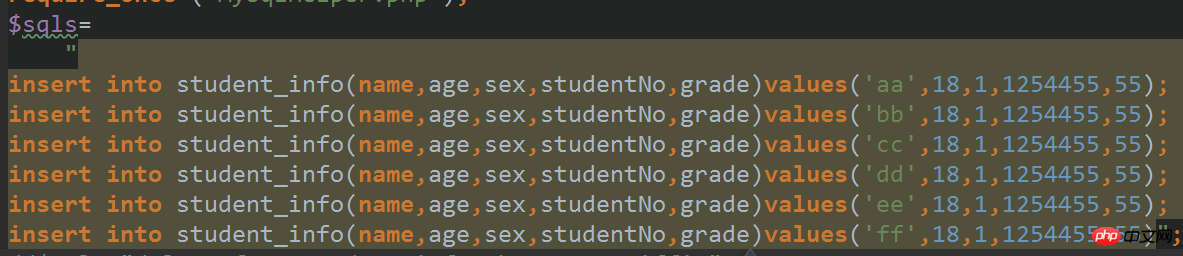
 ## If you think this can completely solve the problem, then you That's wrong, let's take a look at the principle of MySQL database executing sql statements!
As can be seen from the above figure, whether we send one sql statement or multiple sql statements, the database must compile them one by one. Then when the data reaches a certain amount, the database The cost will be huge. So how to solve this problem? At this time, the concept of preprocessing technology was introduced. Now let’s look at a piece of code for preprocessing technology:
 <?         =  mysqli("localhost", "root", "123456", "student"  (->     ("连接失败" . ->  ->query("set names utf8"  = "insert into student_info(name,age,sex,studentNo,grade) values (?,?,?,?,?)"   = ->prepare(   = "张三"  = 30  = 0;  = "1501222"  = 89
->bind_param("siisd", , , , , -> ->close();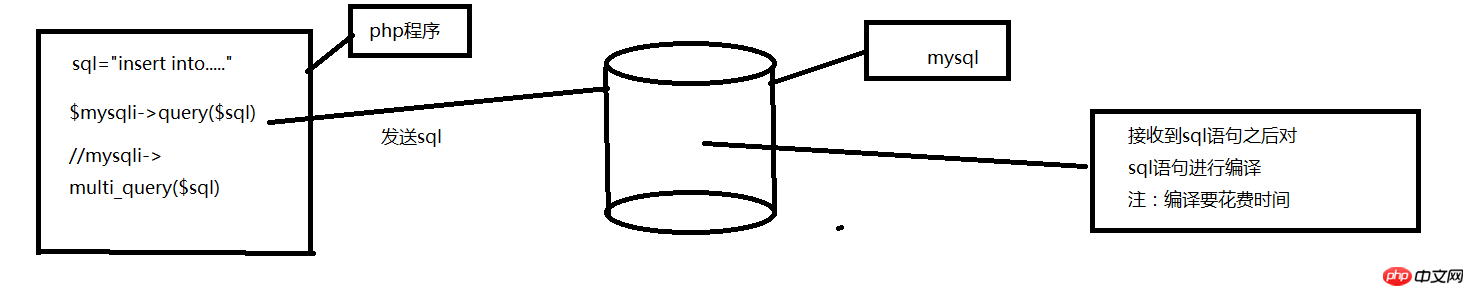 First let’s look at
 等等,为什么values会是问号呢?这里的问号相当于一个占位符,之后只要向数据库发送数据就能够自动把数据对应的填充进去 这就是预编译技术的精髓之处,我们通过bind_param,顾名思义,就是绑定参数的意思,那么,它给谁绑定参数呢?看看上面的values (?,?,?,?,?),bind_param里面的参数一一对应 着values的每一个参数。那么bind_param里面的siisd又是什么意思呢?别急,请看下方: 参数有以下四种类型: i - integer(整型) d - double(双精度浮点型) s - string(字符串) b - BLOB(布尔值) 每个参数都需要指定类型。 通过告诉数据库参数的数据类型,可以降低 SQL 注入的风险.
$mysqli_stmt->execute();
This code is to pass the data to the database.
Querying the database using preprocessed data
<span style="color: #000000"> 代码如下:<br/> </span>
<?php/**
 * Created by PhpStorm.
 * User: Administrator
 * Date: 2017/7/21
 * Time: 9:37 */$mysqli = new mysqli("localhost","root","123456","student");
 if($mysqli->connect_error){
 die("连接失败".$mysqli->error);
}
$mysqli->query("set names utf8");
$sql="select name,sex,age from student_info where id>?";
$mysqli_stmt=$mysqli->prepare($sql);
$id=1;$mysqli_stmt->bind_param("i",$id);
$mysqli_stmt->execute();//绑定结果集,传递的是引用$mysqli_stmt->bind_result($name,$sex,$age);
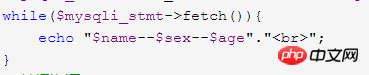
while($mysqli_stmt->fetch()){
    echo "$name--$sex--$age"."<br>";
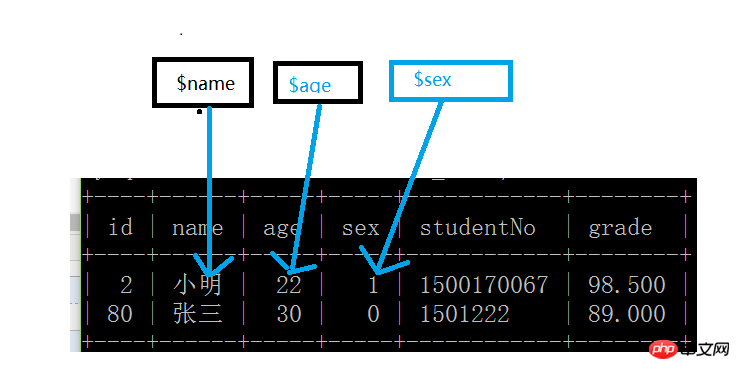
}//关闭资源$mysqli_stmt->free_result();//关闭预编译语句,否则数据库会一直保存$mysqli_stmt->close();//关闭连接$mysqli->close(); than insertion. So what does this code mean?

 Not much to say, the picture above:
The above is the detailed content of Tips on mysql preprocessing technology. For more information, please follow other related articles on the PHP Chinese website!

Hot AI Tools

Undresser.AI Undress
AI-powered app for creating realistic nude photos

AI Clothes Remover
Online AI tool for removing clothes from photos.

Undress AI Tool
Undress images for free

Clothoff.io
AI clothes remover

AI Hentai Generator
Generate AI Hentai for free.

Hot Article
Hot Tools

Notepad++7.3.1
Easy-to-use and free code editor

SublimeText3 Chinese version
Chinese version, very easy to use

Zend Studio 13.0.1
Powerful PHP integrated development environment

Dreamweaver CS6
Visual web development tools

SublimeText3 Mac version
God-level code editing software (SublimeText3)
Hot Topics
 1381
1381
 52
52

 MySQL: Simple Concepts for Easy Learning
Apr 10, 2025 am 09:29 AM
MySQL: Simple Concepts for Easy Learning
Apr 10, 2025 am 09:29 AM
MySQL is an open source relational database management system. 1) Create database and tables: Use the CREATEDATABASE and CREATETABLE commands. 2) Basic operations: INSERT, UPDATE, DELETE and SELECT. 3) Advanced operations: JOIN, subquery and transaction processing. 4) Debugging skills: Check syntax, data type and permissions. 5) Optimization suggestions: Use indexes, avoid SELECT* and use transactions.
 How to open phpmyadmin
Apr 10, 2025 pm 10:51 PM
How to open phpmyadmin
Apr 10, 2025 pm 10:51 PM
You can open phpMyAdmin through the following steps: 1. Log in to the website control panel; 2. Find and click the phpMyAdmin icon; 3. Enter MySQL credentials; 4. Click "Login".
 MySQL: An Introduction to the World's Most Popular Database
Apr 12, 2025 am 12:18 AM
MySQL: An Introduction to the World's Most Popular Database
Apr 12, 2025 am 12:18 AM
MySQL is an open source relational database management system, mainly used to store and retrieve data quickly and reliably. Its working principle includes client requests, query resolution, execution of queries and return results. Examples of usage include creating tables, inserting and querying data, and advanced features such as JOIN operations. Common errors involve SQL syntax, data types, and permissions, and optimization suggestions include the use of indexes, optimized queries, and partitioning of tables.
 Why Use MySQL? Benefits and Advantages
Apr 12, 2025 am 12:17 AM
Why Use MySQL? Benefits and Advantages
Apr 12, 2025 am 12:17 AM
MySQL is chosen for its performance, reliability, ease of use, and community support. 1.MySQL provides efficient data storage and retrieval functions, supporting multiple data types and advanced query operations. 2. Adopt client-server architecture and multiple storage engines to support transaction and query optimization. 3. Easy to use, supports a variety of operating systems and programming languages. 4. Have strong community support and provide rich resources and solutions.
 How to use single threaded redis
Apr 10, 2025 pm 07:12 PM
How to use single threaded redis
Apr 10, 2025 pm 07:12 PM
Redis uses a single threaded architecture to provide high performance, simplicity, and consistency. It utilizes I/O multiplexing, event loops, non-blocking I/O, and shared memory to improve concurrency, but with limitations of concurrency limitations, single point of failure, and unsuitable for write-intensive workloads.
 MySQL and SQL: Essential Skills for Developers
Apr 10, 2025 am 09:30 AM
MySQL and SQL: Essential Skills for Developers
Apr 10, 2025 am 09:30 AM
MySQL and SQL are essential skills for developers. 1.MySQL is an open source relational database management system, and SQL is the standard language used to manage and operate databases. 2.MySQL supports multiple storage engines through efficient data storage and retrieval functions, and SQL completes complex data operations through simple statements. 3. Examples of usage include basic queries and advanced queries, such as filtering and sorting by condition. 4. Common errors include syntax errors and performance issues, which can be optimized by checking SQL statements and using EXPLAIN commands. 5. Performance optimization techniques include using indexes, avoiding full table scanning, optimizing JOIN operations and improving code readability.
 MySQL's Place: Databases and Programming
Apr 13, 2025 am 12:18 AM
MySQL's Place: Databases and Programming
Apr 13, 2025 am 12:18 AM
MySQL's position in databases and programming is very important. It is an open source relational database management system that is widely used in various application scenarios. 1) MySQL provides efficient data storage, organization and retrieval functions, supporting Web, mobile and enterprise-level systems. 2) It uses a client-server architecture, supports multiple storage engines and index optimization. 3) Basic usages include creating tables and inserting data, and advanced usages involve multi-table JOINs and complex queries. 4) Frequently asked questions such as SQL syntax errors and performance issues can be debugged through the EXPLAIN command and slow query log. 5) Performance optimization methods include rational use of indexes, optimized query and use of caches. Best practices include using transactions and PreparedStatemen
 How to recover data after SQL deletes rows
Apr 09, 2025 pm 12:21 PM
How to recover data after SQL deletes rows
Apr 09, 2025 pm 12:21 PM
Recovering deleted rows directly from the database is usually impossible unless there is a backup or transaction rollback mechanism. Key point: Transaction rollback: Execute ROLLBACK before the transaction is committed to recover data. Backup: Regular backup of the database can be used to quickly restore data. Database snapshot: You can create a read-only copy of the database and restore the data after the data is deleted accidentally. Use DELETE statement with caution: Check the conditions carefully to avoid accidentally deleting data. Use the WHERE clause: explicitly specify the data to be deleted. Use the test environment: Test before performing a DELETE operation.
