


Ajax tutorial page partial jump and result return

Through code sample analysis, I will introduce to you how ajax implements partial page jumps and result returns. The specific content is as follows:
1. Submission with result return The process
is demonstrated here with a submit button. The HTML code is:
<input type="button" class="btn" value="提报" name="submit4" onClick="tibao();">
After clicking the report button, the jump to the action is processed through ajax. The JavaScript code is:
function tibao(){
var id="";
var URL = <select:link page="/smokeplan.do?method=Tibao&idset="/>+id;
  $.ajax({url: URL,
      type: "GET",
      success: function(result) {
           alert(result);
        }
});}After the action processing is completed, the returned result will be placed in the result, and a prompt message will pop up on the page; of course, the action jump here needs to be configured with xml.
The background Java class processing process is:
//提报
    public void Tibao(ActionMapping mapping, ActionForm form,
        HttpServletRequest request, HttpServletResponse response) throws Exception {
      String idset=request.getParameter("idset");
      CallHelper helper = initializeCallHelper("L_SmokeBoxtibaoWLDan", form,request, false);
      helper.setParam("bill_ids",idset);
      helper.setParam("personid",getPersonId(request));
      helper.execute();
      PrintWriter write = response.getWriter();
      write.print(helper.getOutput("message"));
write.close(); }Here, the data is processed through a sql statement, a message is returned, and the information is printed to the page;
The result of the operation done here is reflected to the position corresponding to the response, so the stream belonging to the response is obtained instead of a new one.
That is to say, if I jump from there, my information will be returned there. So in js, you can use result to receive the returned result, and use alert to prompt.
How to use AJAX to achieve page jump
The sample code is as follows:
The ajaxAnywhere framework is used in the project to implement ajax. The effect is good and it is easy. Implemented, but the problem now is that even if the page achieves the effect, the business still needs to submit the form. In this case, even after clicking submit, it will still refresh the zone you defined. At this time, if you simply submit the form It’s not enough, the solution I took is:
Use js, a powerful BS project development tool, to customize a function to solve the above problem:
function doGuahao()
{
 if(checkdata())
 {
 if(document.form1.result_flag.value=="0")
 {
  return false;
 }
 else
 {
  if(document.form1.checktype.value=="danganhao")
  {
  form1.action = "<%=formAction%>";
  form1.submit();
  }
  if(document.form1.checktype.value=="xingming")
  {
  form1.action = parent.left.url2;
  form1.submit();
  }
  if(document.form1.checktype.value=="shenfenzheng")
  {
  form1.action = "<%=formAction%>";
  form1.submit();
  }
 }
} }The above is the detailed content of Ajax tutorial page partial jump and result return. For more information, please follow other related articles on the PHP Chinese website!

Hot AI Tools

Undresser.AI Undress
AI-powered app for creating realistic nude photos

AI Clothes Remover
Online AI tool for removing clothes from photos.

Undress AI Tool
Undress images for free

Clothoff.io
AI clothes remover

Video Face Swap
Swap faces in any video effortlessly with our completely free AI face swap tool!

Hot Article
Hot Tools

Notepad++7.3.1
Easy-to-use and free code editor

SublimeText3 Chinese version
Chinese version, very easy to use

Zend Studio 13.0.1
Powerful PHP integrated development environment

Dreamweaver CS6
Visual web development tools

SublimeText3 Mac version
God-level code editing software (SublimeText3)
Hot Topics
 1389
1389
 52
52

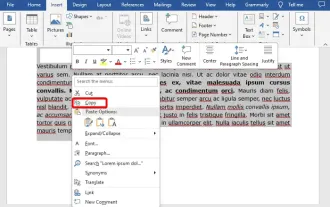 How to copy a page in Word
Feb 20, 2024 am 10:09 AM
How to copy a page in Word
Feb 20, 2024 am 10:09 AM
Want to copy a page in Microsoft Word and keep the formatting intact? This is a smart idea because duplicating pages in Word can be a useful time-saving technique when you want to create multiple copies of a specific document layout or format. This guide will walk you through the step-by-step process of copying pages in Word, whether you are creating a template or copying a specific page in a document. These simple instructions are designed to help you easily recreate your page without having to start from scratch. Why copy pages in Microsoft Word? There are several reasons why copying pages in Word is very beneficial: When you have a document with a specific layout or format that you want to copy. Unlike recreating the entire page from scratch
 How to solve the 403 error encountered by jQuery AJAX request
Feb 20, 2024 am 10:07 AM
How to solve the 403 error encountered by jQuery AJAX request
Feb 20, 2024 am 10:07 AM
Title: Methods and code examples to resolve 403 errors in jQuery AJAX requests. The 403 error refers to a request that the server prohibits access to a resource. This error usually occurs because the request lacks permissions or is rejected by the server. When making jQueryAJAX requests, you sometimes encounter this situation. This article will introduce how to solve this problem and provide code examples. Solution: Check permissions: First ensure that the requested URL address is correct and verify that you have sufficient permissions to access the resource.
 How to quickly refresh a web page?
Feb 18, 2024 pm 01:14 PM
How to quickly refresh a web page?
Feb 18, 2024 pm 01:14 PM
Page refresh is very common in our daily network use. When we visit a web page, we sometimes encounter some problems, such as the web page not loading or displaying abnormally, etc. At this time, we usually choose to refresh the page to solve the problem, so how to refresh the page quickly? Let’s discuss the shortcut keys for page refresh. The page refresh shortcut key is a method to quickly refresh the current web page through keyboard operations. In different operating systems and browsers, the shortcut keys for page refresh may be different. Below we use the common W
 How to solve jQuery AJAX request 403 error
Feb 19, 2024 pm 05:55 PM
How to solve jQuery AJAX request 403 error
Feb 19, 2024 pm 05:55 PM
jQuery is a popular JavaScript library used to simplify client-side development. AJAX is a technology that sends asynchronous requests and interacts with the server without reloading the entire web page. However, when using jQuery to make AJAX requests, you sometimes encounter 403 errors. 403 errors are usually server-denied access errors, possibly due to security policy or permission issues. In this article, we will discuss how to resolve jQueryAJAX request encountering 403 error
 PHP and Ajax: Building an autocomplete suggestion engine
Jun 02, 2024 pm 08:39 PM
PHP and Ajax: Building an autocomplete suggestion engine
Jun 02, 2024 pm 08:39 PM
Build an autocomplete suggestion engine using PHP and Ajax: Server-side script: handles Ajax requests and returns suggestions (autocomplete.php). Client script: Send Ajax request and display suggestions (autocomplete.js). Practical case: Include script in HTML page and specify search-input element identifier.
 How to implement page jump in 3 seconds: PHP Programming Guide
Mar 25, 2024 am 10:42 AM
How to implement page jump in 3 seconds: PHP Programming Guide
Mar 25, 2024 am 10:42 AM
Title: Implementation method of page jump in 3 seconds: PHP Programming Guide In web development, page jump is a common operation. Generally, we use meta tags in HTML or JavaScript methods to jump to pages. However, in some specific cases, we need to perform page jumps on the server side. This article will introduce how to use PHP programming to implement a function that automatically jumps to a specified page within 3 seconds, and will also give specific code examples. The basic principle of page jump using PHP. PHP is a kind of
 How to deal with the problem that Laravel page cannot display CSS correctly
Mar 10, 2024 am 11:33 AM
How to deal with the problem that Laravel page cannot display CSS correctly
Mar 10, 2024 am 11:33 AM
"Methods to handle Laravel pages that cannot display CSS correctly, need specific code examples" When using the Laravel framework to develop web applications, sometimes you will encounter the problem that the page cannot display CSS styles correctly, which may cause the page to render abnormal styles. Affect user experience. This article will introduce some methods to deal with the failure of Laravel pages to display CSS correctly, and provide specific code examples to help developers solve this common problem. 1. Check the file path. First check the path of the CSS file.
 How to solve the problem of jQuery AJAX error 403?
Feb 23, 2024 pm 04:27 PM
How to solve the problem of jQuery AJAX error 403?
Feb 23, 2024 pm 04:27 PM
How to solve the problem of jQueryAJAX error 403? When developing web applications, jQuery is often used to send asynchronous requests. However, sometimes you may encounter error code 403 when using jQueryAJAX, indicating that access is forbidden by the server. This is usually caused by server-side security settings, but there are ways to work around it. This article will introduce how to solve the problem of jQueryAJAX error 403 and provide specific code examples. 1. to make
