


A simple example of HTML checkbox and radio style beautification

下面小编就为大家带来一篇A simple example of HTML checkbox and radio style beautification。小编觉得挺不错的,现在就分享给大家,也给大家做个参考。一起跟随小编过来看看吧
A simple example of HTML checkbox and radio style beautification
checkbox:
<style type="text/css">
input[type="checkbox"]
{
display: none;
}
input[type="checkbox"] + label
{
display: inline-block;
position: relative;
border: solid 2px #99a1a7;
width: 35px;
height: 35px;
line-height: 35px;
border-radius: 4px;
}
input[type="checkbox"]:checked + label:after
{
content: '\2714';
font-size: 25px;
color: #99a1a7;
width: 35px;
height: 35px;
line-height: 35px;
position: absolute;
text-align: center;
background-color: #e9ecee;
}
.tab
{
margin-top: 20px;
margin-bottom: 20px;
width: 100%;
}
.tab td
{
border: solid 1px #f99;
font-size: 25px;
line-height: 39px;
}
</style>
<table class="tab" cellpadding="0" cellspacing="0" style="border-collapse: collapse;">
<tr>
<td>
<p align="center" style="float: left; height: 39px; width: 39px;">
<input id="ck101" type="checkbox" />
<label for="ck101"></label>
</p>
<p style="float: left; height: 39px; line-height: 39px; font-size: 25px; margin-left: 10px; margin-right: 20px;">
测试101
</p>
<p align="center" style="float: left; height: 39px; width: 39px;">
<input id="ck102" type="checkbox" />
<label for="ck102"></label>
</p>
<p style="float: left; height: 39px; line-height: 39px; font-size: 25px; margin-left: 10px; margin-right: 20px;">
测试102
</p>
测试
</td>
<td></td>
</tr>
<tr>
<td style="text-align: center;">
<p style="display: inline-block;">
<p align="center" style="float: left; height: 39px; width: 39px;">
<input id="ck103" type="checkbox" />
<label for="ck103"></label>
</p>
<p style="float: left; height: 39px; line-height: 39px; font-size: 25px; margin-left: 10px; margin-right: 20px;">
测试103
</p>
<p align="center" style="float: left; height: 39px; width: 39px;">
<input id="ck104" type="checkbox" />
<label for="ck104"></label>
</p>
<p style="float: left; height: 39px; line-height: 39px; font-size: 25px; margin-left: 10px; margin-right: 20px;">
测试104
</p>
测试
</p>
</td>
<td>测试
</td>
</tr>
</table>
<p style="border: solid 1px #f99; height: 39px; margin-top: 20px; margin-bottom: 20px;">
<p align="center" style="float: left; height: 39px; width: 39px;">
<input id="ck201" type="checkbox" />
<label for="ck201"></label>
</p>
<p style="float: left; height: 39px; line-height: 39px; font-size: 25px; margin-left: 10px; margin-right: 20px;">
测试201
</p>
<p align="center" style="float: left; height: 39px; width: 39px;">
<input id="ck202" type="checkbox" />
<label for="ck202"></label>
</p>
<p style="float: left; height: 39px; line-height: 39px; font-size: 25px; margin-left: 10px;">
测试202
</p>
</p>radio:
<style type="text/css">
input[type="radio"]
{
display: none;
}
input[type="radio"] + label
{
display: inline-block;
position: relative;
border: solid 2px #99a1a7;
width: 25px;
height: 25px;
line-height: 25px;
padding: 5px;
border-radius: 19.5px;
}
input[type="radio"]:checked + label:after
{
content: ' ';
font-size: 25px;
color: #99a1a7;
width: 25px;
height: 25px;
line-height: 25px;
position: absolute;
text-align: center;
background-color: #99a1a7;
border-radius: 12.5px;
}
input[type="radio"]:checked + label
{
background-color: #e9ecee;
}
.tab
{
margin-top: 20px;
margin-bottom: 20px;
width: 100%;
}
.tab td
{
border: solid 1px #f99;
font-size: 25px;
line-height: 39px;
}
</style>
<table class="tab" cellpadding="0" cellspacing="0" style="border-collapse: collapse;">
<tr>
<td>
<p align="center" style="float: left; height: 39px; width: 39px;">
<input id="rd101" name="rd" type="radio" />
<label for="rd101"></label>
</p>
<p style="float: left; height: 39px; line-height: 39px; font-size: 25px; margin-left: 10px; margin-right: 20px;">
测试101
</p>
<p align="center" style="float: left; height: 39px; width: 39px;">
<input id="rd102" name="rd" type="radio" />
<label for="rd102"></label>
</p>
<p style="float: left; height: 39px; line-height: 39px; font-size: 25px; margin-left: 10px; margin-right: 20px;">
测试102
</p>
测试
</td>
<td></td>
</tr>
<tr>
<td style="text-align: center;">
<p style="display: inline-block;">
<p align="center" style="float: left; height: 39px; width: 39px;">
<input id="rd103" name="rd" type="radio" />
<label for="rd103"></label>
</p>
<p style="float: left; height: 39px; line-height: 39px; font-size: 25px; margin-left: 10px; margin-right: 20px;">
测试103
</p>
<p align="center" style="float: left; height: 39px; width: 39px;">
<input id="rd104" name="rd" type="radio" />
<label for="rd104"></label>
</p>
<p style="float: left; height: 39px; line-height: 39px; font-size: 25px; margin-left: 10px; margin-right: 20px;">
测试104
</p>
测试
</p>
</td>
<td>测试
</td>
</tr>
</table>
<p style="border: solid 1px #f99; height: 39px; margin-top: 20px; margin-bottom: 20px;">
<p align="center" style="float: left; height: 39px; width: 39px;">
<input id="rd201" name="rd" type="radio" />
<label for="rd201"></label>
</p>
<p style="float: left; height: 39px; line-height: 39px; font-size: 25px; margin-left: 10px; margin-right: 20px;">
测试201
</p>
<p align="center" style="float: left; height: 39px; width: 39px;">
<input id="rd202" name="rd" type="radio" />
<label for="rd202"></label>
</p>
<p style="float: left; height: 39px; line-height: 39px; font-size: 25px; margin-left: 10px;">
测试202
</p>
</p>效果图:
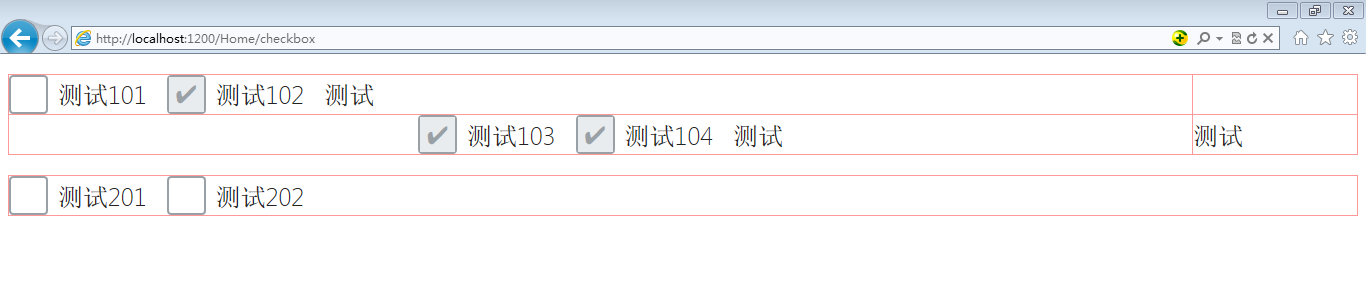

以上这篇A simple example of HTML checkbox and radio style beautification就是小编分享给大家的全部内容了,希望能给大家一个参考,也希望大家多多支持PHP中文网。
更多A simple example of HTML checkbox and radio style beautification相关文章请关注PHP中文网!

Hot AI Tools

Undresser.AI Undress
AI-powered app for creating realistic nude photos

AI Clothes Remover
Online AI tool for removing clothes from photos.

Undress AI Tool
Undress images for free

Clothoff.io
AI clothes remover

AI Hentai Generator
Generate AI Hentai for free.

Hot Article
Hot Tools

Notepad++7.3.1
Easy-to-use and free code editor

SublimeText3 Chinese version
Chinese version, very easy to use

Zend Studio 13.0.1
Powerful PHP integrated development environment

Dreamweaver CS6
Visual web development tools

SublimeText3 Mac version
God-level code editing software (SublimeText3)
Hot Topics
 1384
1384
 52
52

 What is the purpose of the <progress> element?
Mar 21, 2025 pm 12:34 PM
What is the purpose of the <progress> element?
Mar 21, 2025 pm 12:34 PM
The article discusses the HTML <progress> element, its purpose, styling, and differences from the <meter> element. The main focus is on using <progress> for task completion and <meter> for stati
 What is the purpose of the <datalist> element?
Mar 21, 2025 pm 12:33 PM
What is the purpose of the <datalist> element?
Mar 21, 2025 pm 12:33 PM
The article discusses the HTML <datalist> element, which enhances forms by providing autocomplete suggestions, improving user experience and reducing errors.Character count: 159
 What is the purpose of the <meter> element?
Mar 21, 2025 pm 12:35 PM
What is the purpose of the <meter> element?
Mar 21, 2025 pm 12:35 PM
The article discusses the HTML <meter> element, used for displaying scalar or fractional values within a range, and its common applications in web development. It differentiates <meter> from <progress> and ex
 What is the viewport meta tag? Why is it important for responsive design?
Mar 20, 2025 pm 05:56 PM
What is the viewport meta tag? Why is it important for responsive design?
Mar 20, 2025 pm 05:56 PM
The article discusses the viewport meta tag, essential for responsive web design on mobile devices. It explains how proper use ensures optimal content scaling and user interaction, while misuse can lead to design and accessibility issues.
 Is HTML easy to learn for beginners?
Apr 07, 2025 am 12:11 AM
Is HTML easy to learn for beginners?
Apr 07, 2025 am 12:11 AM
HTML is suitable for beginners because it is simple and easy to learn and can quickly see results. 1) The learning curve of HTML is smooth and easy to get started. 2) Just master the basic tags to start creating web pages. 3) High flexibility and can be used in combination with CSS and JavaScript. 4) Rich learning resources and modern tools support the learning process.
 What is the purpose of the <iframe> tag? What are the security considerations when using it?
Mar 20, 2025 pm 06:05 PM
What is the purpose of the <iframe> tag? What are the security considerations when using it?
Mar 20, 2025 pm 06:05 PM
The article discusses the <iframe> tag's purpose in embedding external content into webpages, its common uses, security risks, and alternatives like object tags and APIs.
 The Roles of HTML, CSS, and JavaScript: Core Responsibilities
Apr 08, 2025 pm 07:05 PM
The Roles of HTML, CSS, and JavaScript: Core Responsibilities
Apr 08, 2025 pm 07:05 PM
HTML defines the web structure, CSS is responsible for style and layout, and JavaScript gives dynamic interaction. The three perform their duties in web development and jointly build a colorful website.
 What is an example of a starting tag in HTML?
Apr 06, 2025 am 12:04 AM
What is an example of a starting tag in HTML?
Apr 06, 2025 am 12:04 AM
AnexampleofastartingtaginHTMLis,whichbeginsaparagraph.StartingtagsareessentialinHTMLastheyinitiateelements,definetheirtypes,andarecrucialforstructuringwebpagesandconstructingtheDOM.
