


 Backend Development
PHP Tutorial
Solution to error when exporting Excel file with PHPExcel_PHP Tutorial
Backend Development
PHP Tutorial
Solution to error when exporting Excel file with PHPExcel_PHP Tutorial
Solution to error when exporting Excel file with PHPExcel_PHP Tutorial

phpexcel file is an open source PHP table operation plug-in. Most people who use excel data import and export choose this plug-in, but there will also be problems during use. Let’s look at the problem analysis and research. .
PHPExcel is the most powerful open source project in PHP for importing, exporting, and operating Microsoft Excel. But its system is complex and sometimes difficult to control.
There are many ways to use PHPExcel to export Excel tables on the Internet, so I won’t go into details in this article. However, during use, I discovered an inexplicable problem: that is, using PHPExcel to automatically export excel files can sometimes be exported and opened normally, but sometimes the generated excel files cannot be opened. Excel2007 prompts "It was found that it cannot be read. content".
Use a text editor to open the generated Excel file and find a line prompting "Fatal error: Call to a member function setValue() on a non-object in PHPExcel/Calculation/FormulaParser.php on line 431".
After careful and painful inspection, it was found that among the text values written into the cells, some values started with an equal sign, such as "====China Youth Daily...". As a result, PHPExcel was writing When entering this cell, it is determined to be a formula, so the formula parser is called to calculate the corresponding value, but the calculation cannot be performed correctly (because it is not a formula in the first place), so the generated excel file cannot be opened.
The solution is very simple,
Just filter out the equal sign "=" before writing the text value into the excel cell.
The following are solutions to the two errors:
(1)Fatal error: Maximum execution time of 30 seconds exceeded Error solution
The php.ini file needs to be modified. If it is a server using Ubuntu 9.04 Server, you can find the php.ini file under /etc/php5/apache2/. If it is Freebsd, you can find php.ini under /usr/local/lib/ document. Edit the following statement with sudo privileges:
Change the following statement:
max_execution_time = 30
Modified to:
max_execution_time = 300
That is, the maximum execution time of a PHP script is extended from 30 seconds to 300 seconds.
Then restart the Apache server. If it is an Ubuntu Server server, you can use the following command:
sudo /etc/init.d/apache2 restart
(2) Solution to Fatal error: Allowed memory size of 16777216 bytes exhausted
You also need to modify the php.ini file:
Change the following statement:
memory_limit = 16M
Modified to:
memory_limit = 512M
That is, the memory that the PHP script can apply for is expanded from 16M to 512M. The specific number can be determined according to your own needs.
You also need to restart the Apache server.
Things to note are:
(1) The above modifications may involve certain risks, such as causing excessive burden on the server. So please double-check whether it is necessary to open larger memory space and longer execution time for PHPExcel or other PHP programs.
(2) After modifying php.ini, the new settings will only take effect after restarting Apache.
(3) Please adjust the settings in php.ini according to your own server's situation.

Hot AI Tools

Undresser.AI Undress
AI-powered app for creating realistic nude photos

AI Clothes Remover
Online AI tool for removing clothes from photos.

Undress AI Tool
Undress images for free

Clothoff.io
AI clothes remover

AI Hentai Generator
Generate AI Hentai for free.

Hot Article
Hot Tools

Notepad++7.3.1
Easy-to-use and free code editor

SublimeText3 Chinese version
Chinese version, very easy to use

Zend Studio 13.0.1
Powerful PHP integrated development environment

Dreamweaver CS6
Visual web development tools

SublimeText3 Mac version
God-level code editing software (SublimeText3)
Hot Topics
 1378
1378
 52
52

 Ten recommended open source free text annotation tools
Mar 26, 2024 pm 08:20 PM
Ten recommended open source free text annotation tools
Mar 26, 2024 pm 08:20 PM
Text annotation is the work of corresponding labels or tags to specific content in text. Its main purpose is to provide additional information to the text for deeper analysis and processing, especially in the field of artificial intelligence. Text annotation is crucial for supervised machine learning tasks in artificial intelligence applications. It is used to train AI models to help more accurately understand natural language text information and improve the performance of tasks such as text classification, sentiment analysis, and language translation. Through text annotation, we can teach AI models to recognize entities in text, understand context, and make accurate predictions when new similar data appears. This article mainly recommends some better open source text annotation tools. 1.LabelStudiohttps://github.com/Hu
 How to filter more than 3 keywords at the same time in excel
Mar 21, 2024 pm 03:16 PM
How to filter more than 3 keywords at the same time in excel
Mar 21, 2024 pm 03:16 PM
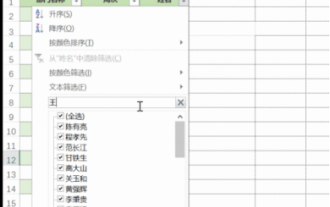
Excel is often used to process data in daily office work, and it is often necessary to use the "filter" function. When we choose to perform "filtering" in Excel, we can only filter up to two conditions for the same column. So, do you know how to filter more than 3 keywords at the same time in Excel? Next, let me demonstrate it to you. The first method is to gradually add the conditions to the filter. If you want to filter out three qualifying details at the same time, you first need to filter out one of them step by step. At the beginning, you can first filter out employees with the surname "Wang" based on the conditions. Then click [OK], and then check [Add current selection to filter] in the filter results. The steps are as follows. Similarly, perform filtering separately again
 15 recommended open source free image annotation tools
Mar 28, 2024 pm 01:21 PM
15 recommended open source free image annotation tools
Mar 28, 2024 pm 01:21 PM
Image annotation is the process of associating labels or descriptive information with images to give deeper meaning and explanation to the image content. This process is critical to machine learning, which helps train vision models to more accurately identify individual elements in images. By adding annotations to images, the computer can understand the semantics and context behind the images, thereby improving the ability to understand and analyze the image content. Image annotation has a wide range of applications, covering many fields, such as computer vision, natural language processing, and graph vision models. It has a wide range of applications, such as assisting vehicles in identifying obstacles on the road, and helping in the detection and diagnosis of diseases through medical image recognition. . This article mainly recommends some better open source and free image annotation tools. 1.Makesens
 Five tips to teach you how to solve the problem of Black Shark phone not turning on!
Mar 24, 2024 pm 12:27 PM
Five tips to teach you how to solve the problem of Black Shark phone not turning on!
Mar 24, 2024 pm 12:27 PM
As smartphone technology continues to develop, mobile phones play an increasingly important role in our daily lives. As a flagship phone focusing on gaming performance, the Black Shark phone is highly favored by players. However, sometimes we also face the situation that the Black Shark phone cannot be turned on. At this time, we need to take some measures to solve this problem. Next, let us share five tips to teach you how to solve the problem of Black Shark phone not turning on: Step 1: Check the battery power. First, make sure your Black Shark phone has enough power. It may be because the phone battery is exhausted
 Solution to Windows Update prompt Error 0x8024401c error
Jun 08, 2024 pm 12:18 PM
Solution to Windows Update prompt Error 0x8024401c error
Jun 08, 2024 pm 12:18 PM
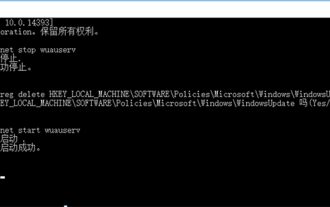
Table of Contents Solution 1 Solution 21. Delete the temporary files of Windows update 2. Repair damaged system files 3. View and modify registry entries 4. Turn off the network card IPv6 5. Run the WindowsUpdateTroubleshooter tool to repair 6. Turn off the firewall and other related anti-virus software. 7. Close the WidowsUpdate service. Solution 3 Solution 4 "0x8024401c" error occurs during Windows update on Huawei computers Symptom Problem Cause Solution Still not solved? Recently, the web server needs to be updated due to system vulnerabilities. After logging in to the server, the update prompts error code 0x8024401c. Solution 1
 How to solve the problem of automatically saving pictures when publishing on Xiaohongshu? Where is the automatically saved image when posting?
Mar 22, 2024 am 08:06 AM
How to solve the problem of automatically saving pictures when publishing on Xiaohongshu? Where is the automatically saved image when posting?
Mar 22, 2024 am 08:06 AM
With the continuous development of social media, Xiaohongshu has become a platform for more and more young people to share their lives and discover beautiful things. Many users are troubled by auto-save issues when posting images. So, how to solve this problem? 1. How to solve the problem of automatically saving pictures when publishing on Xiaohongshu? 1. Clear the cache First, we can try to clear the cache data of Xiaohongshu. The steps are as follows: (1) Open Xiaohongshu and click the "My" button in the lower right corner; (2) On the personal center page, find "Settings" and click it; (3) Scroll down and find the "Clear Cache" option. Click OK. After clearing the cache, re-enter Xiaohongshu and try to post pictures to see if the automatic saving problem is solved. 2. Update the Xiaohongshu version to ensure that your Xiaohongshu
 What to do if the 0x80004005 error code appears. The editor will teach you how to solve the 0x80004005 error code.
Mar 21, 2024 pm 09:17 PM
What to do if the 0x80004005 error code appears. The editor will teach you how to solve the 0x80004005 error code.
Mar 21, 2024 pm 09:17 PM
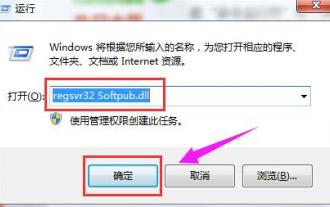
When deleting or decompressing a folder on your computer, sometimes a prompt dialog box "Error 0x80004005: Unspecified Error" will pop up. How should you solve this situation? There are actually many reasons why the error code 0x80004005 is prompted, but most of them are caused by viruses. We can re-register the dll to solve the problem. Below, the editor will explain to you the experience of handling the 0x80004005 error code. Some users are prompted with error code 0X80004005 when using their computers. The 0x80004005 error is mainly caused by the computer not correctly registering certain dynamic link library files, or by a firewall that does not allow HTTPS connections between the computer and the Internet. So how about
 How to insert excel icons into PPT slides
Mar 26, 2024 pm 05:40 PM
How to insert excel icons into PPT slides
Mar 26, 2024 pm 05:40 PM
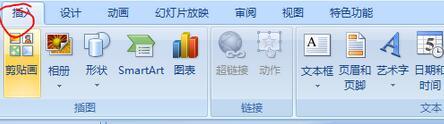
1. Open the PPT and turn the page to the page where you need to insert the excel icon. Click the Insert tab. 2. Click [Object]. 3. The following dialog box will pop up. 4. Click [Create from file] and click [Browse]. 5. Select the excel table to be inserted. 6. Click OK and the following page will pop up. 7. Check [Show as icon]. 8. Click OK.
