


Excel: If cell contains then count, sum, highlight, copy or delete

This tutorial explores various Excel functions and techniques for handling cells based on their content. We'll cover counting, summing, highlighting, deleting, and copying rows based on whether a cell contains specific text or numbers.
Counting Cells Based on Content
Excel offers COUNTIF and COUNTIFS for cell counting based on criteria.
-
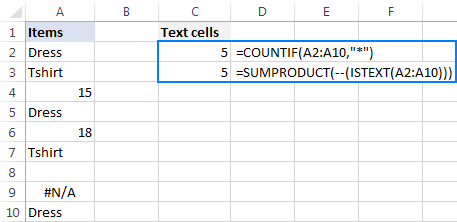
Any Text: Use
COUNTIF(range,"*")orSUMPRODUCT(--(ISTEXT(range)))to count cells with any text. -
Specific Text:
COUNTIF(range,"text")counts cells containing the exact text "text". -
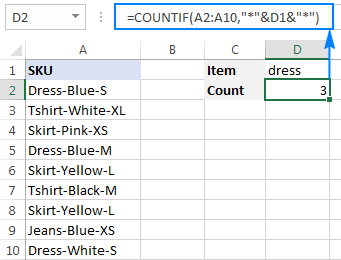
Partial Match:
COUNTIF(range,"*text*")counts cells containing "text" as a substring. -
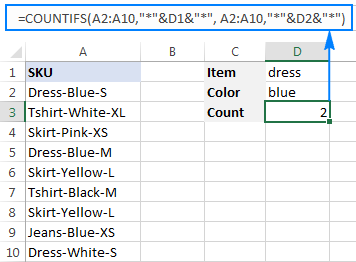
Multiple Substrings (AND Logic):
COUNTIFS(range,"*text1*",range,"*text2*")counts cells containing both "text1" and "text2". -
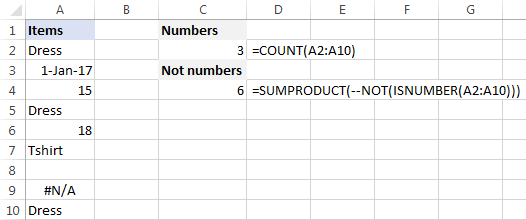
Numbers:
COUNT(range)counts cells with numeric values (including dates and times). To count cells without numbers, useSUMPRODUCT(--NOT(ISNUMBER(range))).
Summing Based on Cell Content
-
Specific Text:
SUMIF(range,"*text*",sum_range)sums values insum_rangewhere corresponding cells inrangecontain "text". -
Multiple Criteria:
SUMIFS(sum_range,range1,"*text1*",range2,"*text2*")sums values based on multiple conditions.


Performing Calculations Based on Cell Value
Nested IF statements allow performing different calculations based on cell values. For example: =B2*IF(B2>=300,10%,IF(B2>=200,7%,IF(B2>=100,5%,0))) calculates bonuses based on sales figures.

Conditional Formatting
Highlight cells containing specific text using conditional formatting rules with SEARCH or FIND (case-insensitive or sensitive, respectively). For multiple conditions, use AND with nested SEARCH functions.


Deleting or Selecting Rows
Use Excel's Find and Replace to delete rows containing specific text. For selecting or copying rows, utilize AutoFilter or Advanced Filter for more complex criteria.

This comprehensive guide provides a strong foundation for manipulating Excel data based on cell content. A practice workbook is available for hands-on learning.
The above is the detailed content of Excel: If cell contains then count, sum, highlight, copy or delete. For more information, please follow other related articles on the PHP Chinese website!

Hot AI Tools

Undress AI Tool
Undress images for free

Undresser.AI Undress
AI-powered app for creating realistic nude photos

AI Clothes Remover
Online AI tool for removing clothes from photos.

Clothoff.io
AI clothes remover

Video Face Swap
Swap faces in any video effortlessly with our completely free AI face swap tool!

Hot Article
Hot Tools

Notepad++7.3.1
Easy-to-use and free code editor

SublimeText3 Chinese version
Chinese version, very easy to use

Zend Studio 13.0.1
Powerful PHP integrated development environment

Dreamweaver CS6
Visual web development tools

SublimeText3 Mac version
God-level code editing software (SublimeText3)

