


jQuery Keep Element in View When Scrolling

This jQuery code snippet keeps an element in view as the page scrolls. A demo shows this effect on a right sidebar ad. The code is presented both as a standalone script and as a reusable jQuery plugin. Finally, a FAQ section addresses common jQuery scrolling questions.
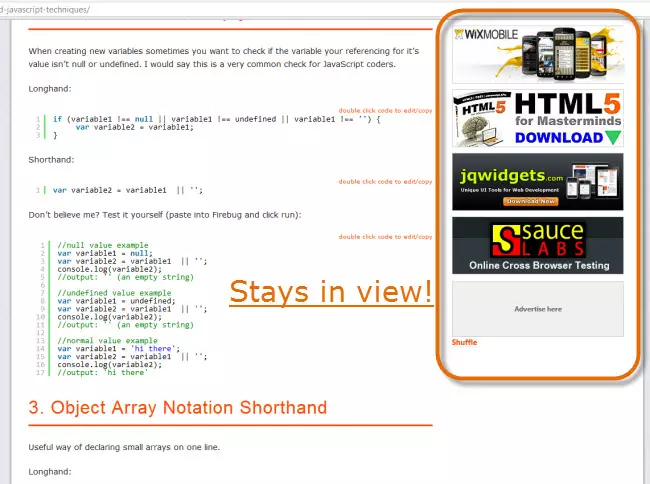
The Code (Standalone):
//keep element in view
(function($) {
    $(document).ready(function() {
        var elementPosTop = $('#jq4u-sidebar-ads').position().top;
        $(window).scroll(function() {
            var wintop = $(window).scrollTop(), docheight = $(document).height(), winheight = $(window).height();
            if (wintop > elementPosTop) {
                $('#jq4u-sidebar-ads').css({ "position": "fixed", "top": "10px" });
            } else {
                $('#jq4u-sidebar-ads').css({ "position": "inherit" });
            }
        });
    });
})(jQuery);
The Code (jQuery Plugin):
/**
 * jQuery keep element in view plugin.
 *
 * @author      Sam Deering
 * @copyright   Copyright (c) 2012 jQuery4u
 * @license     http://jquery4u.com/license/
 * @link        http://jquery4u.com
 * @since       Version 1.0
 * @notes       Plugin only works on scroll down elements.
 */

(function($) {
    $.fn.keepElementInView = function() {
        var elemPosTop = this.position().top;
        $(window).scroll(function() {
            var wintop = $(window).scrollTop(), docheight = $(document).height(), winheight = $(window).height();
            if (wintop > elemPosTop) {
                this.css({ "position": "fixed", "top": "10px" });
            } else {
                this.css({ "position": "inherit" });
            }
        });
        return this;
    };

    $(document).ready(function() {
        $('#jq4u-sidebar-ads').keepElementInView();
    });
})(jQuery);
Frequently Asked Questions (FAQs):
This section provides concise answers to common questions about jQuery element view scrolling, including techniques for animated and instant scrolling, horizontal scrolling, viewport checks, and button-triggered scrolling. The code examples are slightly reformatted for improved readability.
Q1: Animate scroll to element?
$('html, body').animate({ scrollTop: $("#elementID").offset().top }, 2000);
Q2: Instant scroll to element?
$('html, body').scrollTop($("#elementID").offset().top);
Q3: Horizontal scroll to element?
$('html, body').animate({ scrollLeft: $("#elementID").offset().left }, 2000);
Q4: Check if element is in viewport?
function isInViewport(element) {
  let elementTop = $(element).offset().top;
  let elementBottom = elementTop + $(element).outerHeight();
  let viewportTop = $(window).scrollTop();
  let viewportBottom = viewportTop + $(window).height();
  return elementBottom > viewportTop && elementTop < viewportBottom;
}
Q5: Scroll to element on button click?
$("#buttonID").click(function() {
  $('html, body').animate({ scrollTop: $("#elementID").offset().top }, 2000);
});
The above is the detailed content of jQuery Keep Element in View When Scrolling. For more information, please follow other related articles on the PHP Chinese website!

Hot AI Tools

Undress AI Tool
Undress images for free

Undresser.AI Undress
AI-powered app for creating realistic nude photos

AI Clothes Remover
Online AI tool for removing clothes from photos.

Clothoff.io
AI clothes remover

Video Face Swap
Swap faces in any video effortlessly with our completely free AI face swap tool!

Hot Article
Hot Tools

Notepad++7.3.1
Easy-to-use and free code editor

SublimeText3 Chinese version
Chinese version, very easy to use

Zend Studio 13.0.1
Powerful PHP integrated development environment

Dreamweaver CS6
Visual web development tools

SublimeText3 Mac version
God-level code editing software (SublimeText3)
Hot Topics


 How to work with dates and times in js?
Jul 01, 2025 am 01:27 AM
How to work with dates and times in js?
Jul 01, 2025 am 01:27 AM
The following points should be noted when processing dates and time in JavaScript: 1. There are many ways to create Date objects. It is recommended to use ISO format strings to ensure compatibility; 2. Get and set time information can be obtained and set methods, and note that the month starts from 0; 3. Manually formatting dates requires strings, and third-party libraries can also be used; 4. It is recommended to use libraries that support time zones, such as Luxon. Mastering these key points can effectively avoid common mistakes.
 Why should you place tags at the bottom of the ?
Jul 02, 2025 am 01:22 AM
Why should you place tags at the bottom of the ?
Jul 02, 2025 am 01:22 AM
PlacingtagsatthebottomofablogpostorwebpageservespracticalpurposesforSEO,userexperience,anddesign.1.IthelpswithSEObyallowingsearchenginestoaccesskeyword-relevanttagswithoutclutteringthemaincontent.2.Itimprovesuserexperiencebykeepingthefocusonthearticl
 What is event bubbling and capturing in the DOM?
Jul 02, 2025 am 01:19 AM
What is event bubbling and capturing in the DOM?
Jul 02, 2025 am 01:19 AM
Event capture and bubble are two stages of event propagation in DOM. Capture is from the top layer to the target element, and bubble is from the target element to the top layer. 1. Event capture is implemented by setting the useCapture parameter of addEventListener to true; 2. Event bubble is the default behavior, useCapture is set to false or omitted; 3. Event propagation can be used to prevent event propagation; 4. Event bubbling supports event delegation to improve dynamic content processing efficiency; 5. Capture can be used to intercept events in advance, such as logging or error processing. Understanding these two phases helps to accurately control the timing and how JavaScript responds to user operations.
 How can you reduce the payload size of a JavaScript application?
Jun 26, 2025 am 12:54 AM
How can you reduce the payload size of a JavaScript application?
Jun 26, 2025 am 12:54 AM
If JavaScript applications load slowly and have poor performance, the problem is that the payload is too large. Solutions include: 1. Use code splitting (CodeSplitting), split the large bundle into multiple small files through React.lazy() or build tools, and load it as needed to reduce the first download; 2. Remove unused code (TreeShaking), use the ES6 module mechanism to clear "dead code" to ensure that the introduced libraries support this feature; 3. Compress and merge resource files, enable Gzip/Brotli and Terser to compress JS, reasonably merge files and optimize static resources; 4. Replace heavy-duty dependencies and choose lightweight libraries such as day.js and fetch
 A definitive JS roundup on JavaScript modules: ES Modules vs CommonJS
Jul 02, 2025 am 01:28 AM
A definitive JS roundup on JavaScript modules: ES Modules vs CommonJS
Jul 02, 2025 am 01:28 AM
The main difference between ES module and CommonJS is the loading method and usage scenario. 1.CommonJS is synchronously loaded, suitable for Node.js server-side environment; 2.ES module is asynchronously loaded, suitable for network environments such as browsers; 3. Syntax, ES module uses import/export and must be located in the top-level scope, while CommonJS uses require/module.exports, which can be called dynamically at runtime; 4.CommonJS is widely used in old versions of Node.js and libraries that rely on it such as Express, while ES modules are suitable for modern front-end frameworks and Node.jsv14; 5. Although it can be mixed, it can easily cause problems.
 How to make an HTTP request in Node.js?
Jul 13, 2025 am 02:18 AM
How to make an HTTP request in Node.js?
Jul 13, 2025 am 02:18 AM
There are three common ways to initiate HTTP requests in Node.js: use built-in modules, axios, and node-fetch. 1. Use the built-in http/https module without dependencies, which is suitable for basic scenarios, but requires manual processing of data stitching and error monitoring, such as using https.get() to obtain data or send POST requests through .write(); 2.axios is a third-party library based on Promise. It has concise syntax and powerful functions, supports async/await, automatic JSON conversion, interceptor, etc. It is recommended to simplify asynchronous request operations; 3.node-fetch provides a style similar to browser fetch, based on Promise and simple syntax
 What are best practices for writing clean and maintainable JavaScript code?
Jun 23, 2025 am 12:35 AM
What are best practices for writing clean and maintainable JavaScript code?
Jun 23, 2025 am 12:35 AM
To write clean and maintainable JavaScript code, the following four points should be followed: 1. Use clear and consistent naming specifications, variable names are used with nouns such as count, function names are started with verbs such as fetchData(), and class names are used with PascalCase such as UserProfile; 2. Avoid excessively long functions and side effects, each function only does one thing, such as splitting update user information into formatUser, saveUser and renderUser; 3. Use modularity and componentization reasonably, such as splitting the page into UserProfile, UserStats and other widgets in React; 4. Write comments and documents until the time, focusing on explaining the key logic and algorithm selection
 var vs let vs const: a quick JS roundup explainer
Jul 02, 2025 am 01:18 AM
var vs let vs const: a quick JS roundup explainer
Jul 02, 2025 am 01:18 AM
The difference between var, let and const is scope, promotion and repeated declarations. 1.var is the function scope, with variable promotion, allowing repeated declarations; 2.let is the block-level scope, with temporary dead zones, and repeated declarations are not allowed; 3.const is also the block-level scope, and must be assigned immediately, and cannot be reassigned, but the internal value of the reference type can be modified. Use const first, use let when changing variables, and avoid using var.
