


Sogou High-speed Browser has a very good experience because many friends are using it, but recently some users reported that the homepage has been modified and they want to modify it back but don’t know how to set it up. We can do it in the settings. Operation, in response to this situation, today's software tutorial will provide answers to the majority of users, hoping to help you. The operation method is as follows: 1. Double-click to open the software, click the three horizontal lines icon in the upper right corner, and then click the option in the list below.
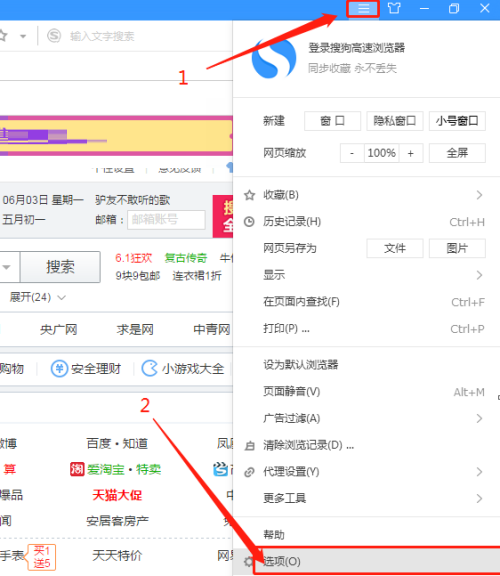
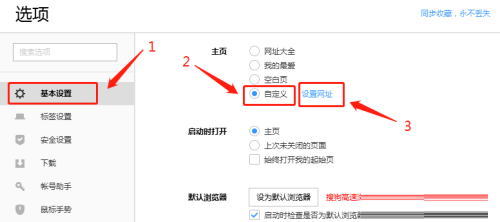
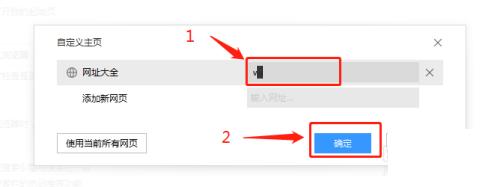
The above is the detailed content of How to set the homepage of Sogou High-speed Browser How to modify the homepage of Sogou High-speed Browser. For more information, please follow other related articles on the PHP Chinese website!
 What are the electronic contract signing platforms?
 Mobile phone encryption software
 How to cut long pictures on Huawei mobile phones
 internal server error
 How to change PS brush color
 What are the video server configuration parameters?
 Solution to the problem that setting the Chinese interface of vscode does not take effect
 Samsung s5830 upgrade




















![[Web front-end] Node.js quick start](https://img.php.cn/upload/course/000/000/067/662b5d34ba7c0227.png)



