


NetEase Cloud Music is a music player software used by many friends. Users can listen to all kinds of music here. Some users reported that NetEase Cloud Music WiFi cannot be loaded when using it. Many music cannot be loaded. Can't play. This problem may be caused by a problem with the network our computer is connected to. It can be restored by resetting it. So in this issue, the editor will share the specific steps. I hope the software tutorial content in this issue can help everyone solve the problem. . What to do if the NetEase Cloud Music wifi cannot be loaded: 1. First, right-click the wifi icon and then open the network settings.
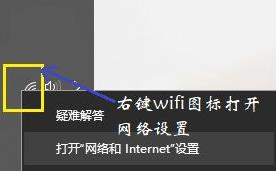
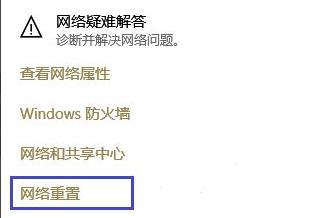
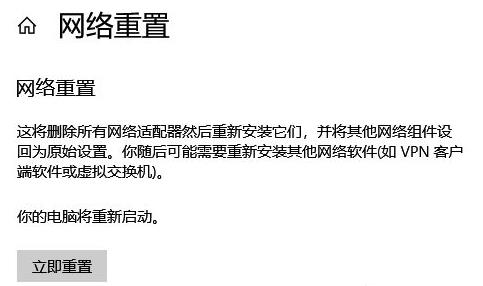


The above is the detailed content of What should I do if NetEase Cloud Music WiFi cannot be loaded? What should I do if NetEase Cloud Music songs cannot be loaded?. For more information, please follow other related articles on the PHP Chinese website!
 What is the encoding used inside a computer to process data and instructions?
 What are the cloud servers?
 What are the methods of rounding in sql
 Where to buy Bitcoin
 ps adjust edge shortcut keys
 ORACLEDISTINCT
 How to clean up your computer's C drive when it's full
 What is the difference between legacy and uefi?




















![[Web front-end] Node.js quick start](https://img.php.cn/upload/course/000/000/067/662b5d34ba7c0227.png)



