


How to save web pages as PDF files? In many cases, we save web pages in HTML format. However, in the Edge browser, you can also save web pages as PDF files. This tutorial walks you through the steps to do this in Edge browser: Open the desired webpage in Edge browser; right-click on an empty area of the webpage; select Print from the context menu; in the Print dialog box , select "Microsoft Print to PDF" as the printer.
2. At this point, you will enter the printing operation interface of the Edge browser. We click on the drop-down menu below the printer.
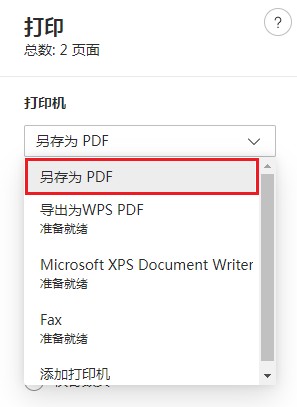
The above is the detailed content of How to save web pages as PDF files in Edge browser. For more information, please follow other related articles on the PHP Chinese website!
 How to bind data in dropdownlist
 jquery implements paging method
 Can Douyin recharge phone bills be refunded?
 How to take screenshots on Huawei mate60pro
 How to register a Bitcoin wallet
 What to do if 302 found
 How to get page elements using javascript
 Recommended order for learning c++ and c language




















![[Web front-end] Node.js quick start](https://img.php.cn/upload/course/000/000/067/662b5d34ba7c0227.png)



