


SQLserver中的常量与变量、判断循环语句

数据库中的变量与常量 数据库中定义变量 【起临时存储数据的作用】 --- 数据库中定义变量 ( 运行时要从头到尾进行运行,从定义变量开始到赋值 ) -- 前面必须加 declare -- 定义变量 : declare @ 变量名 数据类型 declare @aa varchar ( 20 ) -- 赋值 set@aa
数据库中的变量与常量
数据库中定义变量
【起临时存储数据的作用】
---数据库中定义变量(运行时要从头到尾进行运行,从定义变量开始到赋值)
--前面必须加 declare
--定义变量 : declare @变量名 数据类型
declare @aa varchar(20)
--赋值 set @aa='你好'
set @aa ='武松'
select * from xuesheng where 姓名=@aa

--也可以在select后进行赋值
select @aa=姓名 from xuesheng where 学号=10

变量的应用如:

系统常量
--返回sqlserver自上次启动以来的连接数,不管成功还是失败
print @@connections
--返回执行上一个sql语句时的错误,返回代表没错,除了之外的是代表有错
print @@error
--返回当前使用的语言
print @@language
--受上一句影响的行数(在执行修改操作时,查看修改了多少行)
print @@rowcount
--返回安装数据库的版本信息
print @@version
判断、循环语句
【在数据库的判断循环语句使用中,没有大括号的使用,用begin end 代替,代码块写在begin end之间】
如:

If语句基本格式

While语句基本格式

例题,累加求和


Hot AI Tools

Undresser.AI Undress
AI-powered app for creating realistic nude photos

AI Clothes Remover
Online AI tool for removing clothes from photos.

Undress AI Tool
Undress images for free

Clothoff.io
AI clothes remover

AI Hentai Generator
Generate AI Hentai for free.

Hot Article
Hot Tools

Notepad++7.3.1
Easy-to-use and free code editor

SublimeText3 Chinese version
Chinese version, very easy to use

Zend Studio 13.0.1
Powerful PHP integrated development environment

Dreamweaver CS6
Visual web development tools

SublimeText3 Mac version
God-level code editing software (SublimeText3)
Hot Topics
 1378
1378
 52
52

 How to import mdf file into sqlserver
Apr 08, 2024 am 11:41 AM
How to import mdf file into sqlserver
Apr 08, 2024 am 11:41 AM
The import steps are as follows: Copy the MDF file to SQL Server's data directory (usually C:\Program Files\Microsoft SQL Server\MSSQL\DATA). In SQL Server Management Studio (SSMS), open the database and select Attach. Click the Add button and select the MDF file. Confirm the database name and click the OK button.
 How to solve the problem that the object named already exists in the sqlserver database
Apr 05, 2024 pm 09:42 PM
How to solve the problem that the object named already exists in the sqlserver database
Apr 05, 2024 pm 09:42 PM
For objects with the same name that already exist in the SQL Server database, the following steps need to be taken: Confirm the object type (table, view, stored procedure). IF NOT EXISTS can be used to skip creation if the object is empty. If the object has data, use a different name or modify the structure. Use DROP to delete existing objects (use caution, backup recommended). Check for schema changes to make sure there are no references to deleted or renamed objects.
 What to do if the sqlserver service cannot be started
Apr 05, 2024 pm 10:00 PM
What to do if the sqlserver service cannot be started
Apr 05, 2024 pm 10:00 PM
When the SQL Server service fails to start, here are some steps to resolve: Check the error log to determine the root cause. Make sure the service account has permission to start the service. Check whether dependency services are running. Disable antivirus software. Repair SQL Server installation. If the repair does not work, reinstall SQL Server.
 How to check sqlserver port number
Apr 05, 2024 pm 09:57 PM
How to check sqlserver port number
Apr 05, 2024 pm 09:57 PM
To view the SQL Server port number: Open SSMS and connect to the server. Find the server name in Object Explorer, right-click it and select Properties. In the Connection tab, view the TCP Port field.
 How to recover accidentally deleted database in sqlserver
Apr 05, 2024 pm 10:39 PM
How to recover accidentally deleted database in sqlserver
Apr 05, 2024 pm 10:39 PM
If you accidentally delete a SQL Server database, you can take the following steps to recover: stop database activity; back up log files; check database logs; recovery options: restore from backup; restore from transaction log; use DBCC CHECKDB; use third-party tools. Please back up your database regularly and enable transaction logging to prevent data loss.
 Slow Cellular Data Internet Speeds on iPhone: Fixes
May 03, 2024 pm 09:01 PM
Slow Cellular Data Internet Speeds on iPhone: Fixes
May 03, 2024 pm 09:01 PM
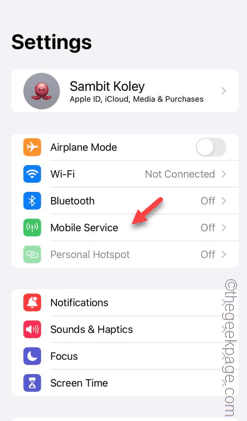
Facing lag, slow mobile data connection on iPhone? Typically, the strength of cellular internet on your phone depends on several factors such as region, cellular network type, roaming type, etc. There are some things you can do to get a faster, more reliable cellular Internet connection. Fix 1 – Force Restart iPhone Sometimes, force restarting your device just resets a lot of things, including the cellular connection. Step 1 – Just press the volume up key once and release. Next, press the Volume Down key and release it again. Step 2 – The next part of the process is to hold the button on the right side. Let the iPhone finish restarting. Enable cellular data and check network speed. Check again Fix 2 – Change data mode While 5G offers better network speeds, it works better when the signal is weaker
 How to delete sqlserver if the installation fails?
Apr 05, 2024 pm 11:27 PM
How to delete sqlserver if the installation fails?
Apr 05, 2024 pm 11:27 PM
If the SQL Server installation fails, you can clean it up by following these steps: Uninstall SQL Server Delete registry keys Delete files and folders Restart the computer
 How to change sqlserver English installation to Chinese
Apr 05, 2024 pm 10:21 PM
How to change sqlserver English installation to Chinese
Apr 05, 2024 pm 10:21 PM
SQL Server English installation can be changed to Chinese by following the following steps: download the corresponding language pack; stop the SQL Server service; install the language pack; change the instance language; change the user interface language; restart the application.
