


3 examples of how to upload images

On a common user registration page, the user is required to select a picture locally as an avatar and preview it at the same time.
There are two common ideas: one is to upload the image to the temporary folder of the server, return the URL of the image, and then render it on the html page; the other is to directly store it in the local memory Preview the image, the user confirms the submission and then uploads it to the server for storage.
Both methods have their own pros and cons. Method one is obviously a waste of traffic and server resources; method two increases the burden on the browser and requires higher browser compatibility (in some low-end environments) version of IE browser is not supported).
The following is the method to realize the above idea:
1. Template file

 ##
## 1 <!DOCTYPE html> 2 <html lang="en"> 3 <head> 4 <meta charset="UTF-8"> 5 <title>Title</title> 6 </head> 7 <body> 8 <div style="margin-left: 30px; margin-top: 30px"> 9 <form action="">10 {% csrf_token %}11 <h3>用户注册</h3>12 <p>用户名:<input type="text" name="userName"></p>13 <p>密码:<input type="password" name="password"></p>14 <p>邮箱:<input type="text" name="email"></p>15 <input id="avatar" type="text" value="/static/images/sample.png" name="avatar" style="width: 400px"> {# 实际应用中要将该input标签隐藏,display:none; #}16 <p><input type="submit" value="注册"></p>17 </form>18 <div style="position: absolute; top: 85px; left: 300px;">19 <input id="avatarSlect" type="file" style="position: absolute;float: left; z-index: 10; opacity: 0;width: 100px; height: 100px;">20 <img id="avatarPreview" src="/static/images/sample.png" title="点击更换图片" style="position: absolute; z-index: 9; float: left; width: 100px; height: 100px">21 </div>22 </div>23 </body>24 25 <script src="/static/jquery-3.2.1.js?1.1.11"></script>26 <script>27 $(function () {28 bindAvatar();29 });30 function bindAvatar() {31 if(window.URL.createObjectURL){32 bindAvatar3();33 }else if(window.FileReader){34 bindAvatar2();35 }else {36 bindAvatar1();37 }38 }39 40 /*Ajax上传至后台并返回图片的url*/41 function bindAvatar1() {42 $("#avatarSlect").change(function () {43 var csrf = $("input[name='csrfmiddlewaretoken']").val();44 var formData=new FormData();45 formData.append("csrfmiddlewaretoken",csrf);46 formData.append('avatar', $("#avatarSlect")[0].files[0]); /*获取上传的图片对象*/47 $.ajax({48 url: '/upload_avatar/',49 type: 'POST',50 data: formData,51 contentType: false,52 processData: false,53 success: function (args) {54 console.log(args); /*服务器端的图片地址*/55 $("#avatarPreview").attr('src','/'+args); /*预览图片*/56 $("#avatar").val('/'+args); /*将服务端的图片url赋值给form表单的隐藏input标签*/57 }58 })59 })60 }61 /*window.FileReader本地预览*/62 function bindAvatar2() {63 console.log(2);64 $("#avatarSlect").change(function () {65 var obj=$("#avatarSlect")[0].files[0];66 var fr=new FileReader();67 fr.onload=function () {68 $("#avatarPreview").attr('src',this.result);69 console.log(this.result);70 $("#avatar").val(this.result);71 };72 fr.readAsDataURL(obj);73 })74 }75 /*window.URL.createObjectURL本地预览*/76 function bindAvatar3() {77 console.log(3);78 $("#avatarSlect").change(function () {79 var obj=$("#avatarSlect")[0].files[0];80 var wuc=window.URL.createObjectURL(obj);81 $("#avatarPreview").attr('src',wuc);82 $("#avatar").val(wuc);83 {# $("#avatarPreview").load(function () {#} /*当图片加载后释放内存空间,但在jQuery3.2.1中会报错。浏览器关闭后也会自动释放*/84 {# window.URL.revokeObjectURL(wuc);#}85 {# })#}86 })87 }88 89 </script>90 </html>

1 from django.shortcuts import render, HttpResponse 2 3 4 def test(request): 5 return render(request, 'test.html') 6 7 8 def upload_avatar(request): 9 file_obj = request.FILES.get('avatar')10 file_path = os.path.join('static/images', file_obj.name)11 with open(file_path, 'wb') as f:12 for chunk in file_obj.chunks():13 f.write(chunk)14 return HttpResponse(file_path)

1 from django.conf.urls import url2 from django.contrib import admin3 from home import views as homeViews4 5 urlpatterns = [6 url(r'^admin/', admin.site.urls),7 url(r'^upload_avatar/', homeViews.upload_avatar), # 上传头像8 url(r'^test/', homeViews.test), # 测试页面9 ]
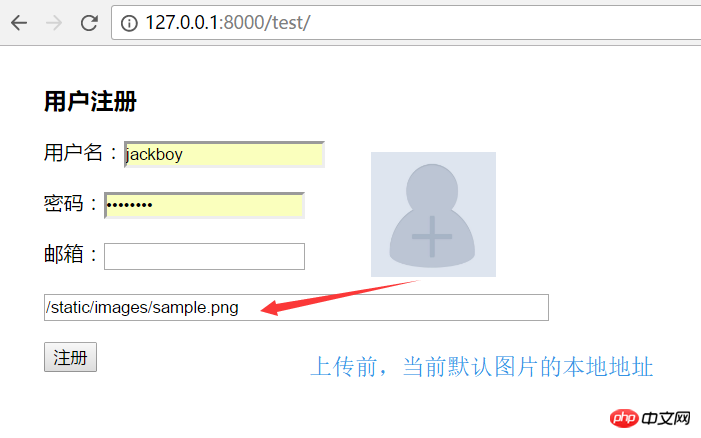
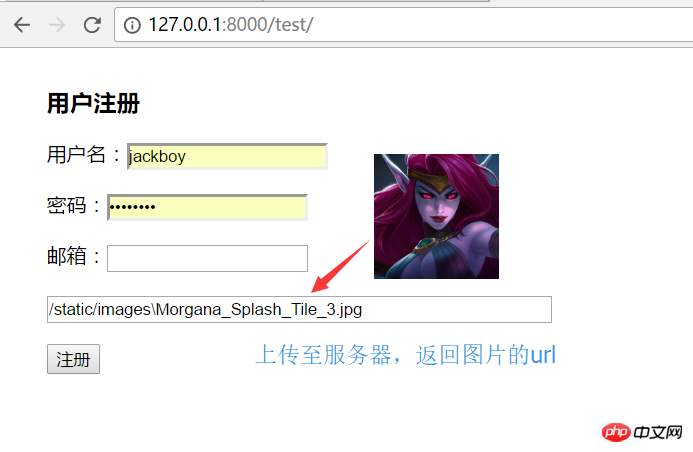 ##window. FileReader local preview, form form submission:
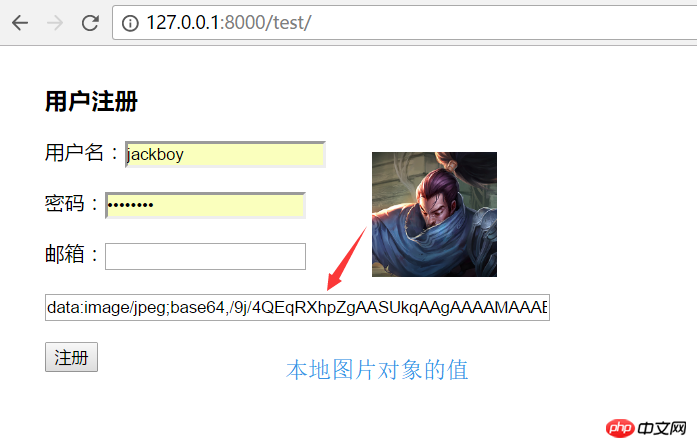
window.URL.createObjectURL local preview, form form submission:
The above is the detailed content of 3 examples of how to upload images. For more information, please follow other related articles on the PHP Chinese website!

Hot AI Tools

Undresser.AI Undress
AI-powered app for creating realistic nude photos

AI Clothes Remover
Online AI tool for removing clothes from photos.

Undress AI Tool
Undress images for free

Clothoff.io
AI clothes remover

AI Hentai Generator
Generate AI Hentai for free.

Hot Article
Hot Tools

Notepad++7.3.1
Easy-to-use and free code editor

SublimeText3 Chinese version
Chinese version, very easy to use

Zend Studio 13.0.1
Powerful PHP integrated development environment

Dreamweaver CS6
Visual web development tools

SublimeText3 Mac version
God-level code editing software (SublimeText3)
Hot Topics
 1378
1378
 52
52

 How to write a novel in the Tomato Free Novel app. Share the tutorial on how to write a novel in Tomato Novel.
Mar 28, 2024 pm 12:50 PM
How to write a novel in the Tomato Free Novel app. Share the tutorial on how to write a novel in Tomato Novel.
Mar 28, 2024 pm 12:50 PM
Tomato Novel is a very popular novel reading software. We often have new novels and comics to read in Tomato Novel. Every novel and comic is very interesting. Many friends also want to write novels. Earn pocket money and edit the content of the novel you want to write into text. So how do we write the novel in it? My friends don’t know, so let’s go to this site together. Let’s take some time to look at an introduction to how to write a novel. Share the Tomato novel tutorial on how to write a novel. 1. First open the Tomato free novel app on your mobile phone and click on Personal Center - Writer Center. 2. Jump to the Tomato Writer Assistant page - click on Create a new book at the end of the novel.
 How to enter bios on Colorful motherboard? Teach you two methods
Mar 13, 2024 pm 06:01 PM
How to enter bios on Colorful motherboard? Teach you two methods
Mar 13, 2024 pm 06:01 PM
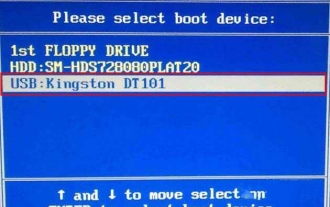
Colorful motherboards enjoy high popularity and market share in the Chinese domestic market, but some users of Colorful motherboards still don’t know how to enter the bios for settings? In response to this situation, the editor has specially brought you two methods to enter the colorful motherboard bios. Come and try it! Method 1: Use the U disk startup shortcut key to directly enter the U disk installation system. The shortcut key for the Colorful motherboard to start the U disk with one click is ESC or F11. First, use Black Shark Installation Master to create a Black Shark U disk boot disk, and then turn on the computer. When you see the startup screen, continuously press the ESC or F11 key on the keyboard to enter a window for sequential selection of startup items. Move the cursor to the place where "USB" is displayed, and then
 How to recover deleted contacts on WeChat (simple tutorial tells you how to recover deleted contacts)
May 01, 2024 pm 12:01 PM
How to recover deleted contacts on WeChat (simple tutorial tells you how to recover deleted contacts)
May 01, 2024 pm 12:01 PM
Unfortunately, people often delete certain contacts accidentally for some reasons. WeChat is a widely used social software. To help users solve this problem, this article will introduce how to retrieve deleted contacts in a simple way. 1. Understand the WeChat contact deletion mechanism. This provides us with the possibility to retrieve deleted contacts. The contact deletion mechanism in WeChat removes them from the address book, but does not delete them completely. 2. Use WeChat’s built-in “Contact Book Recovery” function. WeChat provides “Contact Book Recovery” to save time and energy. Users can quickly retrieve previously deleted contacts through this function. 3. Enter the WeChat settings page and click the lower right corner, open the WeChat application "Me" and click the settings icon in the upper right corner to enter the settings page.
 How to implement dual WeChat login on Huawei mobile phones?
Mar 24, 2024 am 11:27 AM
How to implement dual WeChat login on Huawei mobile phones?
Mar 24, 2024 am 11:27 AM
How to implement dual WeChat login on Huawei mobile phones? With the rise of social media, WeChat has become one of the indispensable communication tools in people's daily lives. However, many people may encounter a problem: logging into multiple WeChat accounts at the same time on the same mobile phone. For Huawei mobile phone users, it is not difficult to achieve dual WeChat login. This article will introduce how to achieve dual WeChat login on Huawei mobile phones. First of all, the EMUI system that comes with Huawei mobile phones provides a very convenient function - dual application opening. Through the application dual opening function, users can simultaneously
 How to set font size on mobile phone (easily adjust font size on mobile phone)
May 07, 2024 pm 03:34 PM
How to set font size on mobile phone (easily adjust font size on mobile phone)
May 07, 2024 pm 03:34 PM
Setting font size has become an important personalization requirement as mobile phones become an important tool in people's daily lives. In order to meet the needs of different users, this article will introduce how to improve the mobile phone use experience and adjust the font size of the mobile phone through simple operations. Why do you need to adjust the font size of your mobile phone - Adjusting the font size can make the text clearer and easier to read - Suitable for the reading needs of users of different ages - Convenient for users with poor vision to use the font size setting function of the mobile phone system - How to enter the system settings interface - In Find and enter the "Display" option in the settings interface - find the "Font Size" option and adjust it. Adjust the font size with a third-party application - download and install an application that supports font size adjustment - open the application and enter the relevant settings interface - according to the individual
 The secret of hatching mobile dragon eggs is revealed (step by step to teach you how to successfully hatch mobile dragon eggs)
May 04, 2024 pm 06:01 PM
The secret of hatching mobile dragon eggs is revealed (step by step to teach you how to successfully hatch mobile dragon eggs)
May 04, 2024 pm 06:01 PM
Mobile games have become an integral part of people's lives with the development of technology. It has attracted the attention of many players with its cute dragon egg image and interesting hatching process, and one of the games that has attracted much attention is the mobile version of Dragon Egg. To help players better cultivate and grow their own dragons in the game, this article will introduce to you how to hatch dragon eggs in the mobile version. 1. Choose the appropriate type of dragon egg. Players need to carefully choose the type of dragon egg that they like and suit themselves, based on the different types of dragon egg attributes and abilities provided in the game. 2. Upgrade the level of the incubation machine. Players need to improve the level of the incubation machine by completing tasks and collecting props. The level of the incubation machine determines the hatching speed and hatching success rate. 3. Collect the resources required for hatching. Players need to be in the game
 Quickly master: How to open two WeChat accounts on Huawei mobile phones revealed!
Mar 23, 2024 am 10:42 AM
Quickly master: How to open two WeChat accounts on Huawei mobile phones revealed!
Mar 23, 2024 am 10:42 AM
In today's society, mobile phones have become an indispensable part of our lives. As an important tool for our daily communication, work, and life, WeChat is often used. However, it may be necessary to separate two WeChat accounts when handling different transactions, which requires the mobile phone to support logging in to two WeChat accounts at the same time. As a well-known domestic brand, Huawei mobile phones are used by many people. So what is the method to open two WeChat accounts on Huawei mobile phones? Let’s reveal the secret of this method. First of all, you need to use two WeChat accounts at the same time on your Huawei mobile phone. The easiest way is to
 PHP Programming Guide: Methods to Implement Fibonacci Sequence
Mar 20, 2024 pm 04:54 PM
PHP Programming Guide: Methods to Implement Fibonacci Sequence
Mar 20, 2024 pm 04:54 PM
The programming language PHP is a powerful tool for web development, capable of supporting a variety of different programming logics and algorithms. Among them, implementing the Fibonacci sequence is a common and classic programming problem. In this article, we will introduce how to use the PHP programming language to implement the Fibonacci sequence, and attach specific code examples. The Fibonacci sequence is a mathematical sequence defined as follows: the first and second elements of the sequence are 1, and starting from the third element, the value of each element is equal to the sum of the previous two elements. The first few elements of the sequence
