Home Web Front-end HTML Tutorial HTML text formatting example

HTML text formatting example

Aug 30, 2016 am 09:21 AM

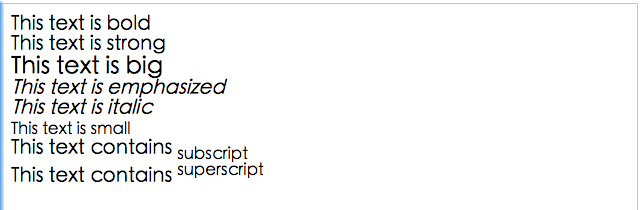
1. Text formatting: This example demonstrates how to format text in an HTML file.

<html>

<body>

<b>This text <span style="color: #0000ff;">is</span> bold</b>

<br />

<strong>This text <span style="color: #0000ff;">is</span> strong</strong>

<br />

<big>This text <span style="color: #0000ff;">is</span> big</big>

<br />

<em>This text <span style="color: #0000ff;">is</span> emphasized</em>

<br />

<i>This text <span style="color: #0000ff;">is</span> italic</i>

<br />

<small>This text <span style="color: #0000ff;">is</span> small</small>

<br /><span style="color: #000000;">

This text contains
</span><sub>subscript</sub>

<br /><span style="color: #000000;">

This text contains
</span><sup>superscript</sup>

</body>
</html>
Copy after login

The effect is as follows:
2. Preformatted text: This example demonstrates how to use the pre tag to control empty lines and spaces.

<html>

<body>

<pre class="brush:php;toolbar:false"><span style="color: #000000;">
这是
预格式文本。
它保留了      空格
和换行。
</span>

pre 标签很适合显示计算机代码:

<span style="color: #0000ff;">for</span> i = <span style="color: #800080;">1</span> to <span style="color: #800080;">10</span><span style="color: #000000;">
     print i
next i
</span>
Copy after login

The effect is as follows:

3. "Computer Output" label: This example demonstrates the display effects of different "Computer Output" labels.

<html>

<body>

<code>Computer code</code>
<br />
<kbd>Keyboard input</kbd>
<br />
<tt>Teletype text</tt>
<br />
<samp>Sample text</samp>
<br />
<<span style="color: #0000ff;">var</span>>Computer variable</<span style="color: #0000ff;">var</span>>
<br />

<p>
<b>注释:</b>这些标签常用于显示计算机/<span style="color: #000000;">编程代码。
</span></p>

</body>
</html>
Copy after login

The effect is as follows:

4. Address: This example demonstrates how to write an address in an HTML file.

<!DOCTYPE html>
<html>
<body>

<address><span style="color: #000000;">
Written by </span><a href=<span style="color: #800000;">"</span><span style="color: #800000;">mailto:webmaster@example.com</span><span style="color: #800000;">"</span>>Donald Duck</a>.<br><span style="color: #000000;"> 
Visit us at:</span><br><span style="color: #000000;">
Example.com</span><br><span style="color: #000000;">
Box </span><span style="color: #800080;">564</span>, Disneyland<br><span style="color: #000000;">
USA
</span></address>

</body>
</html>
Copy after login

The effect is as follows:

5. Abbreviations and acronyms: This example demonstrates how to implement abbreviations or acronyms.

<html>

<body>

<abbr title=<span style="color: #800000;">"</span><span style="color: #800000;">etcetera</span><span style="color: #800000;">"</span>>etc.</abbr>
<br />
<acronym title=<span style="color: #800000;">"</span><span style="color: #800000;">World Wide Web</span><span style="color: #800000;">"</span>>WWW</acronym>

<p>在某些浏览器中,当您把鼠标移至缩略词语上时,title 可用于展示表达的完整版本。</p>

<p>仅对于 IE <span style="color: #800080;">5</span> 中的 acronym 元素有效。</p>

<p>对于 Netscape <span style="color: #800080;">6.2</span> 中的 abbr 和 acronym 元素都有效。</p>

</body>
</html>
Copy after login

The effect is as follows:

6. Text direction: This example demonstrates how to change the direction of text.

<html>

<body>

<p><span style="color: #000000;">
如果您的浏览器支持 bi</span>-directional <span style="color: #0000ff;">override</span><span style="color: #000000;"> (bdo),下一行会从右向左输出 (rtl);
</span></p>

<bdo dir=<span style="color: #800000;">"</span><span style="color: #800000;">rtl</span><span style="color: #800000;">"</span>><span style="color: #000000;">
Here </span><span style="color: #0000ff;">is</span><span style="color: #000000;"> some Hebrew text
</span></bdo>

</body>
</html>
Copy after login

The effect is as follows:

7. Block quotation: This example demonstrates how to implement quotations of different lengths.

<html>

<body><span style="color: #000000;">

这是长的引用:
</span><blockquote><span style="color: #000000;">
这是长的引用。这是长的引用。这是长的引用。这是长的引用。这是长的引用。这是长的引用。这是长的引用。这是长的引用。这是长的引用。这是长的引用。这是长的引用。
</span></blockquote><span style="color: #000000;">

这是短的引用:
</span><q><span style="color: #000000;">
这是短的引用。
</span></q>

<p><span style="color: #000000;">
使用 blockquote 元素的话,浏览器会插入换行和外边距,而 q 元素不会有任何特殊的呈现。
</span></p>

</body>
</html>
Copy after login

The effect is as follows:

Eight, delete sub-effects and insert sub-effects.

<html>

<body>

<p>一打有 <del>二十</del> <ins>十二</ins> 件。</p>

<p>大多数浏览器会改写为删除文本和下划线文本。</p>

<p>一些老式的浏览器会把删除文本和下划线文本显示为普通文本。</p>

</body>
</html>
Copy after login

The effect is as follows:

Statement of this Website
The content of this article is voluntarily contributed by netizens, and the copyright belongs to the original author. This site does not assume corresponding legal responsibility. If you find any content suspected of plagiarism or infringement, please contact admin@php.cn

Hot AI Tools

Undresser.AI Undress

Undresser.AI Undress

AI-powered app for creating realistic nude photos

AI Clothes Remover

AI Clothes Remover

Online AI tool for removing clothes from photos.

Undress AI Tool

Undress AI Tool

Undress images for free

Clothoff.io

Clothoff.io

AI clothes remover

AI Hentai Generator

AI Hentai Generator

Generate AI Hentai for free.

Hot Article

R.E.P.O. Energy Crystals Explained and What They Do (Yellow Crystal)
4 weeks ago By 尊渡假赌尊渡假赌尊渡假赌
R.E.P.O. Best Graphic Settings
4 weeks ago By 尊渡假赌尊渡假赌尊渡假赌
R.E.P.O. How to Fix Audio if You Can't Hear Anyone
4 weeks ago By 尊渡假赌尊渡假赌尊渡假赌
R.E.P.O. Chat Commands and How to Use Them
4 weeks ago By 尊渡假赌尊渡假赌尊渡假赌

Hot Tools

Notepad++7.3.1

Notepad++7.3.1

Easy-to-use and free code editor

SublimeText3 Chinese version

SublimeText3 Chinese version

Chinese version, very easy to use

Zend Studio 13.0.1

Zend Studio 13.0.1

Powerful PHP integrated development environment

Dreamweaver CS6

Dreamweaver CS6

Visual web development tools

SublimeText3 Mac version

SublimeText3 Mac version

God-level code editing software (SublimeText3)

What is the purpose of the <progress> element? What is the purpose of the <progress> element? Mar 21, 2025 pm 12:34 PM

The article discusses the HTML &lt;progress&gt; element, its purpose, styling, and differences from the &lt;meter&gt; element. The main focus is on using &lt;progress&gt; for task completion and &lt;meter&gt; for stati

What is the purpose of the <datalist> element? What is the purpose of the <datalist> element? Mar 21, 2025 pm 12:33 PM

The article discusses the HTML &lt;datalist&gt; element, which enhances forms by providing autocomplete suggestions, improving user experience and reducing errors.Character count: 159

What are the best practices for cross-browser compatibility in HTML5? What are the best practices for cross-browser compatibility in HTML5? Mar 17, 2025 pm 12:20 PM

Article discusses best practices for ensuring HTML5 cross-browser compatibility, focusing on feature detection, progressive enhancement, and testing methods.

How do I use HTML5 form validation attributes to validate user input? How do I use HTML5 form validation attributes to validate user input? Mar 17, 2025 pm 12:27 PM

The article discusses using HTML5 form validation attributes like required, pattern, min, max, and length limits to validate user input directly in the browser.

What is the purpose of the <meter> element? What is the purpose of the <meter> element? Mar 21, 2025 pm 12:35 PM

The article discusses the HTML &lt;meter&gt; element, used for displaying scalar or fractional values within a range, and its common applications in web development. It differentiates &lt;meter&gt; from &lt;progress&gt; and ex

What is the viewport meta tag? Why is it important for responsive design? What is the viewport meta tag? Why is it important for responsive design? Mar 20, 2025 pm 05:56 PM

The article discusses the viewport meta tag, essential for responsive web design on mobile devices. It explains how proper use ensures optimal content scaling and user interaction, while misuse can lead to design and accessibility issues.

What is the purpose of the <iframe> tag? What are the security considerations when using it? What is the purpose of the <iframe> tag? What are the security considerations when using it? Mar 20, 2025 pm 06:05 PM

The article discusses the &lt;iframe&gt; tag's purpose in embedding external content into webpages, its common uses, security risks, and alternatives like object tags and APIs.

Gitee Pages static website deployment failed: How to troubleshoot and resolve single file 404 errors? Gitee Pages static website deployment failed: How to troubleshoot and resolve single file 404 errors? Apr 04, 2025 pm 11:54 PM

GiteePages static website deployment failed: 404 error troubleshooting and resolution when using Gitee...

See all articles