PHP development corporate website tutorial to create a database
First we create the database article and then query the database
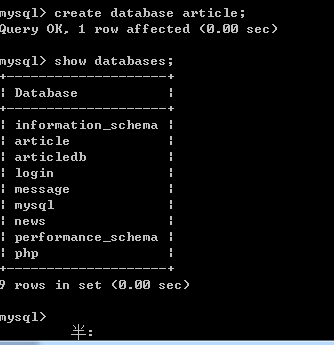
In this way our database has been established
Then we need to select the article database Right Database operation;
Use command: use article;

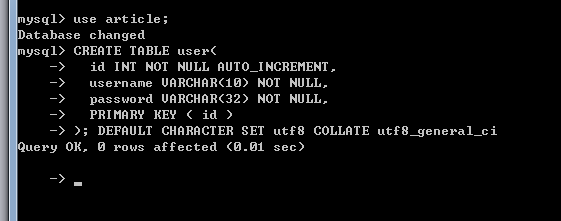
Then we have to create the table
Administrator table:
CREATE TABLE user(
id INT NOT NULL AUTO_INCREMENT,
username VARCHAR(10) NOT NULL,
password VARCHAR(32) NOT NULL,
PRIMARY KEY (id)
); DEFAULT CHARACTER SET utf8 COLLATE utf8_general_ci
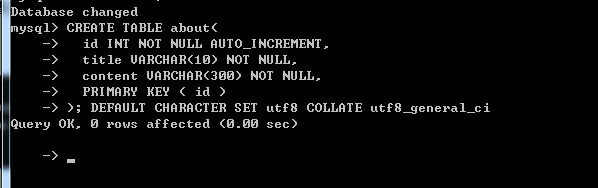
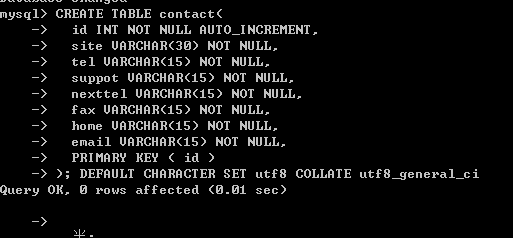
|tel company phone number|suppot technical support|netxtel after-sales phone number|fax Company fax|hone Company homepage|email Email
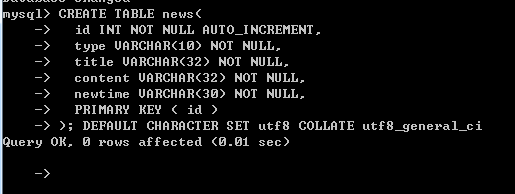
 ##News information form
CREATE TABLE news(
id INT NOT NULL AUTO_INCREMENT,
type VARCHAR(10) NOT NULL,
title VARCHAR(32) NOT NULL,
content VARCHAR(32) NOT NULL,
newtime VARCHAR(30) NOT NULL,
PRIMARY KEY (id)
); DEFAULT CHARACTER SET utf8 COLLATE utf8_general_ci
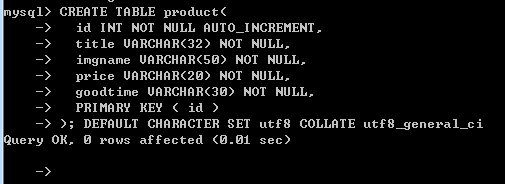
Product table
CREATE TABLE product(
id INT NOT NULL AUTO_INCREMENT,
title VARCHAR(32) NOT NULL,
imgname VARCHAR(50) NOT NULL,
price VARCHAR(20) NOT NULL,
goodtime VARCHAR(30) NOT NULL,
PRIMARY KEY ( id )
); DEFAULT CHARACTER SET utf8 COLLATE utf8_general_ci
We have completed the creation of several tables, and now we are going to do the background development
![Front-end Vue3 actual combat [handwritten vue project]](https://img.php.cn/upload/course/000/000/068/639b12e98e0b5441.png)
![APIPOST tutorial [Popularization of technical concepts related to network communication]](https://img.php.cn/upload/course/000/000/068/63996f34c6c94370.png)