


Python列表的应用方法有哪些

Python 集合(数组)
Python 编程语言中有四种集合数据类型:
列表(List)是一种有序和可更改的集合。允许重复的成员。
元组(Tuple)是一种有序且不可更改的集合。允许重复的成员。
集合(Set)是一个无序和无索引的集合。没有重复的成员。
词典(Dictionary)是一个无序,可变和有索引的集合。没有重复的成员。
选择集合类型时,了解该类型的属性很有用。
为特定数据集选择正确的类型可能意味着保留含义,并且可能意味着提高效率或安全性。
列表
列表是一个有序且可更改的集合。在 Python 中,列表用方括号编写。
实例
创建列表:
thislist = ["apple", "banana", "cherry"]
print(thislist)
运行实例

访问项目
您可以通过引用索引号来访问列表项:
实例
打印列表的第二项:
thislist = ["apple", "banana", "cherry"]
print(thislist[1])
运行实例

负的索引
负索引表示从末尾开始,-1 表示最后一个项目,-2 表示倒数第二个项目,依此类推。
实例
打印列表的最后一项:
thislist = ["apple", "banana", "cherry"]
print(thislist[-1])
运行实例

索引范围
您可以通过指定范围的起点和终点来指定索引范围。
指定范围后,返回值将是包含指定项目的新列表。
实例
返回第三、第四、第五项:
thislist = ["apple", "banana", "cherry", "orange", "kiwi", "melon", "mango"]
print(thislist[2:5])
运行实例

注释:搜索将从索引 2(包括)开始,到索引 5(不包括)结束。
请记住,第一项的索引为 0。
负索引的范围
如果要从列表末尾开始搜索,请指定负索引:
实例
此例将返回从索引 -4(包括)到索引 -1(排除)的项目:
thislist = ["apple", "banana", "cherry", "orange", "kiwi", "melon", "mango"]
print(thislist[-4:-1])
运行实例

更改项目值
如需更改特定项目的值,请引用索引号:
实例
更改第二项:
thislist = ["apple", "banana", "cherry"]
thislist[1] = "mango"
print(thislist)
运行实例

遍历列表
您可以使用 for 循环遍历列表项:
实例
逐个打印列表中的所有项目:
thislist = ["apple", "banana", "cherry"]
for x in thislist:
    print(x)
运行实例

我们将在 Python For 循环 这一章中学习有关 for 循环的更多知识。
检查项目是否存在
如需确定列表中是否存在指定的项,请使用 in 关键字:
实例
检查列表中是否存在 “apple”:
thislist = ["apple", "banana", "cherry"]
if "apple" in thislist:
  print("Yes, 'apple' is in the fruits list")
运行实例

列表长度
如需确定列表中有多少项,请使用 len() 方法:
实例
打印列表中的项目数:
thislist = ["apple", "banana", "cherry"]
print(len(thislist))
运行实例

添加项目
如需将项目添加到列表的末尾,请使用 append() 方法:
实例
使用 append() 方法追加项目:
thislist = ["apple", "banana", "cherry"]
thislist.append("orange")
print(thislist)
运行实例

要在指定的索引处添加项目,请使用 insert() 方法:
实例
插入项目作为第二个位置:
thislist = ["apple", "banana", "cherry"]
thislist.insert(1, "orange")
print(thislist)
运行实例

删除项目
有几种方法可以从列表中删除项目:
实例 remove() 方法删除指定的项目:
thislist = ["apple", "banana", "cherry"]
thislist.remove("banana")
print(thislist)
运行实例

实例 pop() 方法删除指定的索引(如果未指定索引,则删除最后一项):
thislist = ["apple", "banana", "cherry"]
thislist.pop()
print(thislist)
运行实例

实例
del 关键字删除指定的索引:
thislist = ["apple", "banana", "cherry"]
del thislist[0]
print(thislist)
运行实例

实例
del 关键字也能完整地删除列表:
thislist = ["apple", "banana", "cherry"]
del thislist
运行实例

实例
clear() 方法清空列表:
thislist = ["apple", "banana", "cherry"]
thislist.clear()
print(thislist)
运行实例

复制列表
您只能通过键入 list2 = list1 来复制列表,因为:list2 将只是对 list1 的引用,list1 中所做的更改也将自动在 list2 中进行。
有一些方法可以进行复制,一种方法是使用内置的 List 方法 copy()。
实例
使用 copy() 方法来复制列表:
thislist = ["apple", "banana", "cherry"]
mylist = thislist.copy()
print(mylist)
运行实例

制作副本的另一种方法是使用内建的方法 list()。
实例
使用 list() 方法复制列表:
thislist = ["apple", "banana", "cherry"]
mylist = list(thislist)
print(mylist)
运行实例

合并两个列表
在 Python 中,有几种方法可以连接或串联两个或多个列表。
最简单的方法之一是使用 + 运算符。
实例
合并两个列表:
list1 = ["a", "b" , "c"]
list2 = [1, 2, 3]
list3 = list1 + list2
print(list3)
运行实例

连接两个列表的另一种方法是将 list2 中的所有项一个接一个地追加到 list1 中:
实例
把 list2 追加到 list1 中:
list1 = ["a", "b" , "c"]
list2 = [1, 2, 3]
for x in list2:
    list1.append(x)
    print(list1)
运行实例

或者,您可以使用 extend() 方法,其目的是将一个列表中的元素添加到另一列表中:
实例
使用 extend() 方法将 list2 添加到 list1 的末尾:
list1 = ["a", "b" , "c"]
list2 = [1, 2, 3]
list1.extend(list2)
print(list1)
运行实例

list() 构造函数
也可以使用 list() 构造函数创建一个新列表。
实例
使用 list() 构造函数创建列表:
thislist = list(("apple", "banana", "cherry")) # 请注意双括号
print(thislist)
运行实例

列表方法
Python 有一组可以在列表上使用的内建方法。
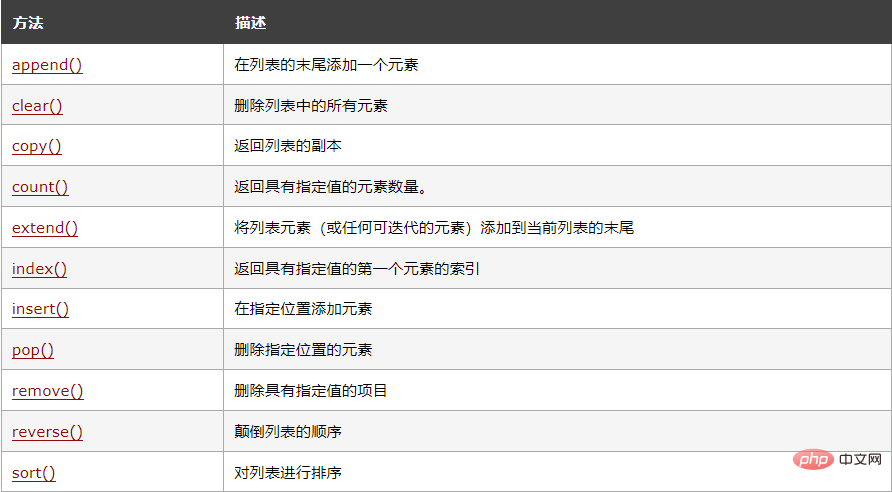
以上是Python列表的应用方法有哪些的详细内容。更多信息请关注PHP中文网其他相关文章!

热AI工具

Undress AI Tool
免费脱衣服图片

Undresser.AI Undress
人工智能驱动的应用程序,用于创建逼真的裸体照片

AI Clothes Remover
用于从照片中去除衣服的在线人工智能工具。

Clothoff.io
AI脱衣机

Video Face Swap
使用我们完全免费的人工智能换脸工具轻松在任何视频中换脸!

热门文章
热工具

记事本++7.3.1
好用且免费的代码编辑器

SublimeText3汉化版
中文版,非常好用

禅工作室 13.0.1
功能强大的PHP集成开发环境

Dreamweaver CS6
视觉化网页开发工具

SublimeText3 Mac版
神级代码编辑软件(SublimeText3)


 如何处理不适合内存的Python中的大型数据集?
Aug 14, 2025 pm 01:00 PM
如何处理不适合内存的Python中的大型数据集?
Aug 14, 2025 pm 01:00 PM
当Python中处理超出内存的大型数据集时,不能一次性加载到RAM中,而应采用分块处理、磁盘存储或流式处理等策略;可通过Pandas的chunksize参数分块读取CSV文件并逐块处理,使用Dask实现类似Pandas语法的并行化和任务调度以支持大内存数据操作,编写生成器函数逐行读取文本文件减少内存占用,利用Parquet列式存储格式结合PyArrow高效读取特定列或行组,使用NumPy的memmap对大型数值数组进行内存映射以按需访问数据片段,或将数据存入SQLite或DuckDB等轻量级数据
 如何在Sublime文本中调试Python代码?
Aug 14, 2025 pm 04:51 PM
如何在Sublime文本中调试Python代码?
Aug 14, 2025 pm 04:51 PM
UseSublimeText’sbuildsystemtorunPythonscriptsandcatcherrorsbypressingCtrl Baftersettingthecorrectbuildsystemorcreatingacustomone.2.Insertstrategicprint()statementstocheckvariablevalues,types,andexecutionflow,usinglabelsandrepr()forclarity.3.Installth
 如何在Sublime文本中运行Python代码?
Aug 16, 2025 am 04:58 AM
如何在Sublime文本中运行Python代码?
Aug 16, 2025 am 04:58 AM
确保已安装Python并将其添加到系统PATH,通过终端运行python--version或python3--version验证;2.将Python文件保存为.py扩展名,如hello.py;3.在SublimeText中创建自定义构建系统,Windows用户使用{"cmd":["python","-u","$file"]},macOS/Linux用户使用{"cmd":["python3
 如何在VScode中调试Python脚本
Aug 16, 2025 am 02:53 AM
如何在VScode中调试Python脚本
Aug 16, 2025 am 02:53 AM
要调试Python脚本,需先安装Python扩展并配置解释器,然后创建launch.json文件设置调试配置,接着在代码中设置断点并按F5启动调试,脚本将在断点处暂停,允许检查变量和单步执行,最终通过查看控制台输出、添加日志或调整参数等方式排查问题,确保环境正确后调试过程简单高效。
 如何在VSCODE中自动格式化Python代码
Aug 14, 2025 pm 04:10 PM
如何在VSCODE中自动格式化Python代码
Aug 14, 2025 pm 04:10 PM
toAutomation formatemationalformatpytpythoncodeinvscode,installblackusingpipinstallblack,installtheofficialmicrosoftpythonextension,setblackastheformatterinsettings.jsonwith“ python.formatting.formatting.provider”
 如何在Sublime文本中创建一个Python项目?
Aug 16, 2025 am 08:53 AM
如何在Sublime文本中创建一个Python项目?
Aug 16, 2025 am 08:53 AM
InstallSublimeTextandPython,thenconfigureabuildsystembycreatingaPython3.sublime-buildfilewiththeappropriatecmdandselectorsettingstoenablerunningPythonscriptsviaCtrl B.2.OrganizeyourprojectbycreatingadedicatedfolderwithPythonfilesandsupportingdocument
 python asyncio队列示例
Aug 21, 2025 am 02:13 AM
python asyncio队列示例
Aug 21, 2025 am 02:13 AM
asyncio.Queue是用于异步任务间安全通信的队列工具,1.生产者通过awaitqueue.put(item)添加数据,消费者用awaitqueue.get()获取数据;2.每处理完一项需调用queue.task_done(),以便queue.join()等待所有任务完成;3.使用None作为结束信号通知消费者停止;4.多个消费者时,需发送多个结束信号或在取消任务前确保所有任务已处理完毕;5.队列支持设置maxsize限制容量,put和get操作自动挂起不阻塞事件循环,程序最终通过canc
 Python中的类方法是什么
Aug 21, 2025 am 04:12 AM
Python中的类方法是什么
Aug 21, 2025 am 04:12 AM
ClassmethodsinPythonareboundtotheclassandnottoinstances,allowingthemtobecalledwithoutcreatinganobject.1.Theyaredefinedusingthe@classmethoddecoratorandtakeclsasthefirstparameter,referringtotheclassitself.2.Theycanaccessclassvariablesandarecommonlyused
