這篇文章主要為大家詳細介紹了php mysql實現簡單登入註冊修改密碼系統,具有一定的參考價值,有興趣的小夥伴們可以參考一下
對於php和mysql的連接在許多blog上都有說明,為了將mysql中的查詢,修改,插入等操作掌握,本文介紹了一下如何採用mysql做一個登入註冊修改密碼的網頁。
其中,如下
1.登入-即給予資料庫中的內容查詢,並驗證html中的資訊與資料庫是否匹配;
2.註冊-即為對資料庫中的內容進行插入,註冊帳號與密碼;
3.修改密碼-即為對資料庫中的內容進行修改。
這三個操作,我用了8個php和html文字來建立具體見程式碼部分
1.登入的主介面index.html:
#
<p>
  </p><pre name="code" class="html">
<!DOCTYPE html>
<html>
<head>
<meta charset="UTF-8">
<title>登录注册修改密码系统主页</title>
<style type="text/css">
form {
  text-align: center;
}
</style>
</head>
<body>
  <form action="enter.php" method="post" onsubmit="return enter()">
    用户名<input type="text" name="username" id="username"><br> 密码<input
      type="password" name="password" id="password"><br> <input
      type="submit" value="登录">  <input type="button"
      value="注册" onclick="register();">

  </form>

  <script type="text/javascript">
    function enter()
    {
      var username=document.getElementById("username").value;//获取form中的用户名
      var password=document.getElementById("password").value;
      var regex=/^[/s]+$/;//声明一个判断用户名前后是否有空格的正则表达式
      if(regex.test(username)||username.length==0)//判定用户名的是否前后有空格或者用户名是否为空
        {
          alert("用户名格式不对");
          return false;
        }
      if(regex.test(password)||password.length==0)//同上述内容
      {
        alert("密码格式不对");
        return false;
      }
      return true;
    }
    function register()
    {
      window.location.href="register.html";//跳转到注册页面
    }
  </script>
</body>
</html>2.登入的後台操作enter.php:
#<!doctype html>
<html>
<head>
<meta charset="UTF-8">
<title>登录系统的后台执行过程</title>
</head>
<body>
<?php
session_start();//登录系统开启一个session内容
$username=$_REQUEST["username"];//获取html中的用户名(通过post请求)
$password=$_REQUEST["password"];//获取html中的密码(通过post请求)
$con=mysql_connect("localhost","root","root");//连接mysql 数据库,账户名root ,密码root
if (!$con) {
die('数据库连接失败'.$mysql_error());
}
mysql_select_db("user_info",$con);//use user_info数据库;
$dbusername=null;
$dbpassword=null;
$result=mysql_query("select * from user_info where username ='{$username}' and isdelete =0;");//查出对应用户名的信息,isdelete表示在数据库已被删除的内容
while ($row=mysql_fetch_array($result)) {//while循环将$result中的结果找出来
$dbusername=$row["username"];
$dbpassword=$row["password"];
}
if (is_null($dbusername)) {//用户名在数据库中不存在时跳回index.html界面
?>
<script type="text/javascript">
alert("用户名不存在");
window.location.href="index.html";
</script>
<?php
}
else {
if ($dbpassword!=$password){//当对应密码不对时跳回index.html界面
?>
<script type="text/javascript">
alert("密码错误");
window.location.href="index.html";
</script>
<?php
}
else {
$_SESSION["username"]=$username;
$_SESSION["code"]=mt_rand(0, 100000);//给session附一个随机值,防止用户直接通过调用界面访问welcome.php
?>
<script type="text/javascript">
window.location.href="welcome.php";
</script>
<?php
}
}
mysql_close($con);//关闭数据库连接,如不关闭,下次连接时会出错
?>
</body>
</html>3.登入成功後的歡迎介面welcome.php:
<!doctype html>
<html>
<head>
<meta charset="UTF-8">
<title>欢迎登录界面</title>
</head>
<body>
<?php
session_start ();
if (isset ( $_SESSION ["code"] )) {//判断code存不存在,如果不存在,说明异常登录
?>
欢迎登录<?php
echo "${_SESSION["username"]}";//显示登录用户名
?><br>
您的ip:<?php
echo "${_SERVER['REMOTE_ADDR']}";//显示ip
?>
<br>
您的语言:
<?php
echo "${_SERVER['HTTP_ACCEPT_LANGUAGE']}";//使用的语言
?>
<br>
浏览器版本:
<?php
echo "${_SERVER['HTTP_USER_AGENT']}";//浏览器版本信息
?>
<a href="exit.php">退出登录</a>
<?php
} else {//code不存在,调用exit.php 退出登录
?>
<script type="text/javascript">
alert("退出登录");
window.location.href="exit.php";
</script>
<?php
}
?>
<br>
<a href="alter_password.html">修改密码</a>
</body>
</html>4.修改密碼的主介面alter_password.html:
<!DOCTYPE html>
<html>
<head>
<meta charset="UTF-8">
<title>修改密码</title>
<style type="text/css">
  form{
    text-align: center;
  }
</style>
</head>
<body>
  <?php
    session_start();
  ?>
  <form action="alter_password.php" method="post" onsubmit="return alter()">
    用户名<input type="text" name="username" id ="username" /><br/> 旧密码<input
      type="password" name="oldpassword" id ="oldpassword"/><br/> 新密码<input
      type="password" name="newpassword" id="newpassword"/><br/> 确认新密码<input
      type="password" name="assertpassword" id="assertpassword"/><br/> <input
      type="submit" value="修改密码" onclick="return alter()">
  </form>
    <script type="text/javascript">
      document.getElementById("username").value="<? php echo "${_SESSION["username"]}";?>"
    </script>

  <script type="text/javascript">
    function alter() {

      var username=document.getElementById("username").value;
      var oldpassword=document.getElementById("oldpassword").value;
      var newpassword=document.getElementById("newpassword").value;
      var assertpassword=document.getElementById("assertpassword").value;
      var regex=/^[/s]+$/;
      if(regex.test(username)||username.length==0){
        alert("用户名格式不对");
        return false;
      }
      if(regex.test(oldpassword)||oldpassword.length==0){
        alert("密码格式不对");
        return false;
      }
      if(regex.test(newpassword)||newpassword.length==0) {
        alert("新密码格式不对");
        return false;
      }
      if (assertpassword != newpassword||assertpassword==0) {
        alert("两次密码输入不一致");
        return false;
      }
      return true;

    }
  </script>
</body>
</html>5.修改密碼的後台操作alter_password.php:
<!doctype html>
<html>
<head>
<meta charset="UTF-8">
<title>正在修改密码</title>
</head>
<body>
<?php
session_start ();
$username = $_REQUEST ["username"];
$oldpassword = $_REQUEST ["oldpassword"];
$newpassword = $_REQUEST ["newpassword"];
$con = mysql_connect ( "localhost", "root", "root" );
if (! $con) {
die ( '数据库连接失败' . $mysql_error () );
}
mysql_select_db ( "user_info", $con );
$dbusername = null;
$dbpassword = null;
$result = mysql_query ( "select * from user_info where username ='{$username}' and isdelete =0;" );
while ( $row = mysql_fetch_array ( $result ) ) {
$dbusername = $row ["username"];
$dbpassword = $row ["password"];
}
if (is_null ( $dbusername )) {
?>
<script type="text/javascript">
alert("用户名不存在");
window.location.href="alter_password.html";
</script>
<?php
}
if ($oldpassword != $dbpassword) {
?>
<script type="text/javascript">
alert("密码错误");
window.location.href="alter_password.html";
</script>
<?php
}
mysql_query ( "update user_info set password='{$newpassword}' where username='{$username}'" ) or die ( "存入数据库失败" . mysql_error () );//如果上述用户名密码判定不错,则update进数据库中
mysql_close ( $con );
?>
<script type="text/javascript">
alert("密码修改成功");
window.location.href="index.html";
</script>
</body>
</html>6.註冊帳號的主介面register.html:
<!doctype html>
<html>
<head>
<meta charset="UTF-8">
<title>注册系统</title>
<style type="text/css">
form {
  text-align: center;
}
</style>
</head>
<body>

  <form action="register.php" method="post" name="form_register"
    onsubmit="return check()">
    用户名<input type="text" name="username" id="username"><br>
    密码<input type="password" name="password" id="password"><br>
    确认密码<input type="password" name="assertpassword" id="assertpassword"><br>
    <input type="submit" value="注册">

  </form>

  <script type="text/javascript">
    function check() {
      var username=document.getElementById("username").value;
      var password=document.getElementById("password").value;
      var assertpassword=document.getElementById("assertpassword").value;
      var regex=/^[/s]+$/;

      if(regex.test(username)||username.length==0){
        alert("用户名格式不对");
        return false;
      }
      if(regex.test(password)||password.length==0){
        alert("密码格式不对");
        return false;
      }
      if(password!=assertpassword){
        alert("两次密码不一致");
        return false;
      }
    }
  </script>
</body>
</html>7.註冊帳號的後台操作register.php:
<!doctype html>
<html>
<head>
<meta charset="UTF-8">
<title>注册用户</title>
</head>
<body>
<?php
session_start();
$username=$_REQUEST["username"];
$password=$_REQUEST["password"];
$con=mysql_connect("localhost","root","root");
if (!$con) {
die('数据库连接失败'.$mysql_error());
}
mysql_select_db("user_info",$con);
$dbusername=null;
$dbpassword=null;
$result=mysql_query("select * from user_info where username ='{$username}' and isdelete =0;");
while ($row=mysql_fetch_array($result)) {
$dbusername=$row["username"];
$dbpassword=$row["password"];
}
if(!is_null($dbusername)){
?>
<script type="text/javascript">
alert("用户已存在");
window.location.href="register.html";
</script>
<?php
}
mysql_query("insert into user_info (username,password) values('{$username}','{$password}')") or die("存入数据库失败".mysql_error()) ;
mysql_close($con);
?>
<script type="text/javascript">
alert("注册成功");
window.location.href="index.html";
</script>
</body>
</html>#8.非法登入時登出登入的操作exit.php:
<!doctype html>
<html>
<head>
<meta charset="UTF-8">
</head>
<body>
<?php
session_start ();//将session销毁时调用destroy
session_destroy ();
?>
<script type="text/javascript">
 window.location.href="index.html";
</script>
</body>
</html>
9.mysql資料庫建置部分
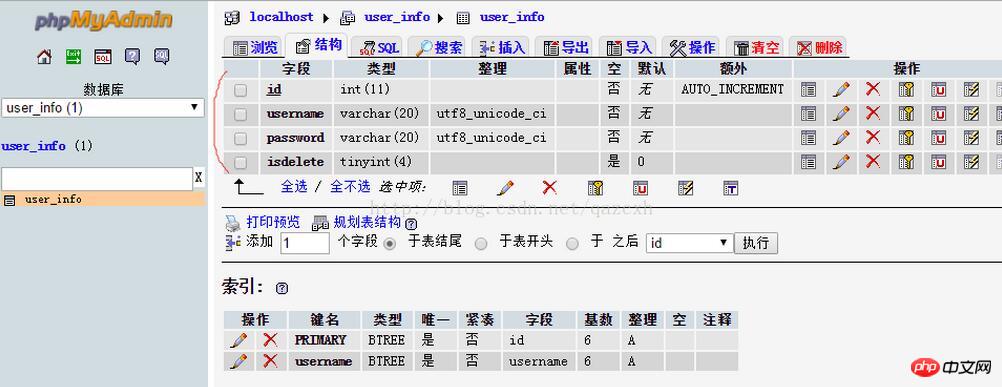
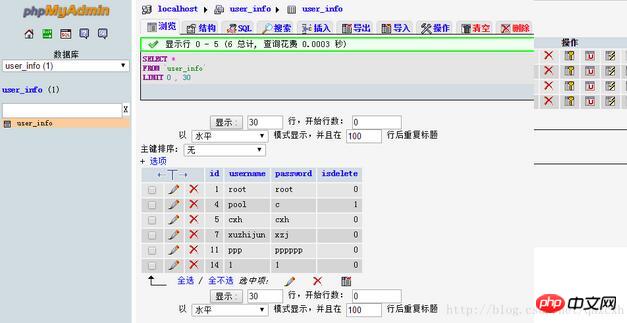
以上就是本文的全部內容,希望對大家的學習有幫助。
相關推薦:
php使用PDO下exec()函數實作查詢執行後受影響行數的方法
#
以上是php+mysql實作登入註冊修改密碼網頁的詳細內容。更多資訊請關注PHP中文網其他相關文章!