


您如何創建Docker卷?

創建Docker卷的常見方法是使用docker volume create命令並指定卷名。步驟包括:1. 使用docker volume create my-volume創建命名卷;2. 通過docker run -v my-volume:/path/in/container將捲掛載到容器;3. 使用docker volume ls驗證卷,用docker volume prune清理無用卷。此外,還可選擇匿名卷或綁定掛載,前者由Docker自動生成ID,後者將主機目錄直接映射到容器。注意卷僅在本地有效,跨節點需外部存儲方案,測試時可用Alpine容器檢查卷內容。
Creating a Docker volume is straightforward, and it's one of the most common ways to persist data when working with containers. The main idea is to set up a directory that exists outside the container's filesystem so data survives even after the container stops or gets removed.
Basic Command: docker volume create
The simplest way to create a Docker volume is by using the docker volume create command. You just need to give your volume a name:
docker volume create my-volume
That's it — you now have a named volume called my-volume . This volume can be mounted into one or more containers later.
You won't see much output unless something goes wrong, but you can verify the volume was created with:
docker volume ls
This lists all volumes currently available on your system.
Mounting a Volume When Running a Container
Creating the volume is only half the job — you'll want to use it in a container. To do that, use the -v flag when running a container:
 docker run -d \
  --name my-container \
  -v my-volume:/path/in/container \
  my-image
Here:
-
-v my-volume:/path/in/containertells Docker to mount the volumemy-volumeto a specific path inside the container. -
/path/in/containerdepends on what your app expects — for example, if you're running a web server, this might be/usr/share/nginx/html.
Once mounted, any data written to that directory inside the container will be stored in the volume and preserved across container restarts or replacements.
Types of Volumes You Can Use
Docker supports a few types of volumes, and it's helpful to know which one fits your use case:
- Named volumes – like we used earlier (
my-volume). These are managed by Docker and are great for databases, config files, etc. - Anonymous volumes – when you don't specify a name, Docker gives it a random ID. Useful for temporary storage.
- Bind mounts – instead of letting Docker manage the storage, you map a specific host directory directly into the container (eg,
-v /your/host/dir:/container/path).
If you're not sure which to pick:
- Use named volumes for most services where persistence matters.
- Use bind mounts when you need direct access to your host's files, like during development.
Some Gotchas and Tips
There are a few small things that often trip people up:
- If you try to mount a volume that doesn't exist when running a container, Docker will automatically create an anonymous volume — not always what you want.
- Volumes are local to the Docker host. If you're using Docker Swarm or Kubernetes, you'll need external storage solutions for multi-node setups.
- Cleaning up unused volumes is easy with:
docker volume prune
Also, if you're testing and want to make sure your volume works, you can spin up a quick Alpine container to inspect its contents:
 docker run -it --rm -v my-volume:/test alpine sh
ls /test
That should show you what's actually inside the volume.
基本上就這些.
以上是您如何創建Docker卷?的詳細內容。更多資訊請關注PHP中文網其他相關文章!

熱AI工具

Undress AI Tool
免費脫衣圖片

Undresser.AI Undress
人工智慧驅動的應用程序,用於創建逼真的裸體照片

AI Clothes Remover
用於從照片中去除衣服的線上人工智慧工具。

Clothoff.io
AI脫衣器

Video Face Swap
使用我們完全免費的人工智慧換臉工具,輕鬆在任何影片中換臉!

熱門文章
熱工具

記事本++7.3.1
好用且免費的程式碼編輯器

SublimeText3漢化版
中文版,非常好用

禪工作室 13.0.1
強大的PHP整合開發環境

Dreamweaver CS6
視覺化網頁開發工具

SublimeText3 Mac版
神級程式碼編輯軟體(SublimeText3)


 docker怎麼啟動容器
Apr 15, 2025 pm 12:27 PM
docker怎麼啟動容器
Apr 15, 2025 pm 12:27 PM
Docker 容器啟動步驟:拉取容器鏡像:運行 "docker pull [鏡像名稱]"。創建容器:使用 "docker create [選項] [鏡像名稱] [命令和參數]"。啟動容器:執行 "docker start [容器名稱或 ID]"。檢查容器狀態:通過 "docker ps" 驗證容器是否正在運行。
 docker容器名稱怎麼查
Apr 15, 2025 pm 12:21 PM
docker容器名稱怎麼查
Apr 15, 2025 pm 12:21 PM
可以通過以下步驟查詢 Docker 容器名稱:列出所有容器(docker ps)。篩選容器列表(使用 grep 命令)。獲取容器名稱(位於 "NAMES" 列中)。
 docker怎麼查看日誌
Apr 15, 2025 pm 12:24 PM
docker怎麼查看日誌
Apr 15, 2025 pm 12:24 PM
查看 Docker 日誌的方法包括:使用 docker logs 命令,例如:docker logs CONTAINER_NAME使用 docker exec 命令運行 /bin/sh 並查看日誌文件,例如:docker exec -it CONTAINER_NAME /bin/sh ; cat /var/log/CONTAINER_NAME.log使用 Docker Compose 的 docker-compose logs 命令,例如:docker-compose -f docker-com
 .NET Core快速入門教程 1、開篇:說說.NET Core的那些事兒
May 07, 2025 pm 04:54 PM
.NET Core快速入門教程 1、開篇:說說.NET Core的那些事兒
May 07, 2025 pm 04:54 PM
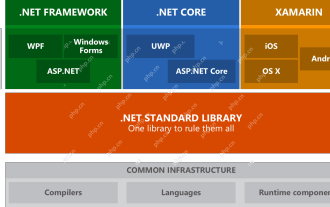
一、.NETCore的起源談到.NETCore,就不能不提它的前身.NET。當年Java風頭正盛,微軟也對Java青睞有加,Windows平台上的Java虛擬機就是微軟依據JVM標准開發的,據稱是當時性能最佳的Java虛擬機。然而,微軟有自己的小算盤,試圖將Java與Windows平台捆綁,增加一些Windows特有的功能。 Sun公司對此不滿,導致雙方關係破裂,微軟隨後推出了.NET。 .NET從誕生之初就借鑒了Java的許多特性,並在語言特性和窗體開發等方面逐漸超越了Java。 Java在1.6版
 Linux上的Docker:Linux系統的容器化
Apr 22, 2025 am 12:03 AM
Linux上的Docker:Linux系統的容器化
Apr 22, 2025 am 12:03 AM
Docker在Linux上重要,因為Linux是其原生平台,提供了豐富的工具和社區支持。 1.安裝Docker:使用sudoapt-getupdate和sudoapt-getinstalldocker-cedocker-ce-clicontainerd.io。 2.創建和管理容器:使用dockerrun命令,如dockerrun-d--namemynginx-p80:80nginx。 3.編寫Dockerfile:優化鏡像大小,使用多階段構建。 4.優化和調試:使用dockerlogs和dockerex
 Docker vs. Kubernetes:主要差異和協同作用
May 01, 2025 am 12:09 AM
Docker vs. Kubernetes:主要差異和協同作用
May 01, 2025 am 12:09 AM
Docker和Kubernetes是容器化和編排的領軍者。 Docker專注於容器生命週期管理,適合小型項目;Kubernetes則擅長容器編排,適用於大規模生產環境。兩者結合可提升開發和部署效率。
 怎樣開發一個完整的PythonWeb應用程序?
May 23, 2025 pm 10:39 PM
怎樣開發一個完整的PythonWeb應用程序?
May 23, 2025 pm 10:39 PM
要開發一個完整的PythonWeb應用程序,應遵循以下步驟:1.選擇合適的框架,如Django或Flask。 2.集成數據庫,使用ORM如SQLAlchemy。 3.設計前端,使用Vue或React。 4.進行測試,使用pytest或unittest。 5.部署應用,使用Docker和平台如Heroku或AWS。通過這些步驟,可以構建出功能強大且高效的Web應用。
 C 中的交叉編譯是什麼?
Apr 28, 2025 pm 08:21 PM
C 中的交叉編譯是什麼?
Apr 28, 2025 pm 08:21 PM
C 中的交叉編譯是指在一個平台上編譯出可以在另一個平台上運行的可執行文件或庫。 1)交叉編譯需要使用專門的交叉編譯器,如GCC或Clang的變體。 2)設置交叉編譯環境可以使用Docker來管理工具鏈,提高可重複性和可移植性。 3)交叉編譯時需注意代碼優化選項,如-O2、-O3或-Os,以平衡性能和文件大小。
