實作後台管理員登入功能
上一章我們選擇了背景登入頁面,並且將驗證碼成功的加入到了登入頁 login.html 檔案中。並且創建了資料庫表admin,加入一條用戶名和密碼的測試資料。這一節我們就來實現登入功能。
先看一個簡單功能實現流程圖:
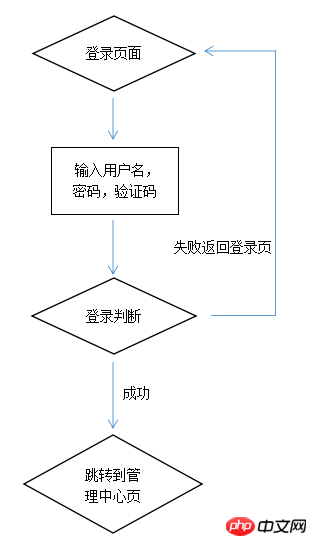
有了流程圖就有了思路,順著思路就知道自己一步一步需要做什麼。
首先還是要引入公共資料庫檔案: config.php
透過POST方式取得資料。使用trim()函數去除不必要的空格等。
$username = trim($_POST["username"]);//用户名
$password = trim($_POST["password"]);//密码
$code = $_POST["code"]; //验证码
對是否填寫使用者名稱和密碼進行驗證,驗證碼進行比對判斷。
if($username == "")
{
    echo"<script type='text/javascript'>alert('请填写用户名');location='login.html'; </script>";
}
if($password == "")
{
    //echo "请填写用户名<br>";
    echo"<script type='text/javascript'>alert('请填写密码');location='login.html'; </script>";
}
if($code != $_SESSION['authcode'])
{
    echo "<script type='text/javascript'>alert('验证码错误!');location='login.html';</script>";
}
拿著提交過來的使用者名稱和密碼去資料庫查找,看看是否存在此使用者名稱以及其密碼
$sql = "select * from admin where username='".$username."' and password='".$password."'";
$result = mysqli_query($link, $sql);
$rows = mysqli_fetch_array($result);
if($rows) {
    //echo "验证成功!<br>";
    $expire_time=time()+7200;
    setcookie('admin_id',$rows['id'],$expire_time);
    setcookie('username',$rows['username'],$expire_time);
    echo "<script type='text/javascript'>alert('登陆成功');location='index.php';</script>";
} else {
    //echo "用户名或者密码错误<br>";
    echo "<script type='text/javascript'>alert('用户名或者密码错误');location='login.html';</script>";
    //echo "<a href='login.html'>返回</a>";
}
登陸成功後進入後台主介面,這樣就實現了管理員登入功能。