


 Operation and Maintenance
Windows Operation and Maintenance
Detailed explanation of how to set access password for Redis under win7 version (picture)
Operation and Maintenance
Windows Operation and Maintenance
Detailed explanation of how to set access password for Redis under win7 version (picture)
Detailed explanation of how to set access password for Redis under win7 version (picture)

redisIf you do not set the access password, the error will be reported as follows:
【redis.clients.jedis.exceptions.JedisDataException: NOAUTH Authentication required.】
Set the password as follows:
Under the installation path, Find the specified file:
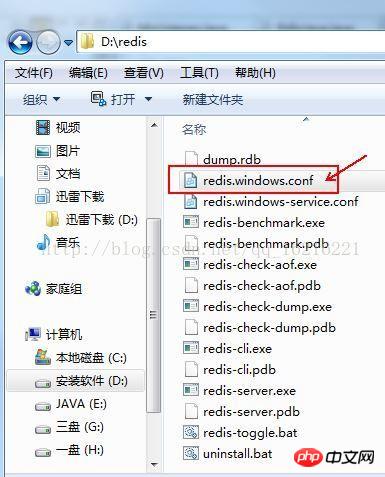
Open the file, add the password as follows, restart the service and it will take effect:
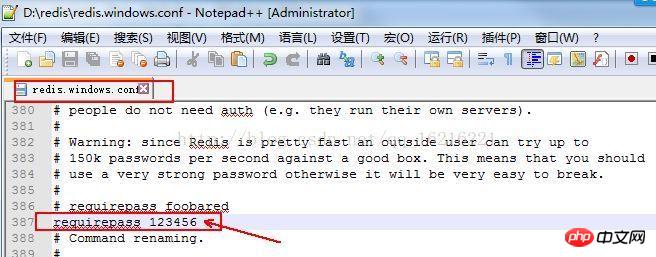
!
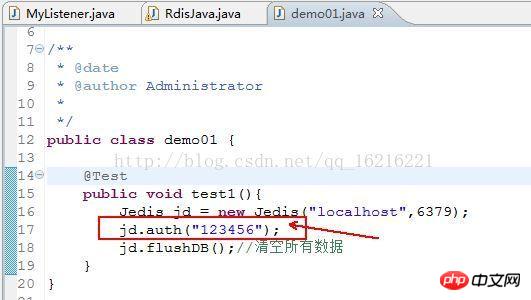
When accessing Redis from the Java client, add the access password:
The above is the detailed content of Detailed explanation of how to set access password for Redis under win7 version (picture). For more information, please follow other related articles on the PHP Chinese website!

Hot AI Tools

Undresser.AI Undress
AI-powered app for creating realistic nude photos

AI Clothes Remover
Online AI tool for removing clothes from photos.

Undress AI Tool
Undress images for free

Clothoff.io
AI clothes remover

AI Hentai Generator
Generate AI Hentai for free.

Hot Article
Hot Tools

Notepad++7.3.1
Easy-to-use and free code editor

SublimeText3 Chinese version
Chinese version, very easy to use

Zend Studio 13.0.1
Powerful PHP integrated development environment

Dreamweaver CS6
Visual web development tools

SublimeText3 Mac version
God-level code editing software (SublimeText3)
Hot Topics
 1378
1378
 52
52