

Course Intermediate 10923
Course Introduction:"Self-study IT Network Linux Load Balancing Video Tutorial" mainly implements Linux load balancing by performing script operations on web, lvs and Linux under nagin.

Course Advanced 16892
Course Introduction:"Shangxuetang MySQL Video Tutorial" introduces you to the process from installing to using the MySQL database, and introduces the specific operations of each link in detail.

Course Advanced 10614
Course Introduction:"Brothers Band Front-end Example Display Video Tutorial" introduces examples of HTML5 and CSS3 technologies to everyone, so that everyone can become more proficient in using HTML5 and CSS3.
2023-08-28 09:14:37 0 1 365
javascript - How to write tabs in a data-driven way?
2017-07-05 10:38:32 0 2 2984
laravel - configuration issues about Homestead
2017-05-16 16:52:45 0 1 522
Ways to fix issue 2003 (HY000): Unable to connect to MySQL server 'db_mysql:3306' (111)
2023-09-05 11:18:47 0 1 681
Experiment with sorting after query limit
2023-09-05 14:46:42 0 1 599
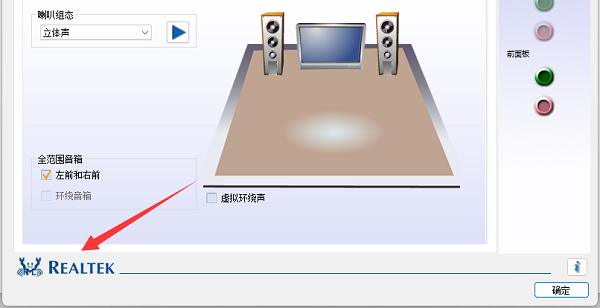
Course Introduction:When we check and adjust the sound card driver, we may find that the driver we want cannot be found in the list, so we hope to find it through the icon. So what does the sound card driver icon look like? In fact, the driver icons are different for different sound card brands. What does the sound card driver icon look like: Different brands of sound card driver icons are different. 1. Our most common sound card driver icon is a blue spider (blue crab), which is Realtek’s sound card driver. 2. Most Windows computers use Realtek sound cards, so the Realtek sound card driver is installed. 3. The sound card driver icons of other brands are basically brand logos, such as the mega sound card driver icon in the picture below. 4. IDT sound card driver icon: 5. Aiken sound card driver icon: 6. Apollo
2024-02-29 comment 0 1342

Course Introduction:Many users don’t understand how Driver Wizard installs the sound card driver when using the Driver Wizard software? The following article brings you the method of Driver Wizard installing the sound card driver. Let’s take a look below. Installing the sound card driver is not complicated. First, you need to download and install the driver wizard. If the current computer cannot connect to the network, it is recommended to download the universal network card version of Driver Wizard on another computer. This version will include the sound card driver. If you can connect to the Internet, it is recommended to install the professional version of the driver wizard. After installing the driver wizard, open the software and run the detection program first to comprehensively detect the drivers on the computer and check whether the sound card driver is installed. After the driver wizard detection is completed, we can see the driver installed on our computer in the driver management office. If
2024-03-04 comment 0 1171
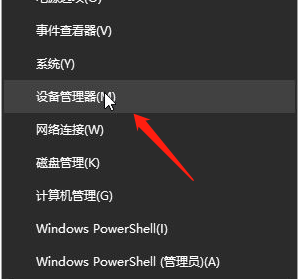
Course Introduction:Some users found that there was a problem with the Win10 sound card driver and wanted to uninstall and reinstall it. So how to uninstall and reinstall the Win10 sound card driver? The editor below will give you a detailed introduction to the Win10 sound card driver uninstallation and reinstallation tutorial. Friends in need can come and see how to achieve it! 1. Press the shortcut key "win+X" and select "Device Manager" in the menu option to open it. 2. After entering the new interface, find the "Sound" column and expand it. Select the sound card driver, right-click and select "Uninstall". 3. Then click "OK" in the pop-up prompt window. 4. Finally, right-click the sound card driver and select Select
2024-09-03 comment 0 654
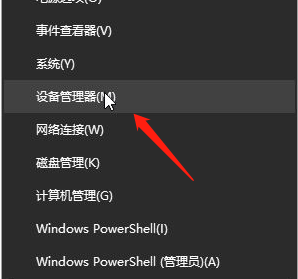
Course Introduction:Some of our win10 system users have no sound from their computers. After testing, we found that there is a problem with the sound card driver. If we want to install a new driver, we need to uninstall the old sound card driver. Some novices don't know how to uninstall and reinstall. In response to this problem, today's win10 tutorial is here to answer the majority of users. I hope that the content shared on this site today can help everyone solve the problem. Tutorial on uninstalling and reinstalling the win10 sound card driver 1. Press "win X" and click "Device Manager". 2. After entering, find the sound column, right-click the sound card driver and select "Uninstall". 3. Confirm to uninstall the device. 4. Still right-click the sound card and select &l
2024-03-16 comment 0 548

Course Introduction:How to repair computer sound card driver? Step 1: Remove the sound card driver 1. Right-click on the win start menu icon and select "Device Manager" from the list. 2. Find Sound, Video and Game Controllers in the Device Manager interface, select the video card driver and right-click "Uninstall Driver". 3. Then select "Remove the driver software for this device" and click "OK" to complete the uninstallation according to the on-screen prompts. Step 2: Install the sound card driver 1. Open the driver wizard and click "Detect Now" 2. After the test is completed, it will show that the device has hung and the sound card driver needs to be installed. We then clicked to install the sound card driver and waited for the repair to complete. How to fix a broken sound card driver? If your sound card driver is broken, it may be
2024-01-18 comment 0 1272